PIA Colour Schemes v2 October 12, 2009
Posted by Duncan in PeopleTools.comments closed
A few years ago I put together a set of five alternate colour schemes for the PeopleSoft PIA and made them available for free download. The intention was that clients could use a colour for each environment, for example, DEV could be Red, TST could be brown, UAT could be green, SIT could be purple etc.
Version 1 of the colour schemes had a surprising amount of downloads, and it’s quite gratifying to walk onto a customer site and see them in use. There were however, some flaws:
- The PIA Header at the top was not altered (as it relied on graphics, not style sheet changes),
- The small icons in the menu, the navigation collections and the pages themselves were still blue, and
- I’d missed a couple of minor style classes
So, I’ve now finished Version 2 of the colour schemes which addresses each of the above issues.
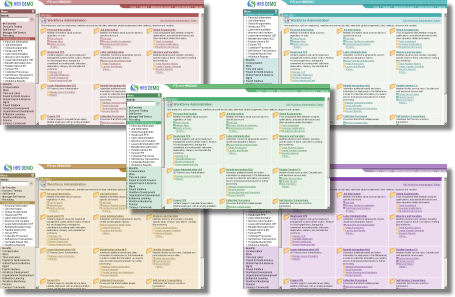
Details and download here.
Release of PeopleTools 8.50 September 19, 2009
Posted by Duncan in PeopleTools, Strategy.comments closed
It’s been a long, long time coming, but PeopleTools 8.50 has been released!
There were a couple of docs floating around that listed 18th Sept as the release date, but no official confirmation from Oracle, so I wasn’t 100% sure that it was coming. Further details here:
http://blogs.oracle.com/peopletools/2009/09/general_availability_ga_of_peopletools_850.html
Rather intriguingly not only is there this release (which is the biggest in the PeopleSoft world for a good year or so) but also a new release of the Oracle Database, and a hardware tie-in with Sun in the last few days. Why are these being released now, with OpenWorld so close? Is there something even bigger that is going to be unveiled during OpenWorld?
A Progress Bar within the REN Window July 20, 2009
Posted by Duncan in PeopleTools.comments closed
A while ago I showed how to output to the REN Window using PeopleCode while running processes through the Process Scheduler. A post I’ve been meaning to write for a while was a practical use of this some colleagues and I made during a Data Migration.
Typically Data Migration programs can run for a while, and for this client (which had >100,000 employees to process) a fair bit of time was spent watching the screen wondering how long was left (or watching the row counts via SQL). We soon got fed up of this and wrote this very quick progress bar for the REN Window:

This migration routine was just for the employee personal data, but we used a similar trick for the other migration processes also.
We could go and get a coffee, or catch up on some other work and with a quick glance every now and again we could see how long remained.
More PeopleTools 8.50 May 17, 2009
Posted by Duncan in PeopleTools.comments closed

Following OpenWorld ’08 I posted about some of the new functionality coming in PeopleTools 8.50, including partial page refresh, modal lookup and prompt dialogues, redesigned menu pagelet etc.
Oracle have now made the RVP available so we get a better idea of what is included in the release.
I’ve picked out a few things that I hadn’t heard about previously:
Maximum number of rows to return on search pages
Search pages will now contain an option to limit the number of rows returned. The maximum is also configurable globally in PeopleTools Options.
64 bit only software
It seems from Tools 8.50 onwards that the hardware the components are installed upon will be 64-bit only. No more installing a sandpit environment on your 32-bit laptop … [EDIT 17th May: It seems that running a 64-bit VM on a 32-bit host is possible with VM Ware, but not Virtual PC. See comment below from Jim Marion.]
Parallel file deploy in CA
Finally! This should speed up file copies.
Decoupling of PS_Home
It seems that there’ll be a read-only PS_Home with all of the binaries etc, and a seperate read/write config_home for the environment specific config files.
Graphical routings of messages
Should help troubleshooting Service Operations
Interactive PeopleCode debugger
It appears that during a debug session you’ll be able to change variables on the fly. Pretty nice.
App Class method drilldown
Right-click and jump to the method, just like you can with PeopleCode functions.
New ‘Swan’ contemporary style sheet
A lick of paint for the UI ‘matching Oracle Corporate application standards’, whatevr they may be. I hope that doesn’t mean the ‘mustard and blue’ that Oracle e-Biz suite users had for years.
Looking forward to it, roll on September …
PeopleSoft Conference April 30, 2009
Posted by Duncan in PeopleTools.comments closed

This year the UKOUG PeopleSoft Conference has been split out from the Oracle Conference (last year it was in the same building, just on a difference floor). We’ve also teamed up with the GPUG (the HCM Global Product User Group) so there’ll be an extra stream of content this year (HCM, Financials, Tech, Round tables and GPUG).
I’ve been for a few years running now and thoroughly enjoy it. There’s always something new in the presentations (check out the agenda if you need convincing), it’s excellent for networking with fellow professionals, and there’s nothing like being able to coral some of the industry’s experts to answer a question or two from back at work.
Finally, there’s been a change of venue. We normally have a contigent of overseas visitors, and seeing as it’s practically on the end of one of Heathrow’s runways it couldn’t be more convenient (just make sure you don’t bring swine flu with you!).
If you’re quick, the early-bird discount will save you a bit of money too …
Applying homepage pagelets to others April 27, 2009
Posted by Duncan in PeopleTools.comments closed
In a previous post I’ve spoken about the benefits of creating a custom Navigation Collection on your homepage.
(Note: this doesn’t need to be Enterprise Portal, this can be done in the HR/Financials/CRM/Student Admin application).
I also covered migrating your setup to other environments. A step I neglected to mention is a common one, when colleagues enviously notice your productive new setup how do you easily apply it to their user profiles so they can benefit also? Or perhaps you’re setting up a homepage to roll-out to the entire user community?
Here’s how you do it:
Looking back at how far we’ve come March 27, 2009
Posted by Duncan in PeopleTools.comments closed
Today I had the need to check something on an old Tools 8.18 / HR v8.3 environment that hadn’t been booted for many a year, and it was quite an eye opener.
The environment was hosted within an old VM, last touched in 2003 and it was fun to mess around and battle to get it booted.
Those of us that have been around for a few years will remember the old Tools 8.1x user interface with the breadcrumbs, but one of the surprises for me was how fast it runs on a modern laptop. I gave it 1.5GB Ram and it absolutely flew!

Quickly export multiple Projects November 17, 2008
Posted by Duncan in PeopleTools.comments closed
It can be a good idea to frequently take flat-file backups of your App Designer Projects, depending upon how reliable the infrastructure is at your site, and how frequently environments get refreshed from Production. I’ve often thought “I wish that there was a shortcut for this procedure”, but have never done anything about it.
I recently chanced across the excellent PeopleSoft Wiki and noticed a batch file containing many command lines to control App Designer, including exporting projects to command line.
Now I’m not awfully keen on automating migration between environments (I like to run the compare reports and set the flags myself immediately before migration) but the exporting of projects caught my eye.
Using the same command line we can create a batch file that’ll loop through a list of projects and export them – one at a time – into a directory of your choosing.
Create a file in the same directory as the batch file with a list of the projects you wish to export (one on each line) named project_list.txt. Then run the following batch file:
set pside=C:\Tools\bin\client\winx86\pside.exe

set export_path=C:\temp\exports\

set dbtype=ORACLE

set user=ddavies

set pwd=******

set srcdb=DEV

FOR /F %%a IN (project_list.txt) DO %pside% -HIDE -PJTF %%a -FP %export_path% -CT %dbtype% -CO %user% -CP %pwd% -CD %srcdb% -QUIET -AF 0 -DDL 1 -PPL 0 -CFD 0 -CFF 0 -LF %export_path%%%a.log

pause
Update: 2nd Feb
Anyone having the same issue as Jeff in the comments (where your project flags are set incorrectly and as a result the project gets copied, but not the objects) can set the flags via SQL.
UPDATE PSPROJECTITEM
SET COPYDONE = 0, TAKEACTION = 1
WHERE PROJECTNAME = ”;
One extra note, when you run the above SQL the results aren’t always immediately visible in App Designer. Sometimes I’ve had to shut it and re-open, and sometimes I’ve had to clear the cache also.
What’s coming in PeopleTools 8.50 November 10, 2008
Posted by Duncan in PeopleTools.comments closed
After seeing some of the slides and blog posts that followed Oracle Open World ’08 I thought I’d put together a recap of what improvements Oracle are including in their next release.
(more…)
Migrating Navigation Collections and Pagelets November 4, 2008
Posted by Duncan in PeopleTools, PIA.comments closed
Following on from yesterday’s post on creating and publishing a Navigation Collection, now you’ve created one you’ll want to migrate it around between environments. There are a few steps to this. (more…)


 The PeopleSoft Tipster Blog