Save time with a Custom Navigation Collection and Pagelet November 3, 2008
Posted by Duncan in PeopleTools, PIA.comments closed
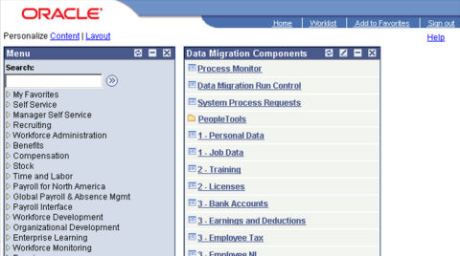
Frequently when I’m working I find that I’m visiting the same areas within the system regularly, so to make my life easier I’ll often create a Pagelet based on a custom Navigation Collection containing my often used components. This greatly reduces the number of clicks required for day-to-day work and could be really useful for end users.
NB: Nothing shown here requires the Enterprise Portal product.
An example can be seen here:
PeopleSoft Timings Records October 14, 2008
Posted by Duncan in PeopleSoft, PeopleTools.comments closed
Have you ever wanted to retrieve timing information for a process only to find out the the purge has removed all trace from Process Monitor? Or have you ever wanted more granular information about which parts of an App Engine took the longest? Or maybe you’re not troubleshooting an individual process but want to establish a baseline for long-term performance gathering on your batch window to identify potential future issues.
There is an easy way to accomplish all of the above as PeopleSoft can (although it doesn’t by default) write some really useful data on processes to database records, all ready to be queried.
(more…)
StackOverflow – excellent new Q&A site October 1, 2008
Posted by Duncan in PeopleTools.comments closed
Have you stumbled across Stack Overflow yet? It’s a great new website that fills a gap for the perfect place to post programming questions.
It is free, unlike Experts Exchange.
It isn’t rammed with adverts and link-spam, unlike PeopleSoftFans.
And it is a lot easier on the eye, more Web 2.0 and faster than IT Toolbox.
The site designers (including Joel Spolsky of Joel on Software fame and Jeff Atwood of Coding Horror), are themselves well known and respected individuals in the art of programming and UI design, and it shows. It has lots of nice features, but I like being able to vote up answers and comments, so the better responses rise up the page.
It has only just come out of closed beta so there isn’t much on there for a niche like PeopleSoft yet, but once the answers start getting indexed by Google I imagine it’ll become the first stop for programming issues. If we can get enough people treating this as ‘the site’ for PeopleSoft Q&A then I think we’d all be winners.
If you ask a question, make sure you tag it with ‘PeopleSoft’ so it’s wasy to find.
A nice spot to Grant Johnson of Amadensor for asking the first question.
Creating an entirely read-only user in PeopleSoft August 28, 2008
Posted by Duncan in Oracle, PeopleSoft, PeopleTools, Security, SQL.comments closed
On big projects it is quite likely that large numbers of developers have access to a many environments. Occasionally they can have access to environment which is quite important, for instance one that the customer is using for training or testing.
To reduce the likelihood of developers accidentally deleting some data that they shouldn’t it would be quite normal to remove their access to the environment altogether. However if they need access for troubleshooting purposes then (at least on projects I’ve seen) it’s quite normal for developers to be told “OK, you can have access, but be careful not to do anything destructive”. Occasionally – as with everything – things can go wrong. Either someone forgets which environment they’re in, or does something with unintended consequences. An alternative to the “just be careful” approach would be to create an entirely read-only user profile (i.e. one that has display only privileges to every component system-wide).
A read-only user profile is shown in screenshot below, where no fields are editable and the save button is inactivated:
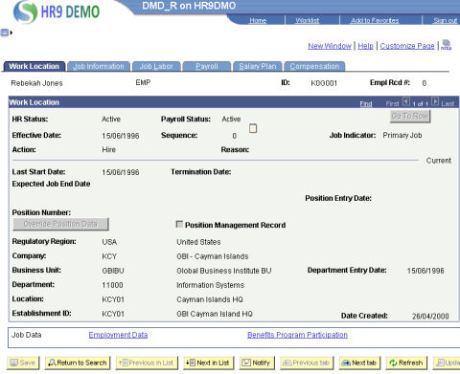
Also, on Run Control pages the ‘Run’ button is inactive. It’s going to be pretty difficult to alter data in this environment.
Here’s how to do it quickly and easily …
PeopleCode records: PSPCMNAME and PSPCMPROG August 11, 2008
Posted by Duncan in PeopleSoft, PeopleTools, SQL.comments closed
A widely known tip and a new (at least for me) discovery:
Widely known tip
Most techies who’ve looked under the covers will be aware of PSPCMPROG. It’s the underlying table where PeopleCode is storeed. This isn’t immediately useful however as the actual code itself is stored in the PROGTXT field in binary so it’s not easily accessible. This isn’t an insurmountable issue however as there are a couple of routines to decode the field (an SQR and a Java version, both by David L Price). I’ve not used either method personally, but a colleague has used the SQR version with great success.
For me, this field isn’t quite the most useful on PSPCMPROG. You may have noticed that if you update the PeopleCode on a record, the record properties aren’t updated to reflect the change – I guess because the record definition itself hasn’t changed (although strangely Component and Page PeopleCode do update the timestamp on the corresponding Component/Page definition – so there’s a bit of an inconsistency there). So how do you check when and by whom a piece of Record PeopleCode was last updated? If you check the LASTUPDDTTM and LASTUPDOPRID fields on the PSPCMPROG record via SQL then it’s all recorded there. This snippet of knowledge has saved me (or at least expedited troubleshooting by showing me the correct person to ask about the change) innumerable times.
Lesser known tip
I’ve not really had much reason to look at the PSPCMNAME record in the past, however a colleague and I checked it recently and discovered the RECNAME and REFNAME fields. Every time you create some PeopleCode your code is parsed and a line inserted into PSPCMNAME for every reference to a Tools object. I assume that this is the record searched when using ‘Find Definition References’ within App Designer. However, now we know the SQL table behind this we can therefore query this table to quickly find out objects affected by code in a specified project, for example.
Both the company I currently work for and my previous employer had utilities to export project details to file, printing out settings and details from Tools objects to speed-up the documentation process (and we know how much techies love documenting!). Now we can add to that utility any objects that are affected but which aren’t included in the project.
SAP to close TomorrowNow July 23, 2008
Posted by Duncan in PeopleTools.comments closed
It doesn’t feel like over three years since SAP purchased TomorrowNow, but now apparently it is to close in the next few months.
http://www.reuters.com/article/mergersNews/idUSN2140305320080721
Whilst this isn’t a huge surprise – the Oracle lawsuit over TomorrowNow’s alleged mass downloading of Customer Connection content has made the company almost unsellable and it’s continued operation prolongs the legal action handing Oracle great PR.
I’m not aware of how many customers it has here in the UK so won’t speculate as to whether we’ll see any effect.
MonkeyGrease Plea July 16, 2008
Posted by Duncan in PeopleSoft, PeopleTools, PIA.comments closed
I’m going to be looking at MonkeyGrease over the next couple of weeks and wondered if anyone felt like sharing their experiences.
I’ll be setting it up in a VM and tinkering with it to see what it can do. As a result I’d love to see screenshots, descriptions or – if you’re feeling particularly generous – some code if you’ve used MonkeyGrease in the past. I’ll give full credit to anything used, and if you do send code I won’t use it on client site, purely for the purposes of demonstrating MonkeyGrease’s functionality.
I’m aware that others have blogged about this in the past, including Jim Marion, Rich Manalang and one of the Grey Sparling team, and there is a Google Group for it. If there is anything else out there I’d love to know. Once I’ve got all the info in I’ll post a consolidated write-up and include all the links.
For those new to MonkeyGrease, see here.
VMWare Player and IP Ranges June 30, 2008
Posted by Duncan in Administration, Oracle, PeopleSoft, PeopleTools, Virtualisation.comments closed
I’ve been doing some work with VMWare Server and VMWare Player. They’re both free tools (download links can be found on the Applications page) and can be invaluable when you need a sandbox environment.
VMWare Server is great for creating the VMs, and you need it while you’re adding virtual disks etc. However once the VM is in place it may be worthwhile switching to VMWare Player. The Player is slightly faster but you can’t perform maintenance like add disks when using it. Also, they don’t co-exist on the same client machine, it’s either one or the other. To be honest, I just uninstall and install as it doesn’t take that long.
The issue I faced, and the reason for this post is that VMWare Server lets the user configure the IP Address assignments and DHCP ranges from within the application, while VMWare player doesn’t. This is a bit of an issue if you have a VM that you’ve configured with a static IP address in a non-default range, then when you switch to VMWare Player the static IP isn’t in the default range.
The secret to know is that the ability is still there, you just have to go looking for it. The utility you need is ‘vmnetcfg.exe’ and it’s under the VMWare Player install directory (i.e. ‘C:\Program Files\VMware\VMware Player’). From here you can configure the IP Ranges to be whatever you wish.
A Progress Bar for the REN Window June 25, 2008
Posted by Duncan in Application Engine, PeopleSoft, PeopleTools.comments closed
When I spoke before about the REN Server window and inserting into it, I mentioned that as well as text a progress bar was a possible inclusion.
The benefit of a progress bar to the users is that they can tell at a glance how far through a long running process is.
There are inherant problems with progress bars of course, in that they’re often less than 100% accurate. Most people have at some point joked at the time estimates for file copy progress bars within Windows, and ‘Microsoft Minutes’ is sometimes used as an ananlogy for inaccurate and super-cautious time estimates.
Despite this, I believe they have a place. For some processes – particularly those that run row-by-row – it’d be pretty easy to work out how far through it is by comparing the row number to the total number of rows.
Here’s how it’s done … (more…)
A glimpse of the future and a glance at the past June 23, 2008
Posted by Duncan in PeopleTools.comments closed
I’ve been on holiday so the posts have slowed over the last fortnight. I also don’t have any PeopleSoft tips to share, however I do have the following two observations:
Glipse of the future
I came across this amazing video in my feed reader (from Guy Kawasaki, I think).
http://www.musion.co.uk/Cisco_TelePresence.html
And all acomplished without a small R2 unit to project it …
Glance at the past
Whilst using a local cashpoint (ATM machine) from one of the UK’s largest banks the other day it appeared to hang. No amount of key pounding or patient waiting led to a returned card so I ventured inside. A member of staff kindly came to help, rummaged in the back of the machine and it rebooted. Being a tech I was of course interested to see what OS it was running, and was surprised.
Windows Embedded? Nope.
A Linux variant? Nope.
It was OS2! I’m wasn’t sure how reassured I was that part of the infrastructure of my bank runs on IBM’s creaking software but after a bit of research it appears quite common.


 The PeopleSoft Tipster Blog