Updating existing data with the Rank May 2, 2007
Posted by Duncan in Oracle, PeopleSoft, SQL.comments closed
In the post ‘Incrementing Counts in SQL’ I detailed a way of ranking rows within key values. This works fine in a select statement, so I was able to use that to insert data into an empty record.
The problem I faced today however, was that the data already existed in a table. I needed to update an existing column with the rank that each row had within the table (there had been multiple inserts into the table, and the rank needed recalculating).
I played around with the problem for a bit and couldn’t see a way of doing it (without a kludge like copying it out to another table and using the rank statement instead of selecting the column). Then it occurred to me that it could be achieved using the two step approach shown here. I wrote a quick App Engine to do it (a DoSelect with a SQL step inside) and it worked a treat. It took 4 minutes to run, and a smart colleague of mine with PL/SQL knowledge bettered me with this (which ran in 15 seconds):
%Execute(/)

DECLARE CURSOR c1 IS

 SELECT x.keyname

      , x.key1

      , x.key2

      , x.key3

      , x.key4

      , x.key5

      , x.key9

      , RANK () OVER (PARTITION BY x.keyname, x.key1 ORDER BY x.keyname, x.key1, x.key9, x.key2) rk

   FROM recname x;

BEGIN FOR c1_rec IN c1 LOOP

UPDATE recname y

   SET y.key3 = c1_rec.rk

 WHERE y.keyname = c1_rec.keyname

   AND y.key1 = c1_rec.key1

   AND y.key2 = c1_rec.key2

   AND y.key9 = c1_rec.key9;

END LOOP;

END;

/
The above code snippet includes the %Execute(/) command needed for running PL/SQL within an App Engine SQL Step.
PeopleTools 8.49 April 24, 2007
Posted by Duncan in Administration, PeopleSoft.comments closed
I heard a mention earlier today that Tools 8.49 is expected before the end of the month.
Having a quick browse on Customer Connection it looks as though it’s a release to get 3rd party software up to date, rather than to introduce new functionality (in the way that Tools 8.48 did).
Details of software requirements here:
http://www4.peoplesoft.com/psdb.nsf/0/74DAD3F64698E696882571EE0083C128?OpenDocument
(customer connection logon needed)
Update:
Tools 8.49 has been released. Details here:
http://www.peoplesoft.com/corp/en/support/roadmap/documents.jsp?doc=7E371AF2B1AAE3CC882570D0007E6E5C
Moving the Search Box April 24, 2007
Posted by Duncan in PeopleSoft, PIA.comments closed
The other day I noticed a PeopleSoft environment with the Search box (the box that appears at the top of the left hand menu on the default home page) in the top right hand corner. It seems a far more logical place to have it
- it takes up no menu space
- it’s available in all components, not just from the home page
Default Position

Better Position
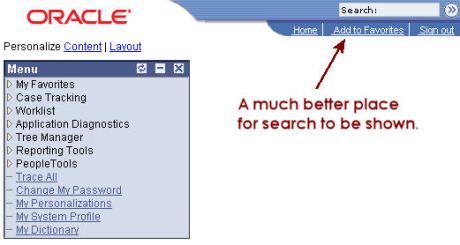
So the question is, how do you move it up there?
(more…)
Oracle’s Project X – What does it mean for a PeopleSoft user? April 18, 2007
Posted by Duncan in Fusion, Oracle, PeopleSoft.comments closed
What is Project X?
There’s been a bit of talk today about Oracle’s Project X. It’s been bubbling around for a while, but now it has been officially announced as ‘Oracle Application Integration Architecture’ and – to paraphrase – it’s a method of joining together disparate ERP systems.
By purchasing Process Integration Packs (PIPs) clients will be able to connect systems – initially I’d imagine it would be PeopleSoft, Oracle e-Biz, Siebel and JDE, but other systems will no doubt be added in the fullness of time. This is, of course, a high visibility use of the much heralded SOA (Service Orientated Architecture) – one of the buzzwords you can’t avoid hearing in any Fusion discussion. I guess this is Oracle responding to customers saying ‘enough with the SOA/BPEL/XMLP tub-thumping, show me how it improves my business’.
What does it mean for PeopleSoft people?
Whenever Oracle come out with a big announcement, the first question for me is always ‘what does this mean for the PeopleSoft world’? After all, straight after the takeover Oracle announced that we’d all be forced to migrate to Fusion. Then we were going to be temporarily supported on our current ERPs before migrating. Next came Applications Unlimited, meaning we could hold fire a bit longer. Now, Oracle release a technology enabling us to not migrate to Fusion at all, but stay put and let the different ERPs communicate.
A cynic might wonder if they were having problems with Fusion. Or perhaps it’s all going swimmingly but they’re hearing that clients quite like their current systems and don’t want to move? Or are they just after the extra revenue stream PIP sales would bring before Fusion comes along?
Moving PeopleSoft Config between Environments April 12, 2007
Posted by Duncan in Administration, Data Mover, PeopleSoft.comments closed
During PeopleSoft implementations it’s a fairly common task to need to move Configuration (i.e. setup data) between environments. Larger implementations may even have a separate Config environment which serves as the master for config data, and from where you’d need to migrate out config into other environments on a regular basis.
There are a number of tools you could use to achieve this, be it data mover, raw SQL or even an SQR or App Engine. All of these would need to be custom written. An alternative solution is to use the Manage Configuration Set functionality. It’s a delivered component (at least on more recent versions of the Application) that lets you choose the modules you wish to export config for, and it builds the DMS files (Data Mover Scripts) for you.
(more…)
Faster SQL Updates using ROWID April 7, 2007
Posted by Duncan in Oracle, PeopleSoft, SQL.comments closed
Most UPDATE statements get written using the technique:
UPDATE <recname>

   SET <fieldname> = <field, expression or statement>

 WHERE <where clause>
However, if the value that you’re setting the field to is a fairly complex SQL statement of its own there may be a better way (particularly if you have an Oracle DB). You can take advantage of the fact that ROWID is the fastest way to locate a row (faster even than the primary key). Run the first bit of SQL to select the rowid of the row to update and the value to update it to, and then the second bit to run the updates. This can be done either as 2 SQL blocks or with an App Engine Step containing DoSelect and SQL actions.
Get up and running with the Tuxedo Administration Console April 2, 2007
Posted by Duncan in Administration, Infrastructure, PeopleSoft, PS Admin, Tuxedo.comments closed
I think I’ve stumbled across a better way of remotely administering servers than using remote control software and PSADMIN. There’s a tool called the ‘Tuxedo Administration Console’ (or sometimes ‘WebGUI’) which does the job also.
It looks like this:
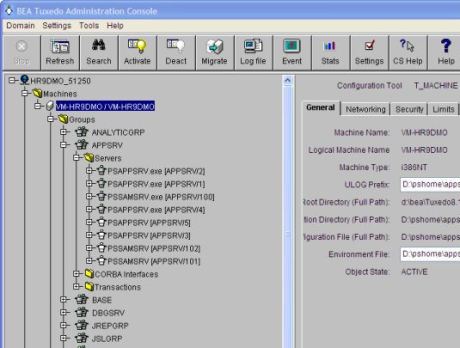
Once you’ve done a little bit of config (no more than 15 minutes, and it’s just config, there’s nothing additional to install) you just point the web browser on your client PC to a URL and it loads up the above screen.
You drop down the Domain menu to choose which App Server or Process Scheduler to administer, then use it to start and stop the domain, or you can do individual processes if you prefer. (For example, on my current client site we have a developer who frequently hangs the domain by using all of the PSAPPSERV processes during debugging. Using this tool, we could change the Max App Servers setting and then boot a couple of extra App Servers, all in a few clicks and without rebooting the domain.)


 The PeopleSoft Tipster Blog