Cedar’s new website is live – get ready for the blog! December 9, 2014
Posted by Duncan in Cedar, TW.comments closed
I’m really pleased that Cedar have got our new website live – just in time for UKOUG Apps 14. 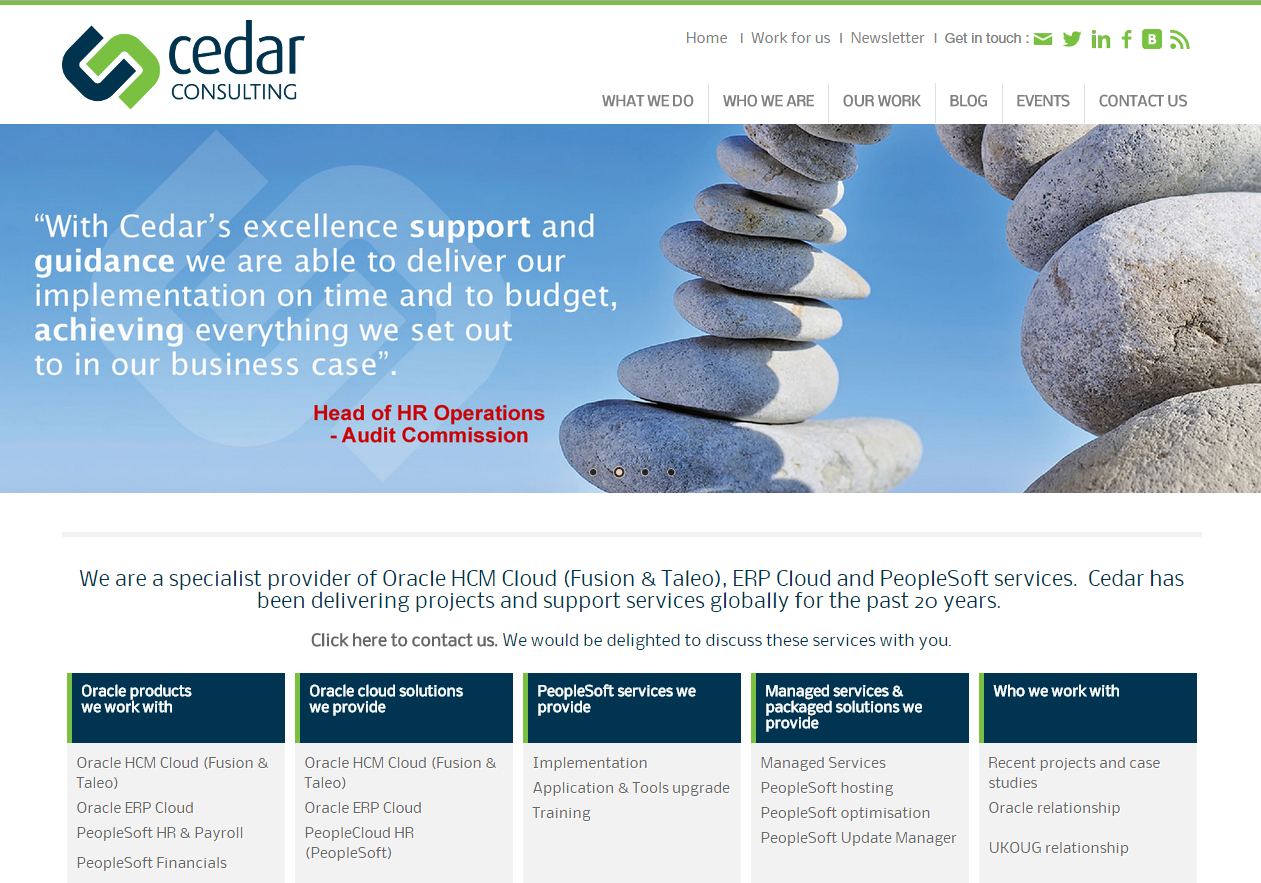 As you would expect it highlights the services that Cedar provides – both Oracle Cloud (Fusion and Taleo) and obviously PeopleSoft implementation, hosting and support. It contains details of our people and locations (we’ve offices in Kings Cross, London, plus India, Switzerland and Australia). It also contains case studies of some of the project successes that we’ve had, and some of the nice things that clients have said about us. One of the things I’m most excited about is the blog. Make sure you add it to your feed reader as we’re going to be sharing some good content there from all of the practices within our company (plus the occasional post of us doing fun things!).
The new website can be found here: http://www.cedarconsulting.co.uk/
Why we won’t need a PeopleSoft v9.3 November 25, 2014
Posted by Duncan in Strategy, TW.comments closed
![3291330534_84cc20eac9_z[1]](https://peoplesofttipster.com/wp-content/uploads/2014/11/3291330534_84cc20eac9_z1.jpg) I caught up with Paco Aubrejuan’s “PeopleSoft Townhall” webinar from Quest the other day. Paco is Senior VP of Development for the PeopleSoft product line and it was a really interesting listen. The session can be found here, although you need to sign-up with Quest to view it. It’s an hour long and he discusses the future direction of the PeopleSoft product family plus the new simplified and mobile user experience for PeopleSoft, the new Fluid User Interface (UI) and the delivery model of more frequent, customer-driven product enhancements which is enabled by PeopleSoft Update Manager.
I caught up with Paco Aubrejuan’s “PeopleSoft Townhall” webinar from Quest the other day. Paco is Senior VP of Development for the PeopleSoft product line and it was a really interesting listen. The session can be found here, although you need to sign-up with Quest to view it. It’s an hour long and he discusses the future direction of the PeopleSoft product family plus the new simplified and mobile user experience for PeopleSoft, the new Fluid User Interface (UI) and the delivery model of more frequent, customer-driven product enhancements which is enabled by PeopleSoft Update Manager.
Most interestingly for me though, was the Q&A section at the end. Paco tackled the v9.3 question head on. I’ve transcribed his words, and I think it’s a strong and positive message for those with an interest in the PeopleSoft product line. Here are the ‘best bits’:
On PUM:
We’re calling our model PeopleSoft Selective Adoption … and let me be specific about what it means, we’re going to deliver new capabilities about 2 to 3 times a year (and may deliver some functionality more frequent than that). Once you’re on 9.2 you can get this functionality without upgrading ever.
On PeopleSoft v9.3:
Should I upgrade to PeopleSoft 9.2 or should I wait for 9.3? There is no 9.3. We don’t have a 9.3 codeline, there’s no 9.3 plan, our plan is to never do a 9.3 and we’re going to continuously deliver on 9.2 using the PeopleSoft Selective Adoption and so you should not be waiting for a 9.3. … We’re just going to continue extending the timelines for PeopleSoft 9.2 so the idea is that there is no more upgrade and premier support will just continue.
On why a 9.3 isn’t needed:
The risk we take with saying that there’s no 9.3 is that people read into that and say that PeopleSoft is dead. … That’s not true. The investment level that we’re making in the product does not change with this delivery model at all. … We’re delivering all the Fluid functionality without a new release. We’ve never done that before. The only thing that this is comparable to is the 8.0 version when we moved from client-server to the internet, and that was a major release. We’re now doing something equivalent to that without even a minor release. It’s now just selective features that you can take as long as you’re on 8.54. So PeopleSoft is not dead, and having no PeopleSoft 9.3 does not mean that PeopleSoft is dead.
So, we now have a definitive answer to the v9.3 question. I think it’s a strong and positive message which is backed up with evidence of the investment that Oracle are putting in to the product family, and a nod to the fact that PeopleSoft is adapting its model to the changing needs of the customer.
Generating a Calendar View of Employee Absence November 24, 2014
Posted by Duncan in PeopleTools.comments closed
This blog post has been kindly contributed by Richard Yip. Richard is a PeopleSoft HCM & Payroll Technical Consultant at Santander Bank here in the UK. He is a long-term PeopleSoft techie and a regular at the UKOUG conferences.
We have posted two guest posts from Richard already, they can be found here:
Generating a custom Org Chart in PeopleSoft
Interacting client-side JavaScript with server-side PeopleCode
Introduction
In PeopleSoft HCM 9.0, an employee’s absence history is displayed in the usual tabular format (a grid with rows and columns). However, we felt the presentation was a bit uninspiring, and needed a better look to it. So we custom built a transaction whereby absences are displayed on a calendar used in both employee and manager self-service transactions. (more…)
Cedar Wins Gold – PeopleSoft Partner of the Year October 28, 2014
Posted by Duncan in PeopleSoft, TW, UKOUG.comments closed
If you follow any number of those in the Partner community on LinkedIn you’ll have seen many of us asking that you vote for us in the UKOUG’s annual Partner of the Year competition. All of the partners are really grateful for your votes as winning an award selected by end-users carries significant prestige.
I’m delighted that the company which I now work for – Cedar Consulting – were awarded 1st place (Gold) for PeopleSoft Partner of the Year for 2014/2015.

Simon (right), collecting the award from David Warburton-Broadhurst – the UKOUG’s President
Cedar were also thrilled to win Silver in the Fusion Partner of the Year awards, further establishing our reputation as the go-to partner for Fusion/Taleo for all existing PeopleSoft customers.
 Simon Wragg, Director at Cedar Consulting said, “We are honoured to receive both the PeopleSoft and Fusion Partner of the Year awards amongst such a strong group of finalists. Cedar Consulting are delighted to be recognised as one of the leading partners within the UK Oracle User Group community. Winning these awards and knowing that so many votes were cast from Oracle customers is a real testament to the service we have provided over the last 12 months”
We’d like to thank all of you who took the time to vote for us, we’re very grateful for your support.
Error unzipping PeopleSoft Images October 4, 2014
Posted by Duncan in TW.comments closed
The new PUM images are a boon for anyone wanting to get a PeopleSoft instance up and running quickly. Once you’ve downloaded the zip archives however, you might find that the delivered zip file doesn’t work by default for everyone.
The line:
unzip HCM-920-UPD-008_OVA_2of11.zip
gives me the following error:
'unzip' is not recognized as an internal or external command
I’m not sure where the unzip utility is supposed to be from, but it’s not delivered as part of Windows 8.1. I typically use the excellent 7zip utility for my zip/archiving needs, so I need to amend the script slightly.
I add the following line near the top:
set PATH=%PATH%;C:\Program Files\7-Zip\
so that I can reference the extraction tool with just the filename, then I change each archive line to use 7zip instead, thus:
7z e HCM-920-UPD-008_OVA_2of11.zip
PeopleSoft and Shellshock September 29, 2014
Posted by Duncan in Security, TW.comments closed
As many will have no doubt heard, there’s a new vulnerability that has been spotted, and there are already exploits for it in the wild.
 The vulnerable systems are those running Bash – so Windows machines are safe, it’s just Unix/Linux and MacOSX.
Security Researcher Kasper Lindegaard from Secunia rates this as a bigger issue than the Heartbleed exploit discovered in April this year. “Heartbleed only enabled hackers to extract information, Bash enables hackers to execute commands to take over your servers and systems.”
The US government has rated this 10 out of 10 from severity point of view.
Oracle have been quick to react to this threat, and have issued a security alert here. It includes this chilling text:
This vulnerability may be remotely exploitable without authentication, i.e. it may be exploited over a network without the need for a username and password. A remote user can exploit this vulnerability to execute arbitrary code on systems that are running affected versions of Bash.
PeopleSoft and Web Browsers – The Guide September 22, 2014
Posted by Duncan in Browsers, PeopleTools 8.53, PeopleTools 8.54, TW.comments closed
 The topic of PeopleSoft/PeopleTools versions and web browsers is often a complicated one, yet it’s an issue that every client will face when they either upgrade PeopleTools or move to a new Application version that contains a Tools increase.
Cedar have recently been asked by a client for some assistance to get a definitive answer to the important questions and we thought it would be useful to share this information. We’ve put together a white paper that shows you the relevant browser versions for PeopleTools 8.54 and PeopleTools 8.53 (i.e. the versions that customers are likely to be upgrading to over the next year or so):
Cedar Consulting White Paper – PeopleSoft and Web Browsers
We hope that it saves you some time during your next upgrade.
Help Please! The UKOUG Partner of the Year awards July 31, 2014
Posted by Duncan in TW.comments closed
We’d really appreciate your help. But first, a bit of background:
The Partner of the Year awards is an annual awards ceremony held by the UK Oracle User Group. It allows customers to show appreciation for partners that have provided a service to them over the previous 12 months. As you would imagine, being voted a winner (for the categories that you operate in) is a wonderful accolade as it’s the end-users that have spoken.
Cedar Consulting has a long history of success in the competition, reflecting our long standing relationships with our clients. I wasn’t going to ask for votes this year, however I notice that many of our competitors are filling Twitter and LinkedIn with pleas so I feel that I should also ask for your vote.
If you’re an existing Cedar client site we’d love your vote. Also, if you are a recipient of any other Cedar service – and I guess here I’m talking about the free PeopleSoft and Fusion Weekly newsletters that we send out – we’d be very grateful if you gave 3 minutes of your time to vote for us.
What we’d like you to do:
1) Go to: http://pya.ukoug.org/index.php
2) Fill in your company name, first name and surname. Then click Next.
3) Enter your email address in both fields, then click Next.
4) Select any checkboxes if you want ‘follow-up communications’ from the UKOUG, or leave all blank, and click Next.
5) Select Cedar Consulting from the drop-down, and click Next.
6) On the PeopleSoft page, select the Gold radio button on the Cedar Consulting row (note, it’s the 3rd column!), then click Next.
7) Repeat by selecting the Gold radio button on the Cedar Consulting row of the Fusion page, then click Next.
8) Click Submit.
And you’re done. Thank you very much. If you want some gratitude for your 3 minutes of effort drop me an email and I’ll thank you personally!
An Introduction to PeopleTools 8.54 (part 2) July 31, 2014
Posted by Duncan in PeopleTools 8.54.comments closed
1. Introduction
The recently launched version of PeopleTools 8.54 contains a broad range of enhancements. Although we’ve had the GA (General Availability) release we can’t upgrade existing environments until the 8.54.02 patch, so now is a good time to perform a fresh sandbox install to investigate the details and highlight the areas that are of most interest.
As in the first part of this series, there is a lot of content to cover so I’ve spread it over several entries. This first part looked at the back-end, infrastructure and System Admin changes, whereas this post moves up the software stack with integration and reporting, and the final entry will finish with the Fluid UI.
2. Developer UI Enhancements
There have been a number of improvements to the User Interface – we’re not talking about Fluid, this is in the Classic UI too although these changes may also benefit Fluid pages).
a. Charting Enhancements
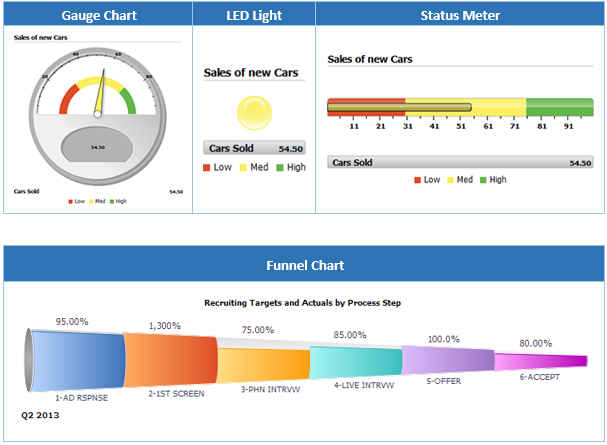
The development team have introduced some new charting types to the toolset. We were already able to select from quite a few options, however we’ve now got Gauges, the LED lights, Status Meters and Funnel charts.
b. Long Edit Box Character Counter
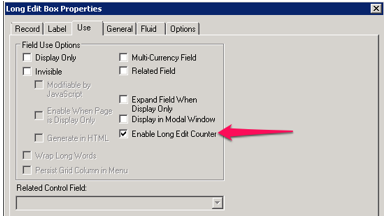
Previously people (myself included) have accomplished similar functionality – with varying levels of success – by inserting JavaScript onto the page. Now it’s natively built in to PeopleTools. A character counter can be activated on the properties on the Long Edit box control:
The result on-screen is like this:

Note: this functionality doesn’t actually limit the text entry and if the user exceeds the limit it will show a negative number.
c. Pivot Grids
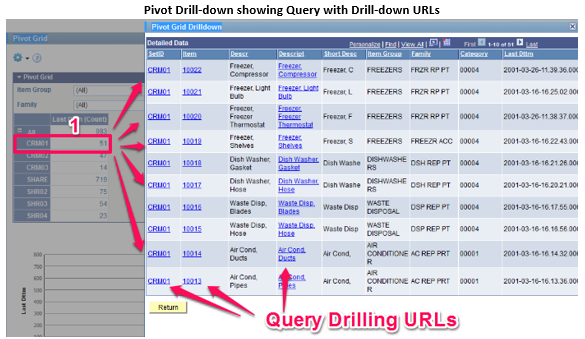
Pivot Grids have been enhanced in a lot of ways – there are almost 30 improvements listed in the Release Notes. Just picking a few, they now include the ability to restrict the number of rows shown in a Pivot Grid, PS Query drilling URLs and Bubble and Scatter charts are now available as Pivot Chart types.
3. Reporting
a. BI Publisher
As of PeopleTools 8.54, BI Publisher now includes support for PCL (Printer Control Language) code in RTF templates. This allows for printing PDF with Secure Fonts, essential for the secure printing of cheques.
Also newly supported are digital signatures – which can be used to verify the sender and to ensure that it the output hasn’t been amended in transit, and updatable PDFs.
b. PS Query
PS Query now supports defaults for prompts:

There have been workarounds to achieve a similar result before, but it’s now built into the configuration pages so we don’t need to search online for the workaround each time we want to use it.
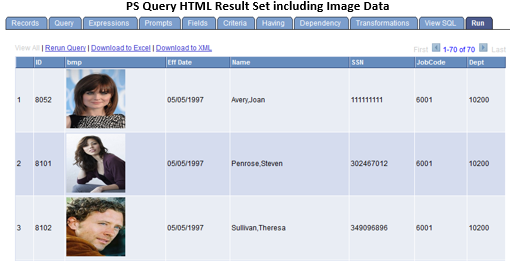
Also new with PS Query is the option to include image fields in your output. There are a number of display alternatives with image fields, either Image Data (in which case PS Query will display the image inline with the rest of the HTML result set), or a Base64 encoded data string representing the image with any output other than HTML, or – when the property is set to Image Hyperlink – a URL to the image will be returned instead of the image itself. When the URL is clicked, the image will be displayed in a new browser window.
Additionally, all PS Queries can be exposed as REST services, and Microsoft Excel 2007 and above is supported thereby increasing the amount of rows you can download from a Query result set into Excel above the previous limit of 64 thousand.
Finally, PeopleTools 8.54 introduces a new Query type, the Composite Query. Composite Queries are a superset of Connected Queries (which have been in PeopleTools for a couple of releases). Composite Queries allow users to connect queries together and have the output presented as a flat result set (instead of the hierarchical data sets which were output from Connected Queries).
4. Batch Processing
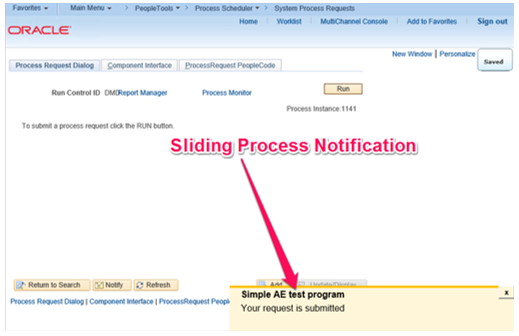
One very visible improvement to the Process Scheduler is a new status window that slides in from the lower right corner to give updates on processing progress. This is a nice touch that I’m sure end-users will appreciate:
Secondly, Activity Guides can improve batch processes as steps – which is important if there’s something a bit more process intensive that’s needed as part of a sequence of steps.
Finally, App Engine program trace allows you to specify which sections to appear in the trace, rather than having to wade through the trace for an entire program. This needs to be enabled in the Process Scheduler config, in Configuration Manager, and then in the App Engine itself:

5. Other Enhancements
Other enhancements included in this version of PeopleTools are:
– There’s a WorkCenter to make the setting up of new Activity Guides easier, plus a cloning function which will be useful when similar – but slightly different – guides are needed.
– SES facets now include numerical and date ranges. Results can include images and report repository content.
– Change Assistant has now been decoupled from the PeopleSoft Image, enabling packages to be moved to subsequent environments without also needing to connect to the PeopleSoft Image (this was quite restricting in Tools 8.53). It also has a fresh new UI and can be scripting/configured via the command line
– Data Migration Workbench has received improvements to Application Data Sets (and define relationships between groups), plus merging, support for managed objects and an improved UI.
– PeopleSoft Test Framework now allows you to perform mass updates (updating a set of tests in one change), interaction with App Designer projects and some usability enhancements.
6. Conclusion
The next version of PeopleTools is bringing many improvements. Much is being made of the new User Interface – and rightly so – however there are other improvements that we will improve our workflow by making it both simpler and more efficient.
PeopleTools 8.54 Sandbox July 14, 2014
Posted by Duncan in PeopleTools 8.54, TW.comments closed
Following the announcement on Friday that Tools 8.54 was available, we dived straight in (whilst cursing under our breath that it was released at 6pm on Friday night on the weekend of the World Cup final!). (more…)


 The PeopleSoft Tipster Blog