Off topic – The Pebble Watch February 28, 2013
Posted by Duncan in PeopleTools.comments closed
This post is nothing whatsover to do with PeopleSoft but I’m hoping that some of you will find it interesting nonetheless.
You may have heard of Kickstarter. It’s a web-site where enterprising inventors/creative types can post an idea, a promotional video and a funding target. Users can browse the site and if they spot a project that they like they can pledge money towards it. There are typically different levels of pledge amounts, and each level has an appropriate reward.
One of the higher profile projects was the ‘Pebble Watch’, a bluetooth smartwatch that integrates with your smartphone (iPhone or Android). They posted their project with a $100,000 funding target that they raised within the first 2 hours(!) and hit $10.2m in the month-long period that it was open. I was one of the 69,000 that pledged to support the project, and in return they promised each of us one of the watches. Mine arrived this afternoon!
This is what it looks like:
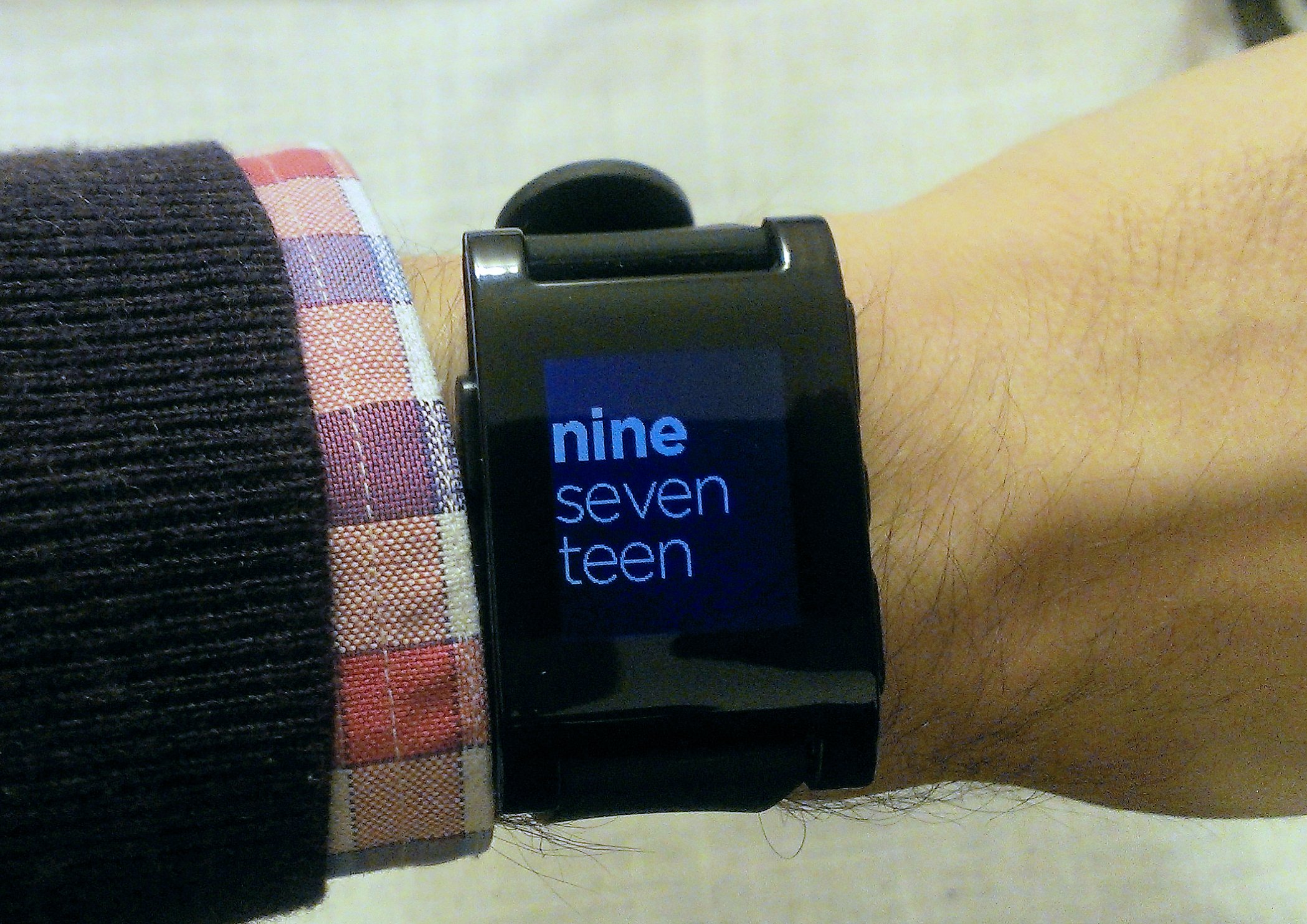
There are a range of different watch faces, including standard analogue designs and variations on digital clocks. The chief benefit though is that it communicates with your phone via bluetooth. Any time you receive an email, text or incoming call the watch vibrates and displays what is happening on the screen. For texts or emails it displays the contents, enabling you to scroll up and down to read the message. For incoming calls it displays the caller, and gives the option to answer or decline the call. You can also do things like control the music on your phone remotely.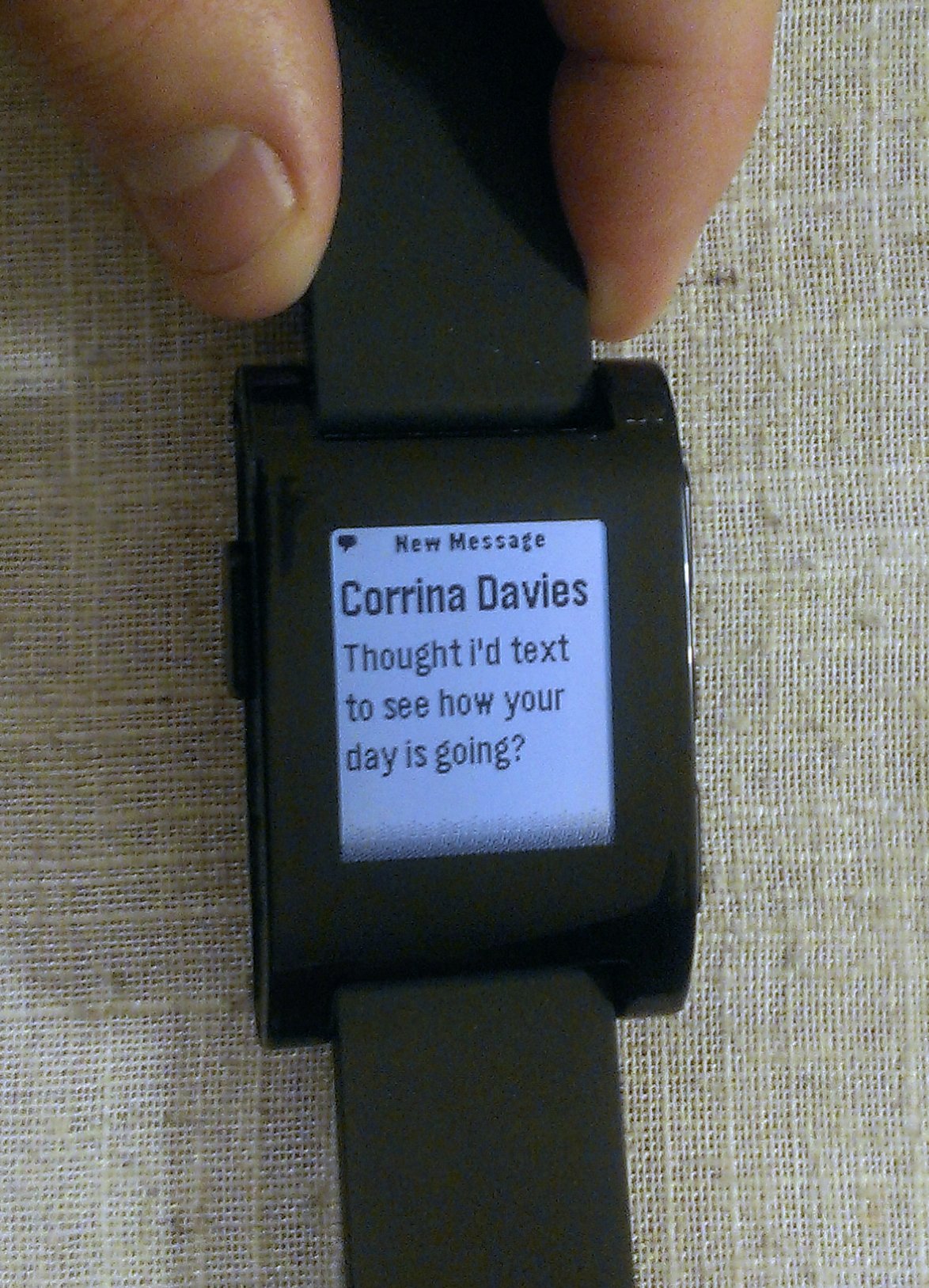
When I was out for a meal with the family earlier this evening I was able to subtly screen emails and texts, and even decline an incoming call (sorry boss!) without taking my phone from my pocket or my wife even noticing (a real plus!). I imagine that it’ll be far more discreet in meetings than glancing at mobile phone screens to see if the interruption is important.
A further point to note is that Pebble allow you to create your own Apps for the device. Even at this early stage there are already apps for adding additional notifications, and a RunKeeper app and an IFTTT channel are on the way.
If anyone is intrigued, there are more details and a video here.
Disabling paste on an input field February 14, 2013
Posted by Duncan in PeopleTools.comments closed
A colleague of mine recently had a requirement to place an email address field on a page, and then just below it a ‘confirm email address’ – however the user should not be permitted to copy and paste from the first field to the second, they should retype their email address.
We didn’t think that there was a way of disabling paste via PeopleCode, so resorted to JavaScript. The solution was actually quite straightforward in the end:
1) Place the two input fields on the page and connect them to the records you wish to save to, as usual.
2) Place an HTML Area on the page, making sure it’s beneath the other fields (both on this screen and the order tab).
3) Make the HTML Area contents static, and paste in the following:
<SCRIPT language=JavaScript>

var message = "Paste disabled. Please re-key.";


function disablepaste(){

alert(message);

return false;

}


document.getElementById('DERIVED_TEST_TEXT2')

.onpaste=disablepaste;

</SCRIPT>
4) Swap DERIVED_TEST_TEXT2 in the above code snippet for you Record/Field name (i.e. it’s the record name, then an underscore, then the fieldname. Look in View Source or Chrome Dev Tools/Firebug if you’re not sure.)
5) You might also want to make the alert message a little more user friendly too.
I’m Chris Malek and this is how I work February 13, 2013
Posted by Duncan in How I work.comments closed
Next up in the ‘How I work‘ series is Chris Malek of Cedar Hills Group. Chris is a Technical Consultant and President/Founder of Cedar Hills Group. He has 12 years experience working on PeopleSoft and is a former PeopleSoft employee. Although some of you may know him from this time, most will have heard his name from the blog he runs – his articles are often featured in the PeopleSoft Weekly.

Name: Chris Malek
Occupation: Independent PeopleSoft Technical Consultant @ Cedar Hills Group, Inc.
Location: San Diego County, CA, USA
Current computer: My main computer is an Apple MacBook Pro with 15 inch Retina display (16 GB RAM, SSD Drive), 24in Apple iMac (4GB RAM) – I use this iMac as a ‘thin’ client mostly and its large screen.
Current mobile devices: Iphone4 and an Ipad 1st Gen (upgrading to an iPad Mini soon)
I work: to learn something everyday and be mentally challenged.
What apps/software/tools can’t you live without?
Snagit – I have been using snagit for years. It makes communication and documentation so much faster. It is super easy to grab a screen-shot, then use the simple but powerful editor to mark it up with text, arrows, call-outs and even pull in other screen-shots. It is worth every penny.
Sublime text 2 – The best text editor I have found. Once you spend the time to learn the subtleties of it and install some plugins (there are hundreds) it is a powerful editor.
PeopleCode PeopleBooks – I write a lot of Peoplecode and I am constantly referencing the PeopleCode API documentation.
Balsamiq – I create a lot of PeopleSoft bolt-ons. I have found that creating low fidelity / pencil drawn UI sketches helps clients understand the proposed application and helps me flush out requirements faster. In general, people do not know what they want until they can see it. So quickly sketching out some UI options in something like Balsamiq helps get better requirements and helps create better applications.
Aperture – I have a large photo library and enjoy photography. Aperture is a great application that is powerful and integrates nicely with the many Apple devices my family has.
Google Reader – I have been a heavy Google Reader user for years. It is a great web app and it allows me to stay up to date on various tech blogs and niche topics I am interested in.
JungleDisk and Amazon S3 – I don’t keep paper and scan all business records to PDF. I backup all my computers to Amazon S3 using JungleDisk. I have piece of mind that if my computer fails or my house catches fire that I can get my records without a problem. It also allows me to do secure syncing with my family computers and I hold the encryption keys which is unlike something like DropBox where they control the encryption keys.
Besides your phone and computer, what gadget can’t you live without?
I don’t know if you can call it a gadget but I can’t live without my surfboards. I started surfing when I moved to Southern California about 8 years ago and it has become a passion. It is really fun, keeps me in shape and is a great stress reliever. Staying in shape is a top priority for me and my TRX Trainer is another favorite non-tech gadget. It is light, portable, and versatile. It gives you an exercise combination between Pilates, Yoga, and weight training.
I also love my Fujitsu ScanSnap scanner. As I stated above, I don’t keep any paper records. This little scanner is amazing and it was pivotal in allowing me to go completely paperless about 5 years ago.
What’s your workspace like?
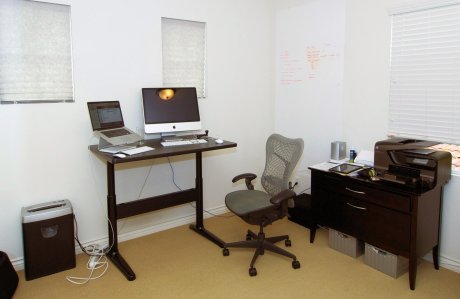
In my home office, I have a desk that can be adjusted for standing. I don’t always stand while working and actually prefer sitting most of the time. However, it is nice to have the options to change postures. I have a white-board on the wall where I can sketch ideas and jot down my daily to do list which helps me stay focused.
What do you listen to while you work?
I love Pandora. Lately, I have been listening to the “Jazz Essentials” station. Another popular station for work hours is my Massive Attack pandora channel which has a bunch of down-tempo type music. I am also a big fan of anything by Yo-Yo Ma especially the album titled “The Cello Suites.”
What PeopleSoft-related productivity apps do you use?
1.) Chrome Developer tools to find field names of PeopleSoft fields by inspecting the HMTL.
2.) HTTPFox FireFox plugin and Fiddler to troubleshoot cookie issues, dig into weblibs and spy on javascript Ajax calls.
3.) My DataDumper application class to quickly view buffer states and debug code because I hate looking at trace files. You can view an introduction here.
Do you have a 2-line tip that some others might not know?
If you are viewing any PeopleSoft page in any web browser (except IE), right click on a field and choose “inspect element”. That will bring up the developer tools and will display the HTML source of the field that you had highlighted. The “id” attribute will have the record and field name in the form of {Record Name}_{Field Name}. This is really useful for dynamic pages where opening up the application designer page definition may not be obvious especially if there are nested sub-pages. This is a good trick to teach analysts that create tech specs as they can easily find the technical names and communicate in the language of the technical staff.
What SQL/Code do you find yourself writing most often?
I create and support a lot of electronic signature / approval type customizations. This requires me to log in as many different users throughout the day for testing purposes. Therefore, I do a lot of password resets from the back end. Here is a script I use against my base account where I know the password and reset some target user’s password to match mine so I can login as them.
UPDATE PSOPRDEFN
SET OPERPSWD = (SELECT OPERPSWD
FROM PSOPRDEFN B
WHERE B.OPRID = ‘USER-WITH-KNOWN-PASSWORD’)
WHERE OPRID = ‘USER-I-NEED-TO-LOGIN-AS’;
There are some caveats to this trick. This will not trigger an integration broker message since you are updating from the back end. Therefore, this will not sync to other PeopleSoft databases. I have also seen in the 8.53 pre-release notes that the password hashes may be stored with a salt soon so this will probably not work after 8.53 is released.
What would be the one item you’d add to PeopleSoft if you could?
If I could not get version control then I would focus some of the following areas of Application Designer:
* Code completion
* Better support for navigating complex Application Class hierarchies
* An option to force PeopleCode variable declarations
* Support for message catalogs on compare reports
* Support for exporting message catalogs to a file with the project
I could go on for hours.
What everyday thing are you better at than anyone else?
I think I am a very quick learner and have the ability to understand complex problems and break the problem into smaller manageable chunks. I owe this to the Engineering program that I completed in college. The program taught amazing problem solving skills and transformed the way I think.
What’s the best advice you’ve ever received?
When I was in training at PeopleSoft, a veteran consultant told me “Never learn COBOL or you will be stuck as the COBOL guy on a big project and never learn any new technology.” This stuck with me because I love learning new technologies. I took the advice and stayed clear of COBOL and I don’t regret it.
I also recently heard a quote the resonated with me: “It is OK to make mistakes as long as they are new ones.”
Jim Marion’s new book February 5, 2013
Posted by Duncan in PeopleTools.comments closed
I’ve been meaning to read Jim Marion’s new book ‘PeopleTools Data Management and Upgrade Handbook’ for a while, and last month it finally got to the top of my reading pile. This time he has co-authored with Paula Dean who also has a strong past in the PeopleSoft world.
Here’s a link to it on Amazon.com.
And here’s a link on Amazon UK.
Those are direct links, not affiliate links.
I also wrote a review of the book on Amazon.com. Here’s what I said:
The ‘Data Management and Upgrade Handbook’ fills a large gap in the PeopleSoft book marketplace. We have Jim’s first book which caters for genuine hard-core PeopleCode developers. We also have David Kurtz’s book which caters for DBAs. For a long time we’ve been missing a book for those of us that sit in between, maybe we do some development, but we also perform some system administration activities too (like migrating code between environments, using data mover, applying the odd patch or bundle etc). This book is aimed squarely at these ‘DevOps’ staff – and there are a lot of us.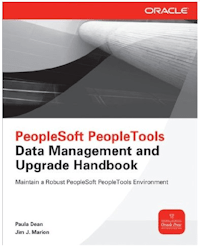
In the first part of the book (Data and Change Management) Jim and Paula take us methodically through each of the tools that you’re going to need to use as part of your day job (like Change Assistant and Data Mover) and introduces those that you might not ‘have’ to use, but should make your life easier (like Data Archive Manager and Version Control).
In the second part (Upgrades) they walk us through a typical upgrade, covering the factors that govern the time and manpower required, through project teams and activities, and onto the tools that smooth the process (like PeopleSoft Test Framework and automated test suites).
It’s just over 300 pages, so it’s short enough to read through cover-to-cover when you’re trying to upskill someone with a few years experience, but it’s also detailed enough to keep around as a reference manual. There’s not a single customer that couldn’t benefit from having a copy or two of this in the project office.
I’m Praj Basnet and this is how I work January 30, 2013
Posted by Duncan in How I work.comments closed
Next up in the How I Work series is Praj Basnet, the talent behind the excellent PeopleSoft Wiki. I don’t know for sure – but judging by the traffic coming in to this blog from elsewhere – I suspect Praj’s site is amongst the most visited PeopleSoft related websites. The traffic he gets is no doubt due to the breadth and depth of the content he’s posted on there.

Name: Praj Basnet
Occupation: Software Engineer and PeopleSoft Consultant
Location: Rockhampton, Australia
Current computer: Mac Book Pro 15″ (16GB RAM, SSD)
Current mobile devices: iPhone 4, Samsung Galaxy Tab 2
I work: largely remotely, and have never been more productive or happy.
What apps/software/tools can’t you live without?
The Google suite (gmail, calendar, reader, drive). Evernote and Wunderlist to manage information. Software that is multi-platform and works/syncs across devices (phone, tablet, laptop etc).
Besides your phone and computer, what gadget can’t you live without?
Turns out with a laptop, and a smartphone that has Internet access, I can pretty much work from anywhere and focus on getting things done. It’s always nice to also have a good cup of coffee and some peace and quiet. So a decent coffee machine and noise cancelling headphones are always a help.
What’s your workspace like?
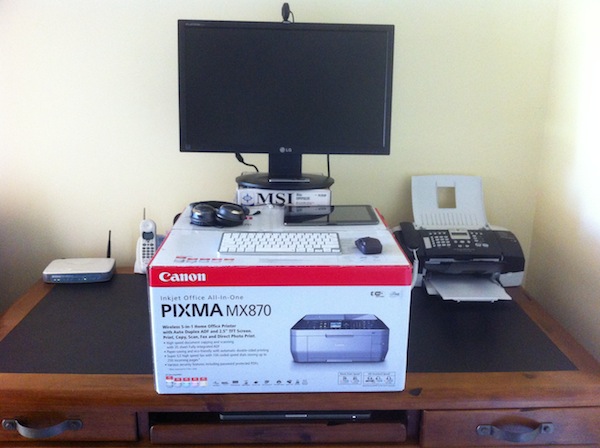
I recently switched to a make-shift standing desk. The first two weeks were hard work! I found I could only stand for 30 minutes or so at a time. Slowly I’ve built up to standing about 4-5 hours a day with breaks in between. I undock and use my laptop and sit somewhere comfortable when I do need to sit down. If you are thinking about switching to a standing desk, take it easy, and keep at it. It can be hard work in the beginning, but the benefits and increased energy are worth it.
Other than that, when on the move, I just clear out a workspace and start working. The main thing for me is that it has to be clutter-free. Nothing worse than paper, devices, wires and stuff everywhere.
What do you listen to while you work?
My diverse music collection. Usually it works a treat, but it can be too distracting. Sometimes having the noise cancelling headphones on and nothing else is enough (i.e. white noise). Other times, I get sick of having headphones on and just like silence. It depends.
What PeopleSoft-related productivity apps do you use?
On Windows when connecting to Oracle databases, SQLTools++ is a must. Text editors like Sublime Text and NotePad++ are essential. I love the command line and use it as much as I can. One thing I find myself doing a lot is grepping through multiple files/folders to search for a text string (e.g. a PeopleCode export or bunch of configuration files).
There’s a comprehensive list of the tools I’ve used over at the PeopleSoft Wiki, although at the moment it is mainly Windows focused. I need to update it with Mac, iOS and Android apps.
Do you have a 2-line tip that some others might not know?
If you are ever stuck without PIA access to a PeopleSoft site, and need to manage or create users, use the User Profile component interfaces and the Application Designer CI tester to get the job done. See the wiki for details.
Bonus tip, you can restart the PUB/SUB processes on the app server without restarting everything else through the tuxedo tmadmin console using shutdown -g PUBSUB and boot -g PUBSUB. See the wiki for details.
What SQL/Code do you find yourself writing most often?
Effective date logic, it just seems to come up all the time. I cheat sometimes and use app designer and the %EffdtCheck meta-sql to generate some of the SQL for me. But it generally needs tweaking.
What would be the one item you’d add to PeopleSoft if you could?
Simple, effective version control and change management out of the box. Having all the code in app designer go straight to a git repository or something similar would be great.
What everyday thing are you better at than anyone else?
I’m not better than anyone else at them, but there are two things I would consider my strengths:
Consistency. When I started the PeopleSoft Wiki, my one and only goal was to be consistent about getting a few articles up there every week. Some weeks would be great, others, not so good, but I think success all came down to putting in an effort every day/week/month and not making excuses.
Willingness to share information. If I learn something interesting, I like to tell others about it. I don’t like keeping things to myself in the hopes of being “smarter than everyone else”. If anything by sharing information you tend to get more respect because people genuinely value your input.
What’s the best advice you’ve ever received?
Ideas without execution have very little value. Everyone has great ideas, but few people ever actually get to the stage of “doing” something with them. Even fewer people keep at it when things get tough. The people that do, are the successful ones.
I’m Jiju Vengal and this is how I work January 15, 2013
Posted by Duncan in How I work.comments closed
Next up in the ‘How I Work’ series is Jiju Vengal of HRoi Consulting. You’ll probably recognise Jiju’s name from his popular PeopleSoft HCM for You blog where he focuses mostly on Time and Labor and Absence Management. He’s probably the most prolific PeopleSoft blogger, averaging almost a post a week in 2012. On top of the blog posts Jiju often experiments with other mediums, most recently podcasts and ERP movies.

Name: Jiju Vengal
Occupation: PeopleSoft HCM Functional Consultant/Chief Consultant at HRoi Consulting
Location: Singapore
Current computer: HP Pavillion (Win7, 8GB RAM)
Current mobile devices: iPhone4, Samsung Galaxy Tab2
I work: better and more productively after regular office hours (when the office is quiet!)
What apps/software/tools can’t you live without?
Internet connection is a definite life line for me. Other than the ever dependable google search and e-mail, I use blogger.com, wikipedia and the RSS aggregator on Outlook frequently. Having access to a sandbox PeopleSoft instance will also be high on the must have list!
Besides your phone and computer, what gadget can’t you live without?
I am not a gadget person. Besides work, I read quite a lot, but prefer to have a physical book in hand rather than an e-reader!
What’s your workspace like?
This is a tricky question as I have been primarily working from different customer sites away from Singapore for some time now – so it really depends on where I am working. But, my work desk in Singapore would have my laptop, a fixed line phone, photos of family and the books in my personal library decked up.
What do you listen to while you work?
I do not listen to music when I work. Unfortunately I need a quiet environment when I am working on important things!
What PeopleSoft-related productivity apps do you use?
I find UPK (User Productivity Kit) to be an extremely useful tool for business process documentation and user training (including documentation of customisations). We have also been using Firebug quite a lot these days.
Do you have a 2-line tip that some others might not know?
The Time and Labor rule set provides the functionality to write and execute SQL statements from PIA (including updates and deletes) – without the need to have access to app designer or even a database editor like SQL Navigator or TOAD. If used judiciously, this can be a powerful tool to implement certain requirements without heavy customisations – a simple example is the need to have a process to create user defaults in T&L for new hires.
What SQL/Code do you find yourself writing most often?
I do not do a lot of dedicated coding these days, but when I have to – they are mostly SQLs on Time and Labor/Absence Management tables for reporting purposes and T&L rule writing.
What would be the one item you’d add to PeopleSoft if you could?
Improvements to the Time and Attendance product line like native mobile apps for T&A (I know companies like Succeed have worked on this!), country extensions for Time and Labor, better self-service experience in Absence Management etc. I have been trying to advocate this in my blog for some time and I hope the Oracle product team get to hear it.
What everyday thing are you better at than anyone else?
There are many consultants who have more experience in PeopleSoft than me, but what has helped me in my career are – a) Ability to see the forest instead of the trees b) Empathise with the customer – provide business oriented solutions rather than purely IT oriented solutions and c) Working harder than the rest.
What’s the best advice you’ve ever received?
It’s foolish competing against others, the only way to move up is to compete against yourself and keep improving yourself.
PeopleSoft Weekly Stats January 11, 2013
Posted by Duncan in PeopleTools.comments closed
After showing some stats for this blog yesterday, I thought I’d show some for the PeopleSoft Weekly newsletter too. As most of you will know, the PeopleSoft Weekly is a newsletter that we started back in August to give people an alternative mechanism for receiving news and opinions to RSS Feed Readers, with the added bonus that it’s curated so you should miss most of the spam and re-blogged content.
So, 5 months in, this is where we are:

The blue bars are the subscriber numbers, which are mounting up nicely. We’ve just passed 350 and are adding 15-20 readers a week. As this is an opt-in newsletter it’s unlikely to ever rocket up, so we’re very happy with how it’s going.
The red columns are the ‘unique opens’, or how many people actually read the newsletter. This is also increasing, however a little slower than sign-ups. Ideally I’d like this to be increasing at the same rate, however we still have over 50% of those that receive the email who open it which is much better than the industry average of 17%.
The most clicked on articles across all issues are these:
- PeopleSoft Video Feature Overviews for 9.1 Feature Packs and 9.2
- The Oracle OpenWorld content catalog
- Oracle Sues Yet Another Partner Over Support Services
- User Experience Highlights in PeopleSoft: Direct from Jeff Robbins
- Paco Aubrejuan’s letter to Customers attending OpenWorld
- Jeff Kemp’s Top 10 Confusing Things in Oracle
- How to check if a user has access to a Content Reference
- Jim Marion’s Query for Component and/or CREF Navigation Take II
- PeopleSoft Business Process Maps
- I’m Duncan Davies and this is how I work
- Create appealing Dashboards with PeopleTools 8.52
- Oracle OpenWorld Day 0 (Larry’s Keynote)
- Workday files IPO as Oracle Fusion Builds Momentum
- I’m David Kurtz and this is how I work
- Chris Malek’s Some Options for Sending Emails in PeopleTools
- Derek Tomei’s The PIA Explained
- PeopleSoft CRM 9.2 Release Value Proposition
- PeopleSoft HCM 9.2 Prerelease Notes
- Chris Malek’s Running a PeopleSoft Query with Ruby over HTTP
- The scariest chart in the history of computing (for one company at least)
If there are any good sources that we miss, or suggestions for improvement please let me know in the comments. Thanks.
Blog stats for 2012 January 10, 2013
Posted by Duncan in PeopleTools.comments closed
At the turn of every year WordPress (who host this blog) send out a ‘your year in blogging’ email which triggered my interest enough to spend 15 mins looking back at the posts and the stats on this blog, to see what went down well and what didn’t.
Over the course of the year, this blog was viewed approx 120,000 times. Here’s a graph of the views over the last few years:
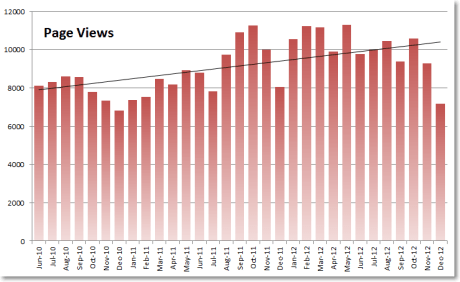
You can see the general trend is slowly up, but it really varies between months – none more so than every December when there’s a huge dip. Most visitors are from the US, followed by India and Canada.
Apart from Google and Twitter, the top referring sites in 2012 were:
The PeopleSoft Wiki
IT Toolbox forums
Jim Marion’s Blog
The PeopleSoft Customizer.com
Thanks guys!
Those that have commented the most on posts are Jim Marion, Jeremy Radwan, Graham Smith and Nicolas Gasparotto. I’m grateful for all of your corrections 🙂
When people have arrived at this blog from a search engine WordPress logs the search terms. Most of the top 20 from last year are fairly predictable, however these caught my eye (they’re either a term that people don’t already have enough info on, or are common yet confusing errors):
tmboot: cmdtux_cat:827: error: fatal error encountered; initiating user error handler
ren server
peoplesoft erd
peopletools 8.53 release date
peoplesoft cloud
The most popular posts since I started (in 2007) tend to be those that have been around the longest, so SQL Developer tips, PeopleSoft ERDs, what’s coming in PeopleTools 8.50 etc all feature highly. Excluding the ‘How I work’ posts, the most popular new entries from last year are these:
Highlights from the PeopleTools 8.53 RVP
Oracle OpenWorld Day 0 (Larry’s Keynote)
Deleting old User Profiles
Monitoring/Automating PeopleSoft with Open Source Tools
PeopleSoft App Store
PeopleSoft and IE9 redux
I’m Matthew Haavisto and this is how I work November 27, 2012
Posted by Duncan in How I work.comments closed
The honour of being both the first US-based PeopleSoft guru, and the first Oracle employee to be profiled, falls to Matthew Haavisto. Matthew’s official title is “Strategy/Product Manager, PeopleTools” but most will know him either from his conference sessions, his work with customers and partners or from the PeopleSoft Technology Blog. Matthew is heavily involved with the PeopleSoft Tech effort at OpenWorld and can often be found discussing UI or the PeopleSoft Interaction Hub in his laid-back but knowledgeable manner.
 Name: Matthew Haavisto
Occupation: Strategy/Product Manager, PeopleTools
Location: Pleasanton, California
Current computer: Dell Laptop (nearing end of life)
Current mobile devices: iPhone
I work: Diligently
What apps/software/tools can’t you live without?
We’re doing more with collaborative tools these days, so we use Oracle Beehive Workspaces more and more. Workspaces are more efficient than email and file systems for communication and doc sharing among our project teams. Sad to say, but my colleagues and I are still bound too much to email, though I’m hoping to reduce that use over time. Collaborative technology is easy to deploy, but changing ingrained behavior is more difficult. I produce a lot of external collateral like red/white papers, data sheets, RVPs, and conference presentations, so simple apps like MS Word and Powerpoint still get a lot of use. These apps are also useful for internal communications like business requirements, specifications, and scoping presentations as well. I also use Visio for simple modeling, and Balsamiq for low-fi UX mockups.
Besides your phone and computer, what gadget can’t you live without?
Despite working in software, I guess I’m a bit of a Luddite. I don’t go in for a lot of gadgets. I do most of my work from my office or my home, so I’m connected when I need to be. When I’m off work and engaged in personal pursuits (sports and music), I don’t want to be connected, so I deliberately cut the cord.
What’s your workspace like?
My workspace at the office is similar to my workspace at home. Both are pretty simple and efficient. I have a monitor and docking station so setup is fast.
 I like coming into the office to interact personally with colleagues, though I do work from home a fair amount as well. Since I work with colleagues, partners, and customers around the globe, I’m often on calls/web conferences at odd hours of the morning or night, and in those cases, I take the meetings at home.
What do you listen to while you work?
I’m a big fan of Pandora. I listen mostly to classical, particularly at work. Favorites are Beethoven, Sibelius, Smetana, and Tchaikovsky.
What would be the one item you’d add to PeopleSoft if you could?
Since I work for PeopleTools, I have some influence on this. I’m hoping we can establish better integration with social apps like Oracle Social Network. We are also doing some really cool stuff for the future UX and mobile, so keep your eyes peeled.
What everyday thing are you better at than anyone else?
I don’t know that I’m better at one thing than others. Rather, I’m a bit of a factotum. I do many things pretty well, and tend to learn things quickly.
What’s the best advice you’ve ever received?
Balance your work with the rest of your life.
I’m Nicolas Gasparotto and this is how I work November 14, 2012
Posted by Duncan in How I work.comments closed
Nicolas Gasparotto is one of the longest running PeopleSoft bloggers having started in 2006 (a year before me, the same year as Jim Marion and David Kurtz, and only one year after the Grey Heller guys). His ‘On the PeopleSoft Road‘ blog focuses mainly on installation, infrastructure and DBA activites and is packed with step-by-step walkthroughs of installs. Nicolas is also an Oracle ACE and is often found dishing out helpful advice on the OTN Discussion Forums (since August 2002 he’s made 23,742 posts – an average of 6.5 posts every day, for a decade!).
 Name: Nicolas Gasparotto
Occupation: Oracle and PeopleSoft Administrator – contractor
Location: Amsterdam, the Netherlands
Current computer: Dell Inspiron 1720 (WinXP Pro, 4GB RAM, 2*250Gb HD). It’s rather old. In fact, it’s nothing but a client to my Dell server PowerEdge 2900III (16GB RAM, 4*500Gb HD in RAID0, Quad core Xeon CPU) and Qnap NAS Server (4*1Tb in RAID5)
Current mobile devices: Samsung Galaxy S, Kindle
What apps/software/tools can’t you live without?
Installed on my own Dell PowerEdge 2900III server, I’m using VMWare vSphere Hypervisor (free) on a daily basis for learning the new PeopleSoft stuff on my own, installing etc. I also had an Oracle VM implementation on a spare desktop, but it has to be renewed.
Regarding the databases side, I can’t live without Oracle Enterprise Manager Cloud Control 12c, especially helpful when managing 50+ databases.
Besides your phone and computer, what gadget can’t you live without?
My Kindle is my best friend in the 3 hours I spend daily on public transportation. I read a lot.
What’s your workspace like?
My home desk is currently “under construction”… my 1.5 year old son makes it a bit more complicated to manage.

What do you listen to while you work?
I already tried it, but at the end of the disc, I was surprised that was finished, I realized I did not hear anything. Since then, I don’t listen music at all when I work.
What PeopleSoft-related productivity apps do you use?
If available on client site, OEM is definitely a useful tool. Easy to make performance comprehensive reports, and being able to show it to the Infra manager… for further action.
Do you have a 2-line tip that some others might not know?
I can say the Peoplesoft plugin in Enterprise Manager Cloud Control is a must to have. It gives a lot of information, availability, loading…
It allows to configure a lot of parameters, if not all, on AppServer, Process Scheduler and PIA, start/stop… even though it needs to be improve a lot.
What SQL/Code do you find yourself writing most often?
I use a bunch of my own SQL scripts for locks checking, AWR reporting… Somehow, I also have run quite often a DMS script to unlock/change password of users on demo/test environments without SSL.
What would be the one item you’d add to PeopleSoft if you could?
It would be nice to have a page in PeopleTools menu dedicated to the Application Server configuration (and Process Scheduler ?), such as something we have for the Web Profile. I’d like to be able to set trace level, change parameter without going somewhere else (actually on the server) and take back the logs. We could then give some permission to the developer’s account for that. Of course, as an administrator, you should keep an eye on the disk space.
And in a dream, be able to work on PeopleSoft without the need of Windows OS. Have App Designer running on a Linux Distro?
What everyday thing are you better at than anyone else?
Keeping an eye on the OS and databases heartbeat to be pro-active as much as possible, trying to solve issues quickly before the phone rings, with a good and positive mind.
What’s the best advice you’ve ever received?
Don’t postpone until tomorrow what you can do today.


 The PeopleSoft Tipster Blog