Generating a custom Org Chart in PeopleSoft July 8, 2014
Posted by Duncan in TW.comments closed
This week we have a second guest-post from Richard Yip. Richard is a PeopleSoft HCM & Payroll Technical Consultant at Santander Bank here in the UK. He is a long-term PeopleSoft techie and a regular at the UKOUG conferences. I’m delighted to be able to give him a conduit through which to share some of his good work.
Richard’s previous post can be found here.
Custom Organisation Charts in PeopleSoft
In the PS_EMPLOYEES table, there is a custom field called SUPERVISOR_ID. This is used to connect the employee to the supervisor or line manager. This is similar to the REPORTS_TO field in PS_JOB.
I developed this after toying with the GOOGLE API Organisation Chart. Generating the boxes was straight forward enough, so the trick was to understand how to generate the connecting lines.
I also included some Javascript to make the images appear when the box is clicked and disappear when it is double-clicked. The images are from the PS_EMPL_PHOTO, so a data URI with Base64 encoding is used.
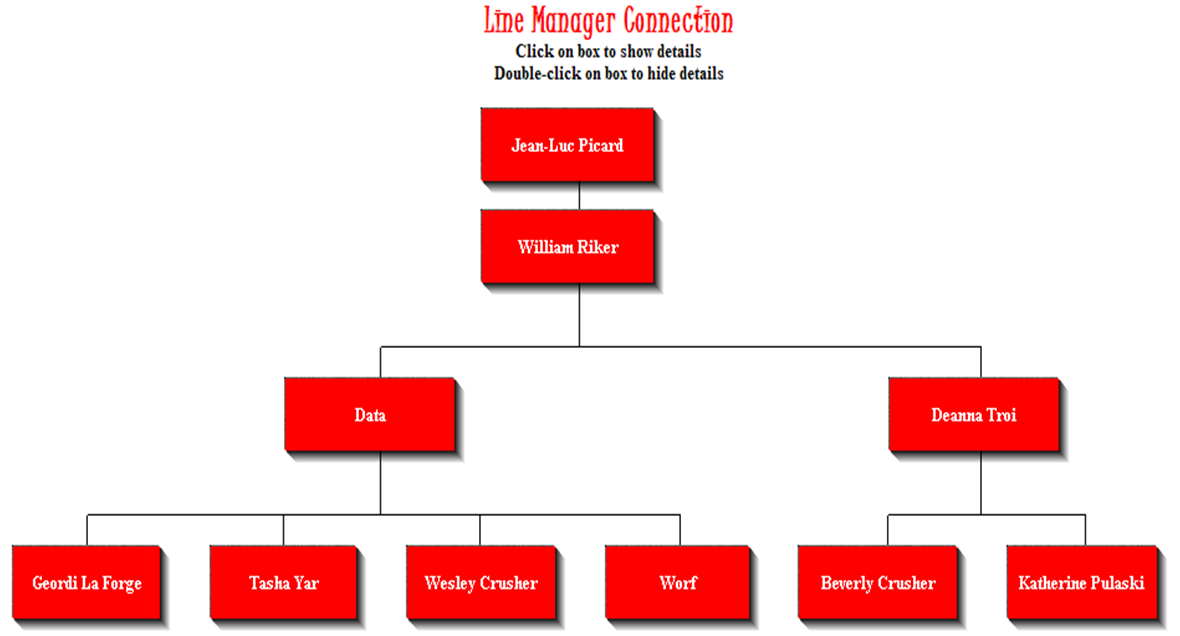 Default Appearance
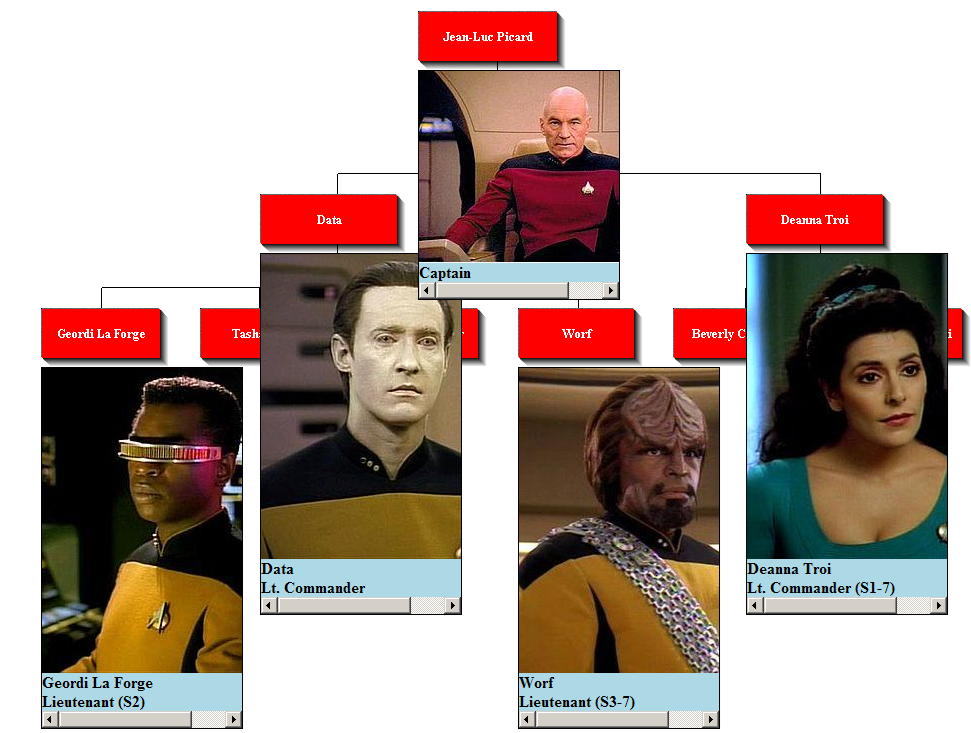 Expanded to show photos
Richard has kindly shared all the code required to get this working. See Generate a custom Organisation chart from ps_employees for the listings.
New Pastures June 24, 2014
Posted by Duncan in TW.comments closed
I try to keep the content on here focused on the products and implementation tips however I hope you’ll indulge me with one personal post.
After six and a half enjoyable years I have left Succeed Consultancy. I’m leaving behind a lot of talented colleagues and great friends, however for reasons that I don’t want to bore you with it’s time to move on.
As of yesterday I’ve started work for Cedar Consulting. One of the largest the ‘tier 2’ PeopleSoft consultancies in EMEA.
Cedar have been running – in one form or other – for nearly 20 years and have an impressive list of PeopleSoft implementations, upgrades and support/hosting clients. There are few UK PeopleSoft clients who haven’t engaged Cedar at one point or other. As well as their large team of UK consultants they have a number of offices spread globally and a solution centre in India.
Importantly for me, Cedar also have a strong focus on Fusion and already have both a live Fusion client under their belt and the UKOUG Fusion Partner of the Year gold award.
This career move also means that the branding of the PeopleSoft and Fusion Weeklies will change. I’d to thank Succeed for sponsoring the newsletters up to this point and I’m grateful to Cedar for agreeing to sponsor it going forwards. You should notice a rebrand in this week’s editions.
PeopleSoft 9.3 – A clarification June 20, 2014
Posted by Duncan in PeopleSoft, Strategy, TW.comments closed
After the release and subsequent removal of the ‘there is no PeopleSoft 9.3’ post on the My Oracle Support site and twitter I’ve been in contact with Oracle to find out the truth behind these rumours. Let me share with you what I have learned directly from Oracle… (more…)
It’s official, there is no PeopleSoft 9.3 June 18, 2014
Posted by Duncan in PeopleSoft, Strategy, TW.comments closed
EDIT: It seems that this was an erroneous announcement by Oracle (it appeared on both their Twitter feed and the MOS site).
I’ve now received further clarification from Oracle, read about it here.
Loading Photos into PeopleSoft in v9.2 June 17, 2014
Posted by Duncan in PeopleSoft 9.2, TW.comments closed
This is a guest post by Anton de Weger, a highly experienced PeopleSoft Consultant who works for StratusHR in Australia. Anton has been previously featured in the post “I’m Anton de Weger and This is How I Work“.
Introduction
As part of a v8.9 to v9.2 upgrade of PeopleSoft HCM my current client wanted to take the opportunity to load all of their employee photos from their security system into PeopleSoft so that they could take advantage of the photos showing on the Talent Summary and Manager Dashboard, as well as on the name mouse-over in the core pages. I thought this would have been a pretty straight forward process given that this is delivered functionality, but was surprised at the lack of examples on the internet and the difficulty in doing image manipulation through PeopleCode. (more…)
An Introduction to PeopleTools 8.54 (part 1) June 10, 2014
Posted by Duncan in PeopleTools 8.54.comments closed
1. Introduction
The next version of PeopleTools is expected to be released in a couple months’ time. Oracle have now made available both the Release Value Proposition and the Pre-Release Notes for PeopleTools 8.54. As no more official documents are expected before the release hits GA (General Availability) now is a good time to pick through the details and highlight the areas that are of most interest.
There is a lot of content to cover so – to prevent this entry becoming too big to read in one sitting – I’ll spread it over several parts. This first part will look at the back-end, infrastructure and System Admin changes, whereas subsequent posts will move up the software stack with integration and reporting, and finishing with the new UI.
2. Supported Platforms
Each new release of PeopleTools adds new supported platforms and retires older versions. PeopleTools 8.54 introduces support for new versions of Oracle Weblogic (12.1.2) and Oracle Tuxedo (12.1.1), and deprecates WebLogic 10.x and Tuxedo 11.x. The version 12 releases are the only supported versions of these technologies.
Also added are some new server OS versions: Windows 2012 and 2012 R2, plus Oracle Linux v6. Deprecated OSes are Windows 2008 R1 (although 2008 R2 should still be supported) and zOS 1.11.
On the database side Oracle 12c is added and 10.2.0.5 and 11.2.0.3 removed (so 11.2.0.4 should still be supported). SQL Server sees MSSQL 2014 added and MSSQL 2008 removed, leaving 2012 and 2014 as the supported versions.
Without doubt the most difficult items to adhere to will be the client browser and OS certifications. Firefox and Chrome are straightforward as they typically auto-update to the latest versions, however for enterprises where the mandated corporate standard is Internet Explorer it gets a little trickier. Support for IE11 has been added and IE8 deprecated with PeopleTools 8.54, leaving IE9, 10 and 11 as the supported versions. If you wish to use the new Fluid UI however, you need to get your users to IE11. Users on IE9 and 10 will get the ‘classic’ UI, which means the look and feel from PeopleTools 8.53.
Finally, you’ll also need to ensure that your clients are on Windows 7 (64-bit) or Windows 8.x. The 32-bit version of Windows 7 is not supported. As with all PeopleTools versions, it is possible to run using an un-certified browser and client OS combination, however there may be some workarounds required for edge-case functionality.
3. Oracle Database Specific Enhancements
This release brings some enhancements specifically for the Oracle RDBMS.
a. Global Temporary Tables
PeopleTools already has temporary tables built-in to the toolset (i.e. if you wish to enable multiple copies of an App Engine to run concurrently you need to build that many instances of the Temporary Tables). With Tools 8.54 you can take advantage of Oracle Global Temporary Tables within the database itself (but only for batch processes, not online page operations). GTTs are working tables that are process specific, so each concurrent process doesn’t have access to the working data from the tables from another version of the same process, and they’re lighter-weight on the database (specifically, they don’t generate redo) so they are more efficient to use.
Some clients have already made use of this, including one major retailer here in the UK – with the assistance of a DB tuning guru – however now it’ll be built into the PeopleTools toolset rather than requiring customisation.
b. Materialised Views
For the uninitiated, a materialised view is a special database object where the results of the view SQL is stored as a data table. They’re especially useful for migrations, integration, reporting and data warehouses as they save repeated queries against the same data. Complex SQL can be used in a Materialised View so that it is performed once, and then any subsequent queries for the same data can use the data stored as the view output rather than running the query again.
c. Multi-tenant Database Support
Oracle’s 12c database comes with the ability to store ‘pluggable databases’ within a ‘container database’. This reduces overheads by saving on disk space, CPU and memory, but also by enabling database patching to be performed once. PeopleTools 8.54 includes support for the pluggable databases within the Oracle 12c database platform.
d. Partitioning Support
Many clients use partitioning on their tables, particularly with PeopleSoft Global Payroll and large numbers of employees. It was possible to partially configure this from Tools 8.51, however partitioning can now be completed entirely within App Designer with Tools 8.54.
4. Developer Tools
What functionality has changed for developers in Tools 8.54? For a start, the developer tools are now 64-bit, which – aside from the performance benefit – will make developer client machine administration easier. This includes not only App Designer, but Data Mover, Change Assistant, App Engine etc.
The other major improvement – and it’ll be a much welcomed one – is code completion in App Designer. Many other IDEs have had this functionality for a while so I’m grateful that we’re going to be seeing this in PeopleTools. App Designer will auto-complete after the developer uses a ‘.’ for constants, system variables, functions and app classes – not just showing the method but the parameter details also.
5. Automated Configuration Manager
An intriguing item in both of the Oracle documents is the ‘Automated Configuration Manager’. Neither document gives a great amount of detail, but it sounds like an improvement or twist to the Automated Environment Configuration tool that Hakan Biroglu blogged about. As a sys-admin this is particularly exciting as it’s moving PeopleSoft towards the ‘dev-ops’ holy grail of automated configuration management popularised by tools such as Chef and Puppet. Any tool that makes the creation of new environments quicker, or reduces the changes of configuration getting out of sync will be very welcome.
6. Conclusion
The next version of PeopleTools is bringing many improvements. Much is being made of the new User Interface – and rightly so – however there are other improvements that we will improve our workflow by making it both simpler and more efficient.
PeopleSoft and Heartbleed April 22, 2014
Posted by Duncan in PeopleTools, TW.comments closed
Oracle have released a post detailing exactly which products are vulnerable to Heartbleed, which have fixes available and which aren’t vulnerable at all.
If you aren’t aware of what Heartbleed is, here’s a primer:
http://www.engadget.com/2014/04/12/heartbleed-explained/
There’s also an excellent web-comic here that explains quickly how the exploit works:
Here is Oracle’s list:
http://www.oracle.com/technetwork/topics/security/opensslheartbleedcve-2014-0160-2188454.html
Happily, PeopleSoft is on the ‘not vulnerable’ list.
This doesn’t mean that you’re completely safe of course. You may well be using other components in your system that were impacted. At Succeed, for example, we use Amazon’s Elastic Load Balancer that was vulnerable but has now been patched.
Interacting client-side JavaScript with server-side PeopleCode April 16, 2014
Posted by Duncan in PeopleTools.Tags: GuestPost
comments closed
This week we have a guest-post from Richard Yip. Richard is a PeopleSoft HCM & Payroll Technical Consultant at Santander Bank here in the UK. He is a long-term PeopleSoft techie and a regular at the UKOUG conferences. I’m delighted to be able to give him a conduit through which to share some of his good work.
Richard Yip: How to interact client-side Javascript with server-side PeopleCode
(using getElementById.focus(), getElementById.submit(), submitAction_win0(this.form,this.name) and window.showModalDialog)
This example shows a custom built payroll results calendar which allows the user to display multiple sets of payroll results information on a single page, without needing to navigate out of the page as is currently delivered.
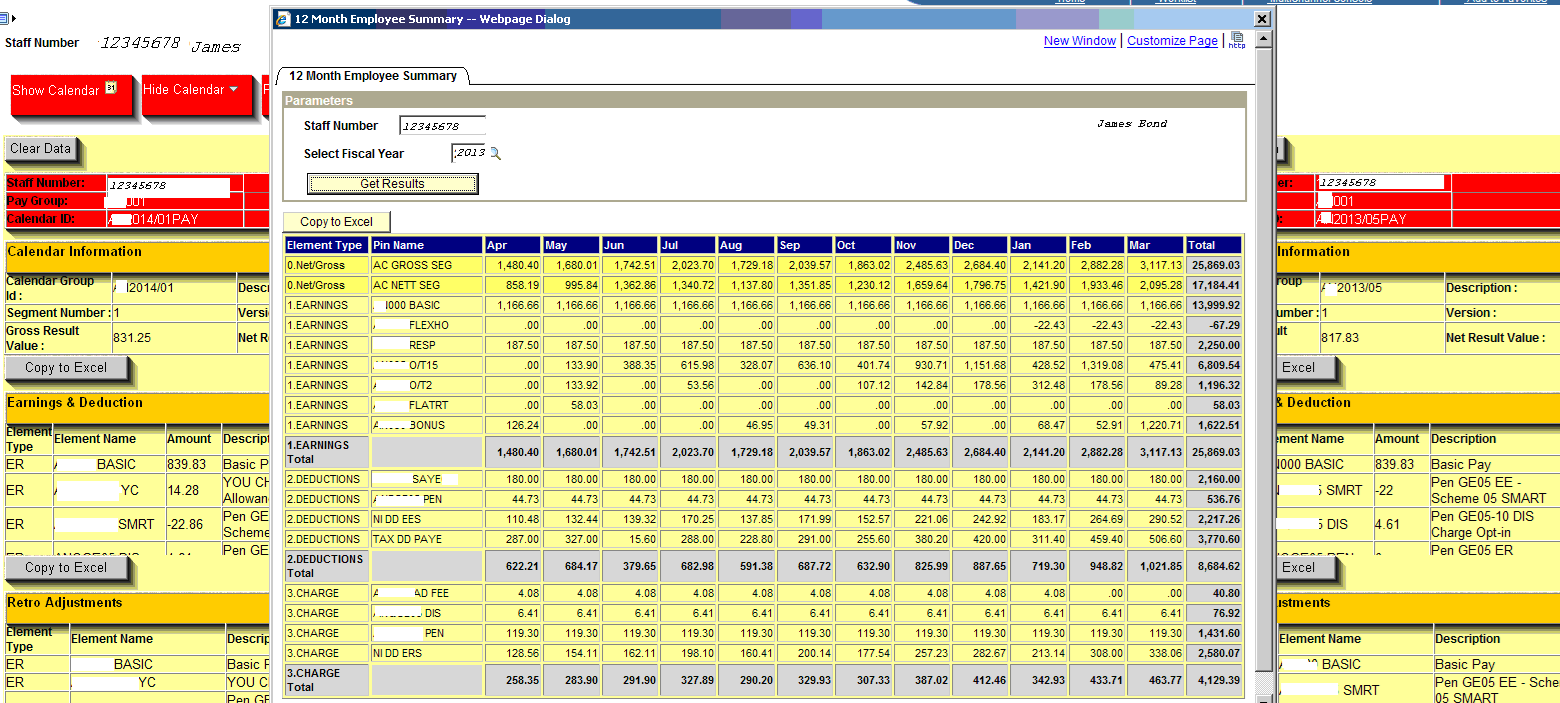
Additionally, it allows the display of related information such as payslip and 12 Months Fiscal Summary (pivoted summary results).
Note: results have been “desensitized” .
Something that looks like this:

Click for bigger
The App Designer page, PeopleCode, SQL, JavaScript, CSS and HTML are shown below. The HTML/CSS were initially prototyped using Microsoft Office SharePoint Designer.
Screen shots
Main page after selecting an employee from a search page. 
The menu bar above is created by HTML.RY_GP_RSLT_CAL_PIVOT_SQL_HDR
The following codes are used: –
PeopleCode :
DERIVED_RY_GP10.HTMLAREA2.RowInit
SQL: HTML.RY_GP_RSLT_CAL_PIVOT_SQL
HTML: HTML.RY_GP_RSLT_CAL_PIVOT_SQL_HDR
HTML: HTML.RY_GP_RSLT_CAL_PIVOT_SQL_DTL
Displaying the results calendar
When ‘Show Calendar’ is clicked, the payroll results for this calendar are now visible. See function Show_Calendar() and Hide_Calendar() in Javascript collection in HTML.RY_GP_RSLT_CUSTOM_JS.
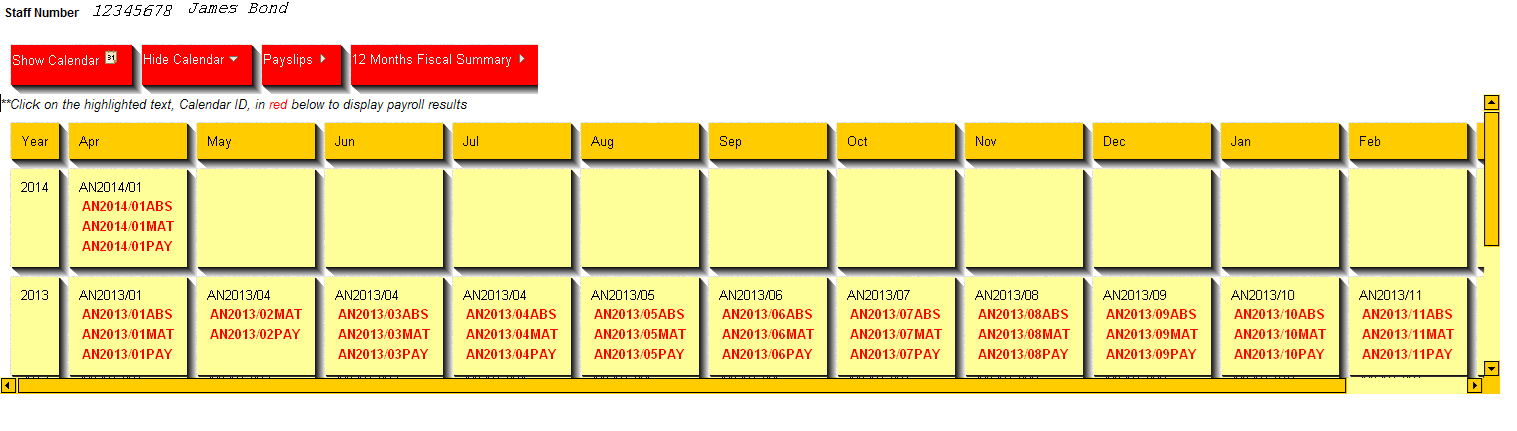
Click for bigger
Displaying the payroll results information
When then user clicks on any Calendar ID, highlighted in red, the PeopleCode is invoked via client side JavaScript.
To invoke PeopleCode, I used the javascript DOM method – see function do_calid(obj) in GetHTMLText(HTML.RY_GP_RSLT_CUSTOM_JS)
document.getElementById("DERIVED_RY_GP10_DETAIL_BUTTON").focus();
document.getElementById("DERIVED_RY_GP10_DETAIL_BUTTON").click();
Screen shot below show 3 different calendar group/calendar id clicked by the user using the results calendar above.
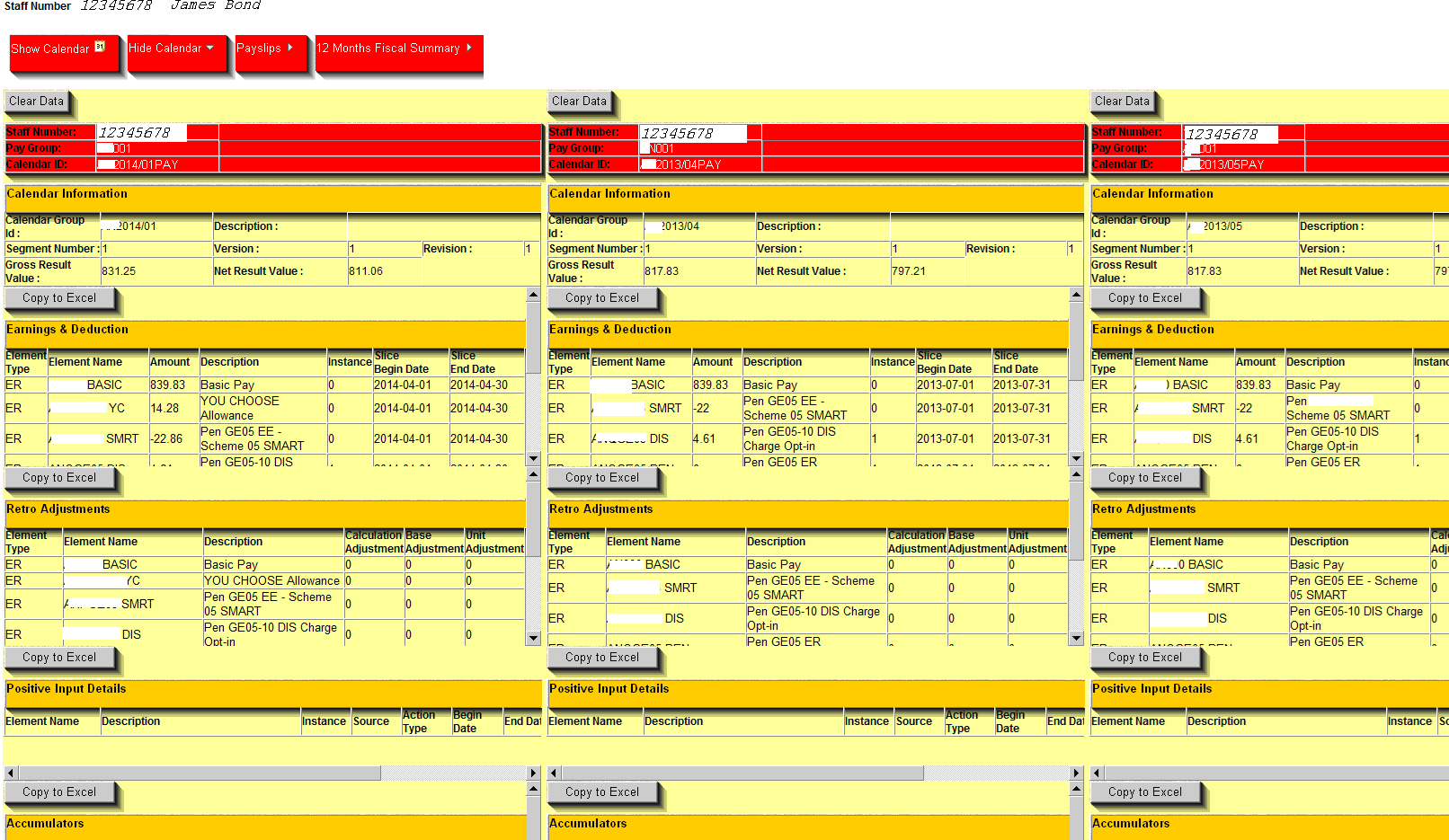
Click for bigger
The Clear Data button will remove the specific payroll result. Basically, each calendar results in contained in a <DIV> tag with an ID. The following line takes the id of the <div> tag, for example BOX1 and passes it to the field DERIVED_RY_GP10.ID_LBL and then automatically clicks the field DERIVED_RY_GP10_CLEAR_BUTTON. This is similar to the DOM click() function previously mention. See HTML.RY_GP_RSLT_SEG_HDR
<div id='%Bind(:12)' class="result_container">
<input class='calendar_container' id="DERIVED_RY_GP10_CLEAR_BUTTON" title="ID" style="WIDTH: 72px" onclick="this.form.DERIVED_RY_GP10_ID_LBL.value='%Bind(:12)';submitAction_win0(this.form,this.name);" type="button" value="Clear Data" name="DERIVED_RY_GP10_CLEAR_BUTTON">
The Copy to Excel button will download the information to Excel. This uses the ActiveXObject(“Excel.Application”) function. See HTML.RY_GP_RSLT_HDR
Display the 12 Months Fiscal Summary
Using the window.showModalDialog function to display the 12 Months Fiscal Summary. See Get_Summary() in RY_GP_RSLT_CUSTOM_JS . Also see Get_Payslip().
Other method may include <iframe>
Click for bigger
Summary/Design consideration
Strong knowledge of html, Javascript, CSS and SQL in addition to PeopleCode.
Using a HTML editor facilitates prototype stage.
In this example, it’s all about presentation as getting the data from the database via SQL is fairly easier.
I have used the SQL XMLElement function to inject some html, albeit with a bit of trickery.
Page Field Name and Enable as Page Anchor gives the developer control over how the field is referenced in html
Code Listing
How to interact client side Javascript with server side PeopleCode
PeopleSoft Roadshow / What’s next for PeopleSoft … a Correction April 11, 2014
Posted by Duncan in PeopleTools.comments closed
Thanks for all your feedback on the roadshow / what’s next for PeopleSoft write-up. It’s wonderful that there’s such a large and active PeopleSoft community out there that’s so positive about the new functionality that Oracle is adding to the product.
After I posted the article Marc Weintraub got in touch and has  asked me to correct an inconsistency in one of the sections. I had included a paraphrased quote which gave the impression that net-new PeopleSoft opportunities are not important, and this was misleading. I’m happy to concede that about a week elapsed between his session and when I posted it here and my memory might not have been as fresh as if I’d live-blogged it.
I’ve updated the article, and the paragraph in question now reads:
Also, there was another statement which I didn’t realise the signifcance of until letting things percolate down through on the train journey home, but Marc’s statement that PeopleSoft has a “95% retention rate, and the focus is on our existing customers.” is quite important. It’s great that Oracle are focusing on keeping existing customers happy – that’s what the ongoing licence fee is for, after all – and 95% is a good success rate and ongoing investment is designed to add value to existing customers.
Marc also added “The 95% retention rate of existing PeopleSoft customers is accurate. The point I wished to convey is that our future investments are more aligned to meeting the needs of our existing customers. Oracle still does secure net-new customers for PeopleSoft at a rate significant rate.”
This last point is something that we can testify to as Succeed have implemented at least one greenfield PeopleSoft implementation every year for the last 5 years.
Apologies if this has caused any confusion and I’m happy to set the record straight.
The PeopleSoft Roadshow 2014 – What’s coming next for PeopleSoft? April 7, 2014
Posted by Duncan in PeopleTools.Tags: FLuiD, MAP, PeopleTools 8.54, PivotGrids, UKOUG
comments closed
Last week I attended the UKOUG PeopleSoft Roadshow, and it was very interesting for a number of reasons. Here’s what I took away from the event:
Presenters
We’re quite used to hearing Marc Weintraub and Jeff Robbins speak here in the UK. They come over every year for the roadshow, and they’re the sessions that everyone attends for.
Marc’s style was a touch different this time in that he gave us a little more insight into his personality. Finding out who his sports teams are, what he does for fun (running Tough Mudders), what he drives (surprisingly, a Mini Cooper) etc rounded him out more as a person in our eyes – an important change as previously we really only got the professional side of Marc.
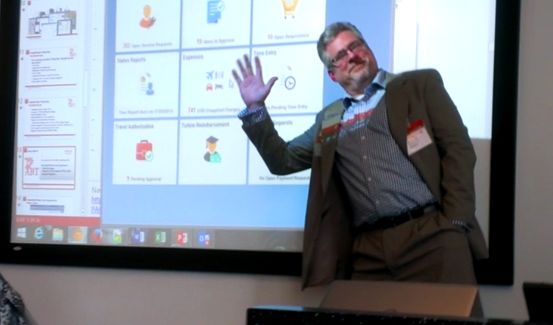
Jeff’s style was the same as ever … dry, humorous, and very comfortable and relaxed speaking to a room full of people. At one point he even paused his session so that he could photobomb a pic I was taking of his demo.
Strategy
So what did we learn about PeopleSoft from a strategic point of view?
The switch to patching via images every 10 weeks means that customers don’t have to wait for a major release to gain new functionality. This does sound more like the continuous delivery model that has been used with Campus Solutions (where there is no major release) whereby new functionality comes via regular bundles. As a result, the 9.3 applications might just be a roll-up of everything that has been released in the images since v9.2. There are some interesting implications of this, and we’re not sure how a client can truly be sure that they are on 9.3 if they’ve only applied some of each of the patches that comprise it. The 9.3 releases are still looking like appearing in 2017, but it doesn’t have focus within Oracle as continuous delivery is the preferred method of providing new functionality. There is an internal edict not to target functionality for 9.3 as that means you’re not thinking about delivering something now, which does sound a positive message.
Much was made of the fact that PeopleSoft is “the only enterprise application suite that gives you the ability to deploy PERFECT FIT applications, through the use of PeopleTools.” After years of customisation=bad it’s interesting that there is now an admission that often a small amount of judiciously applied changes are needed to fully meet client expectations.
Also, there was another statement which I didn’t realise the signifcance of until letting things percolate down through on the train journey home, but Marc’s statement that PeopleSoft has a “95% retention rate, and the focus is on our existing customers.” is quite important. It’s great that Oracle are focusing on keeping existing customers happy – that’s what the ongoing licence fee is for, after all – and 95% is a good success rate and ongoing investment is designed to add value to existing customers.
EDITED above paragraph on 11th April to correct paraphrased quote.
User Interface
There was a lot that was exciting to see here. The new UI (christened FLuiD) is very contemporary and pleasing to look at. It works across multiple devices (i.e. mobile, tablet and desktop) and is responsive based on the device resolution. Jeff gave a live demo where the items on the screen realigned themselves and changed as he dragged the width of the screen to be smaller.
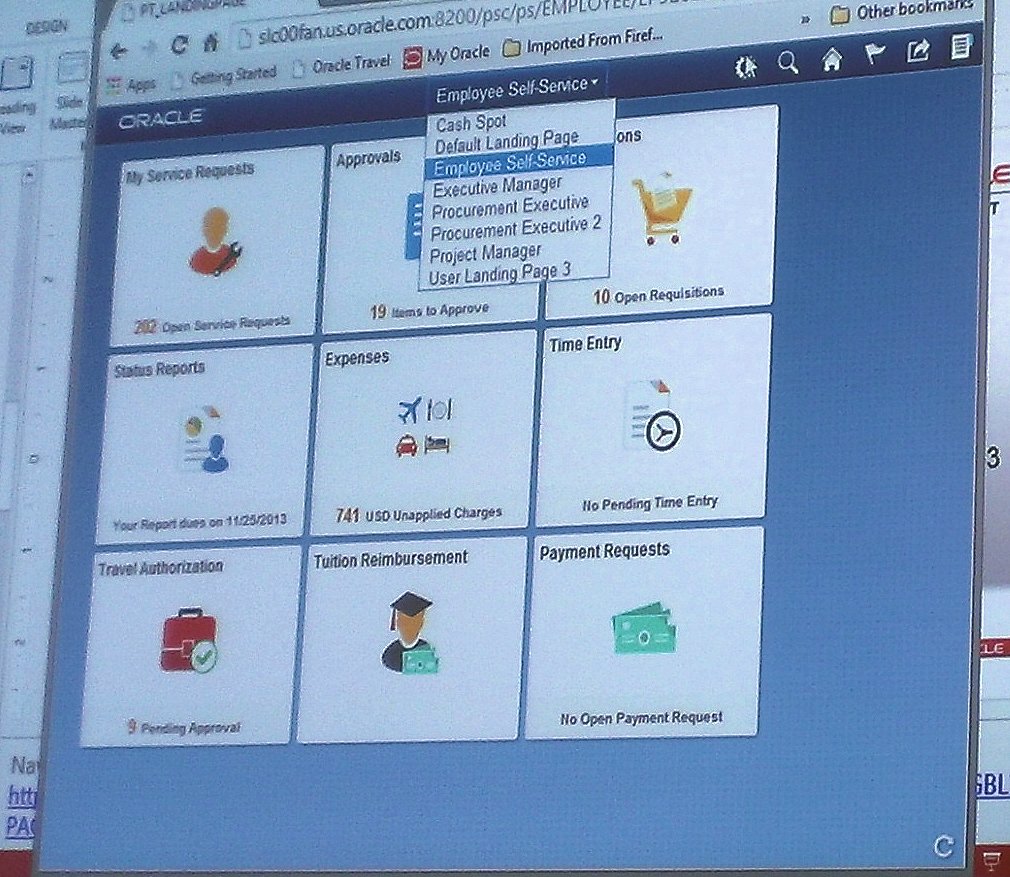
Role-based landing pages (eg. for execs, team members, employees).
It appears to have been very well thought through. The previous changes to the UI have been ‘all or nothing’. If you wanted the Swan UI (Tools 8.50) or the Tangerine UI (Tools 8.53) it was switched on or off as a system side setting. Whether or not the FLuiD UI is shown is based on your preferences and whether your device is capable of displaying it, so one user may get the full FLuiD UI and for another user with an older device PeopleSoft will seamlessly fall back to the ‘Classic UI’ – which I assume means the Tools 8.53 tangerine UI.
Unified UX seems to be a trend at the moment as Fusion R8 has introduced a new UI also. This UI convergence is sensible from a co-existence P.O.V. as users are going to be surprised if you switch them to Taleo and the look-and-feel is different. It’s notable that as Oracle’s applications UIs converge, PeopleSoft is often getting there first – possibly because of the toolset, and possibly as it had a better UI starting point. Often Fusion or EBS or JDE adopt UI elements that PeopleSoft has already adopted.
The FLuiD UI components are new components that run alongside the existing components. Security is inherited however, if you have security for the existing ‘PIA’ component then you’ll be allowed to use the new component. In terms of browser requirements, we’ll need IE9 for the Classic UI and IE11 for the FLuiD UI. You can still use FLuiD on your smartphone and tablet without issues, and you can use Chrome, Firefox or Safari quite happily.
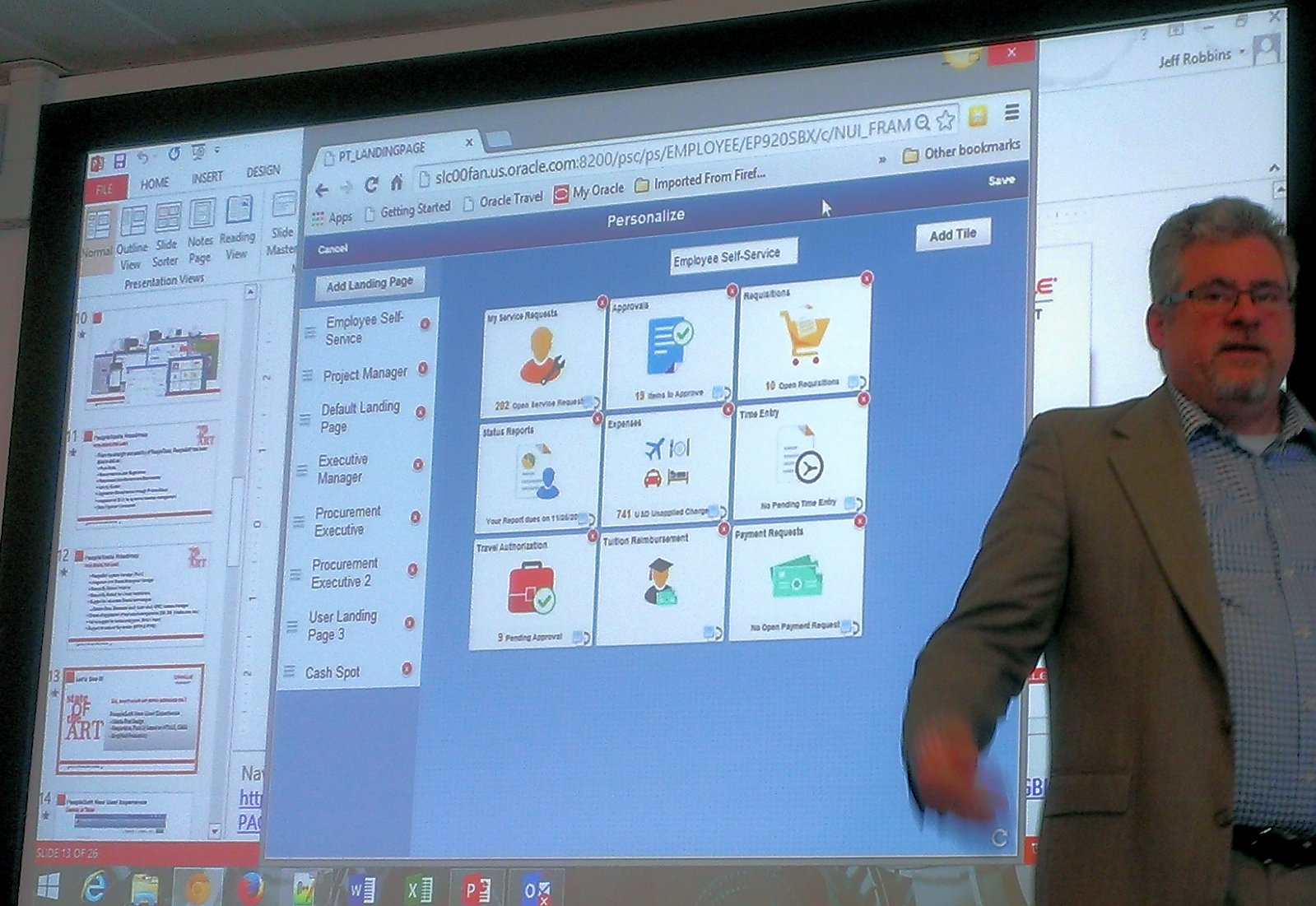
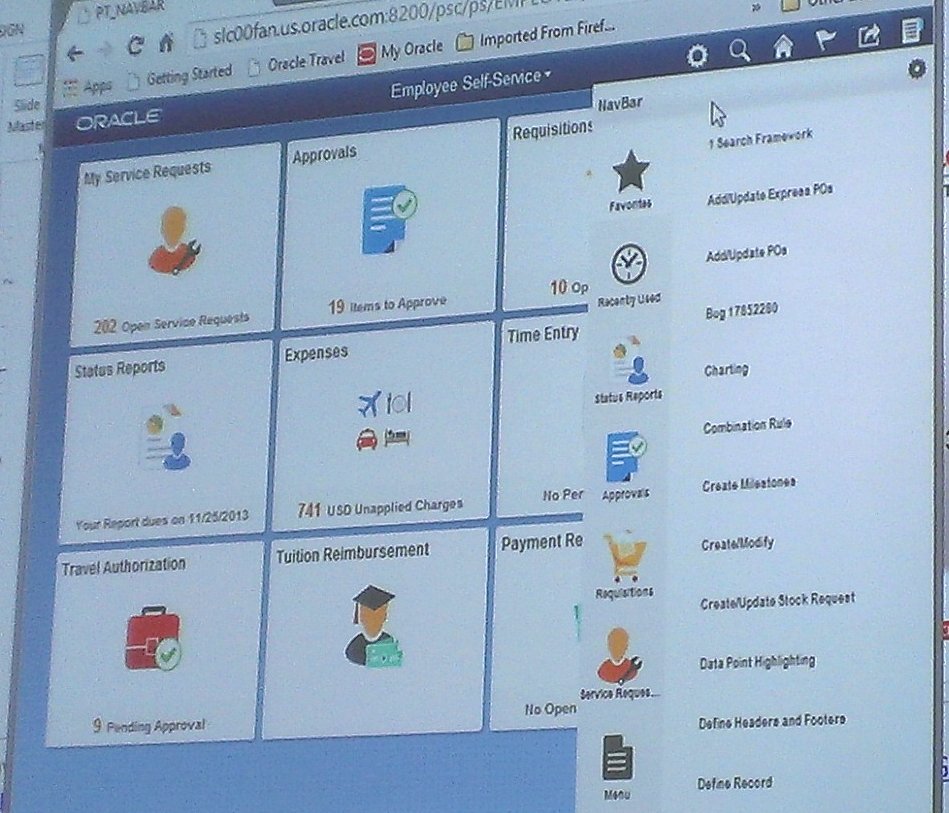
Configuring a Landing Page and the Side Nav Menu
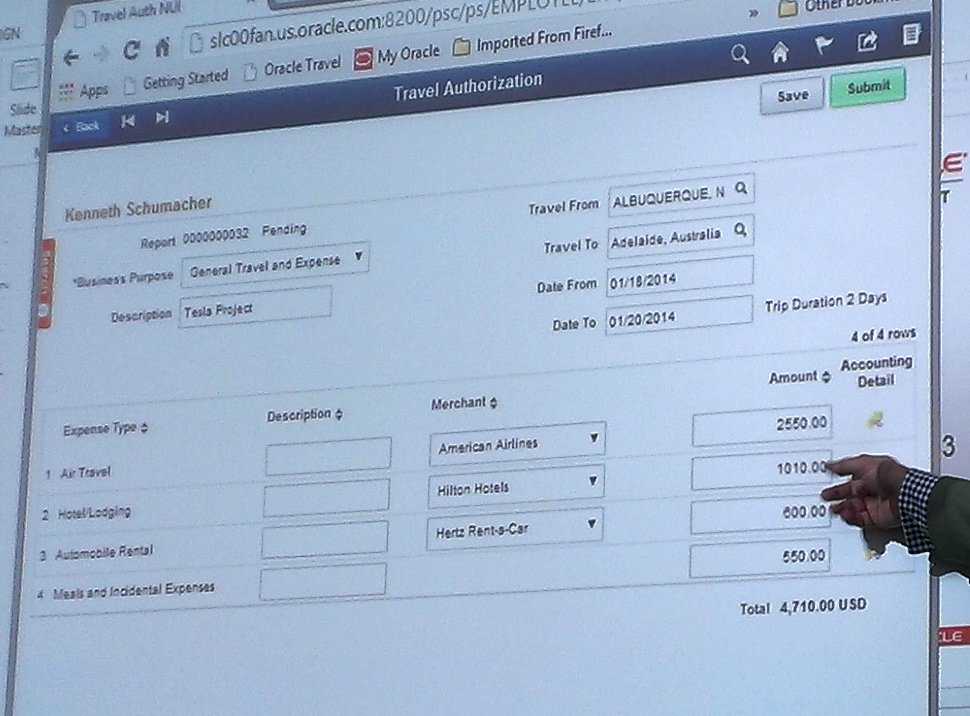
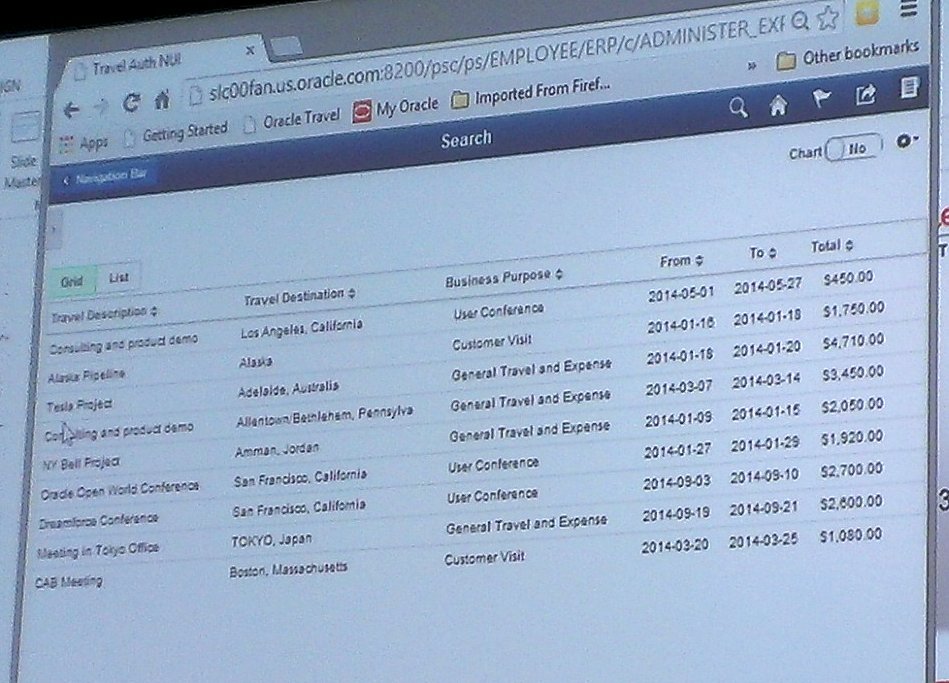
Components within FLuiD
Technical
Aside from the UI, what else is new in Tools 8.54?
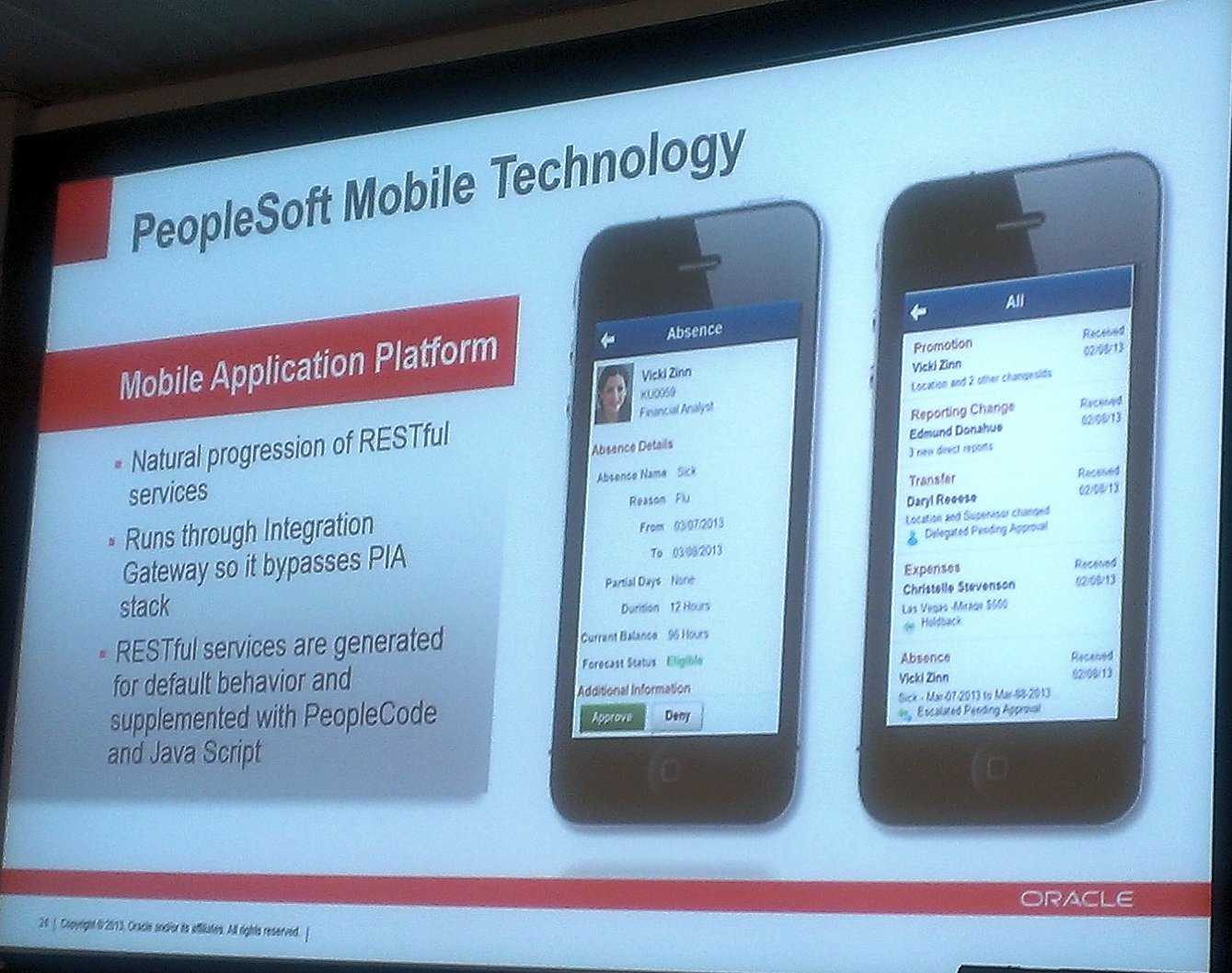
Also arriving is the Mobile Application Platform (MAP). This is a standalone app – i.e. it’ll be native to your device, and can retain credentials etc. Applications for MAP will come in a PUM image after Tools 8.54, but there was no comment about how quickly after Tools 8.54 this will come, and maybe not until Tools 8.55 (Oracle aim to release a new version of PeopleTools every 15 months approx).
There are also lots of changes for analytics and reporting. Pivot Grids are getting a lot of new functionality – and they’re already better and more dynamic than much of the competition offers. It was stressed that Pivot grids aren’t static images pasted onto pages, or from data taken into other systems, but live and dynamic analytics over your data. You’ll also be able to add multiple pivot grid views on top of a pivot grid model from 8.54.
Jeff also demoed functionality where a component search page was replaced by a pivot grid, allowing you to select segments of the grid to refine the search results. This was a very slick upgrade to the search facets that we’ve previously seen.
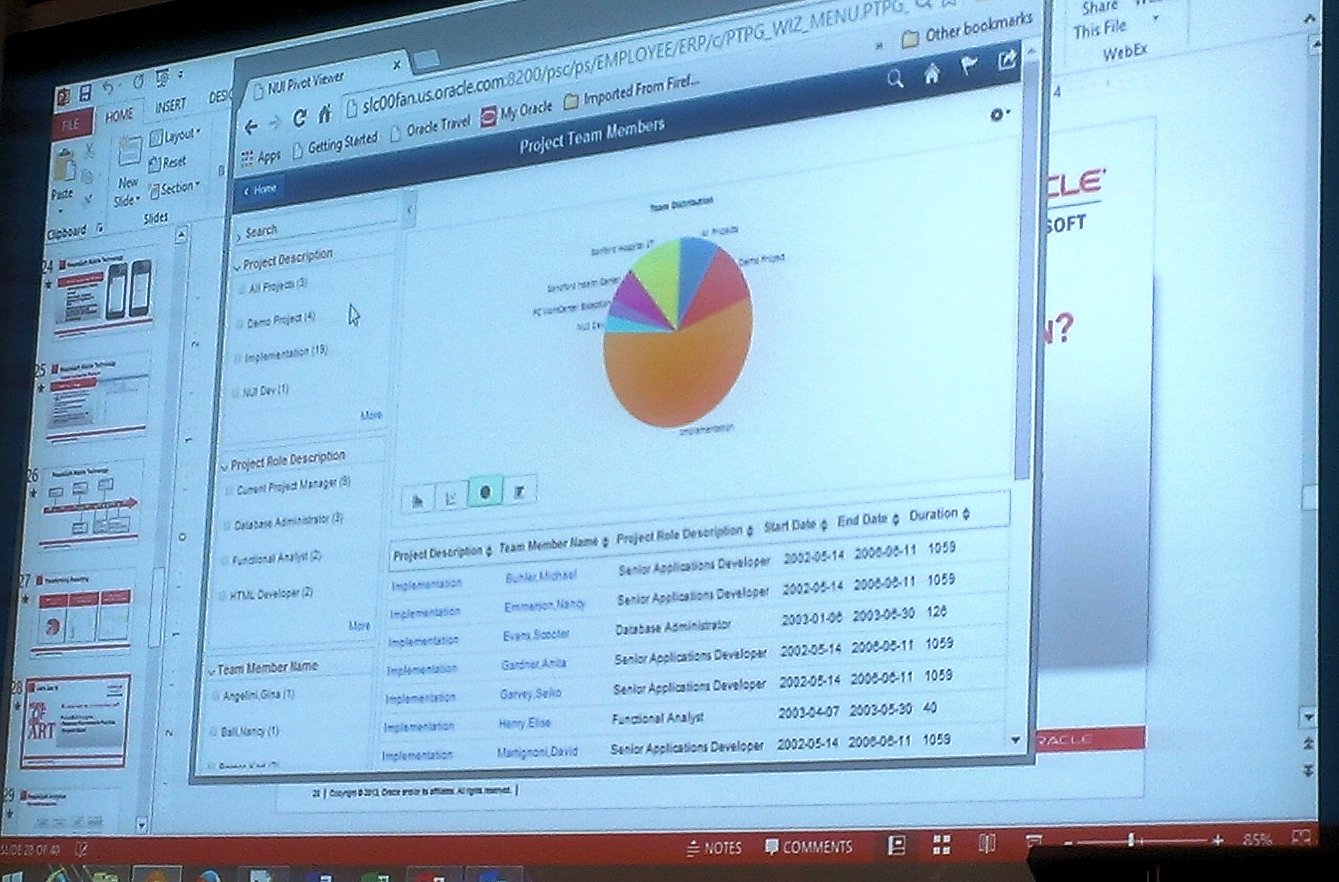
Filter search results by facet
PeopleSoft Test Framework in 8.54 has improved around management of test cases and delivery of pre-supplied test cases will apparently come in later tools versions.
Graham Smith
As well as the Oracle guys, Graham Smith from Oxfam also gave a session on their Financials upgrade from 8.9/8.50 to 9.2/8.53.
Graham was particularly enthusiastic about the new PeopleSoft Images and the PUM update process. Although he did concede that the PUM process is difficult to get the hang of initially – and that they ended up doing some things more than once – however it works very well for them now. Upskilling the team in advance was very important. The Oxfam approach is to divide up the improvements, allocate them to team members and give everyone time to research their topics and then report back to the team – which seems a very good way of improving the team quickly.
It has added a new requirement however, as it doesn’t replace the DMO environment (we need DMO to contain the vanilla versions of just the patches that we’ve applied), whereas the PUM image contains all modules and patches that have been released. We previously used Oracle Support as the repository of all patches and bundles.
Oxfam have also used Performance Monitor to gather intelligence on how their users are using the system. It’s really interesting to gather stats on which areas of the system are used the most (both ‘Most popular components by number hits’ and ‘most popular components by the number of users’). This allows the team to invest time in the components that are used the most, or are used by the most users – thereby targetting the effort at the areas which will give the most impact.
Other tips from Graham included:
– The Merge page functionality in App Designer is really useful during upgrades when comparing updated pages with customised ones.
– Reapply customisations in module order (as this helps the testers) instead of object type order.
– When applying custom code, aim for empty events if you can, as the cost of upgrading is less (as there’ll be no code to compare).
Graham also spoke about SES which they’ve found to be very fast and doesn’t need particularly beefy hardware. They have needed to spend some time looking at indexing, but in the main it’s a positive experience.
Summary
In conclusion, this was a very strong event with lots of great content. The next versions of PeopleSoft are going to bring a lot of exciting changes, and we can’t wait to read the Release Value Proposition when it is released.


 The PeopleSoft Tipster Blog