Hide the ‘Windows 7 is not supported’ message January 27, 2010
Posted by Duncan in PeopleTools 8.50, PIA, Windows.comments closed
If you’ve been using the latest version of PeopleTools with any version of Windows 7 (which is becoming more prevalent) then you’ll have seen this error message many times:

Now I’m all for being warned if I’m doing something unsupported and I know Windows 7 isn’t supported yet, but probably will be in the near future. I’m not going to swap my client OS just to keep the PIA happy, but I don’t want to be warned every single time. Also, it’s not a very well formatted error message as it throws out the alignment of the logon screen and it just looks a little messy.
I wasn’t going to do anything about my niggly annoyance until someone else wondered how to remove it then it piqued my curiosity.
As far as I could see there are two ways to fix this, find a way of adding Windows 7 to the supported OSes, or hide the warning message.
I tried many variations of OS codes in the browser.xml file as that appears to be where the supported OSes are read from (the sharper eyed among you may have noticed that I’ve added Windows 7 to the list in the above screenshot). This had no effect however, so I admitted defeat in trying to fix the cause and resigned myself to just trying to hide the symptom.
The HTML behind the signon page is ‘signin.html’ within ‘<PIA_HOME>\webserv\<domain>\applications\<site>\PORTAL.war\WEB-INF\psftdocs\<node>’. We can’t just comment out the error sections as we only want to hide this specific error message, other errors like ‘invalid password’ we still want to see.
The first step is to hide the browser error message. Search for ‘id=”browsercheck_error”‘ and you’ll see this section. Comment out as shown.
<div style="text-align:center">

<h1 id="error_img" style="display:none"><a id ="error_link" href="javascript:setFocus();" tabindex="1"><img src="<%=psCtxPath%><%=psHome%>/images/PT_LOGIN_ERROR.gif" alt="<%=130%>" border="0"/></a></h1>

<h2 id="login_error"> <%=error%> </h2>

<h2 id="discovery_error"> <%=ps.discovery.error%> </h2>

<!--<h2 id="browsercheck_error" style="text-align:left"> <%=browserCheck%> </h2>-->

</div>
This prevents the text from showing, however we also want to prevent the warning image being displayed for this warning also.
Search for ‘setErrorImg’ and you’ll see this function. Comment as shown and add the line below.
function setErrorImg()

{

var login_error = document.getElementById('login_error').innerHTML;

var discovery_error = document.getElementById('discovery_error').innerHTML;

/*var browsercheck_error = document.getElementById('browsercheck_error').innerHTML;*/

var browsercheck_error = "";

login_error = login_error.replace(/^\s+/,"");       // delete leading spaces

discovery_error = discovery_error.replace(/^\s+/,"");

browsercheck_error = browsercheck_error.replace(/^\s+/,"");

if (login_error.length != 0 || discovery_error.length != 0 || browsercheck_error.length != 0)

{

document.getElementById('error_img').style.display = 'block';

document.getElementById('error_link').focus();

}

else

setFocus();

}
Bounce your PIA and now the message won’t be displayed when you use Windows 7, however other error messages will still appear as desired.
Note: Updated 27th Jan after Jim Marion’s suggestion below on my incorrect commenting syntax.
Restyling/rebranding HR9.1/Tools 8.50 January 12, 2010
Posted by Duncan in Look and Feel, PeopleTools 8.50.comments closed
I’ve spent a couple of days doing a rebranding job on one of our v9.1/Tools 8.50 environments and it’s a lot harder than it used to be pre-8.50.
Previously, if you had a rough idea of how it all fits together and knew the colour scheme that you were moving to you could do it in a day or two. Now however, I think it’ll take a bit longer. Here’s why: (more…)
A Custom Message on the Signon Page (Final Word) January 4, 2010
Posted by Duncan in PeopleTools.comments closed
Some people have been having issues with the signon page messages and caching on more recent versions of Weblogic (after all I posted the original more than 2 years ago now). I thought I’d revisit it on an up-to-date environment and try to fix it.

These are the steps I took (Tools 8.50.04/Weblogic 10.3):
PeopleSoft and Google Wave November 25, 2009
Posted by Duncan in PeopleTools.comments closed
 So is anyone in the PeopleSoft community doing anything exciting with Google Wave?
Being a bit of a tech magpie I’m attracted by anything shiney and new, and I’m looking forward to putting it through its paces.
I get that it’s great for using with family and friends, and for collaboration within a team at work. Has anyone had any inspirations for utilising it to help within the PeopleSoft sphere?
PS. I have some invites left if anyone is still waiting to join.
Combined SIG – 24th Nov 09 November 23, 2009
Posted by Duncan in PeopleTools.comments closed
 I’m going to be presenting a session in the Technical Stream of the UKOUG Combined SIG taking place in Slough tomorrow. If you’re part of the UKOUG and not coming I encourage you to have another look.
There’s going to be some decent content there. All streams are starting with a keynote from Paco Aubrejuan – the VP of Development for the PeopleSoft product line – who’ll be running through some of the new features in the 9.1 Apps and Tools 8.50.
In the tech stream we have a strong focus on Tools 8.50, with further slots from Graham Smith (talking about Related Content, the Org Chart class and what’s new in Portal) and myself (taking on Connected Query, the Reporting Console and other non-UI enhancements).
Other presentations from David Kurtz (database level wizardry) and Steve Smith (building an ad-hoc Query Tool) round out the content and the day finishes with a Q&A with Paco.
The full agenda (including the HR and Financials streams) can be found here.
Stress/Performance Testing PeopleSoft November 12, 2009
Posted by Duncan in PeopleTools.comments closed
A colleague from my company has just landed a role testing the performance of PeopleSoft at a client. The client wanted to use free software and settled on ‘The Grinder‘ by Philip Aston (who I believe works for Oracle). Other open-source online performance testing tools are Apache’s JMeter and OpenSTA.)
I was really interested as I’d not done anything similar before, and the use of Open Source software was also a plus as I’d only heard of LoadRunner in this domain before (anything that makes PeopleSoft cheaper for clients is a good thing).

After a bit of experimenting we discovered that The Grinder is an nifty piece of software. It uses a central console as the controller and one or more agents, one per machine. The agents run worker threads that execute scripts (written in the jython scripting language).
It also contains TCPProxy, which you can use to record scripts (saving you from writing the jython from scratch).
Setting up SSL was a little fiddlier, involving messing around with keystores etc, but was nothing too challenging.
There’s not much info on the Internet concerning using The Grinder with PeopleSoft (there isn’t much for OpenSTA either, and only Brent’s post for JMeter).
Anyone wanting to know more can either get in touch, or check out the following resources:
Installed 8.50 but still have the old look? November 5, 2009
Posted by Duncan in PeopleTools 8.50.comments closed
If you install PeopleTools 8.50 with an ‘old’ application (i.e. one that is prior to v9.1) then the UI you’ll see still looks very much like the one we’re used to. What’s happened to all of the new 8.50 ajax-y goodness?
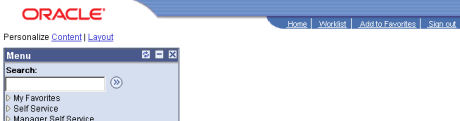
Yes, this is Tools 8.50!
These are the changes you need to make:
Main Menu->PeopleTools->Utilities->Administration->PeopleTools Options:
Style Sheet Name: PSSTYLEDEF_SWAN
Main Menu->PeopleTools->Portal->General Settings:
Navigation Type: Drop-Down
PeopleTools->Portal->Portal Utilities->System Options:
Style Sheet Name: PTSTYLEDEF_SWAN
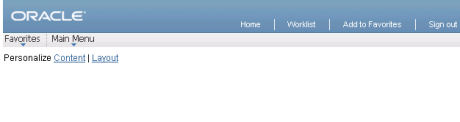 That’s better!
Thanks to Bauke Gehem for commenting on Nicolas Gasparotto’s blog with the above advice.
When you install a fresh 9.1 environment this is set by default.
Oracle OpenWorld Day 3 October 15, 2009
Posted by Duncan in OOW.comments closed
The week’s best bit of news came in Larry Ellison’s keynote today. Larry said that although Fusion will arrive sometime next year, Oracle will keep developing PeopleSoft for a few years yet.
“We’re going to enhance those applications for the next decade. We’re a pretty large software company. We can afford not only to maintain the software you’re running today, but to build the next generation of applications.…We don’t think all customers are going to replace what they have today with Fusion.”
A fuller recap of Larry’s keynote can be found here.
Graham Smith (Oxfam) gave us an insight into the OpenWorld party, which sounds amazing.
There’s a packed post from Brent Martin (ERP Associates) full of Tools info. Apparently there’s a new reporting console to replace Progress Monitor and Report Manager in Tools 8.50, which I didn’t know.
Great work guys. Thanks!
Oracle OpenWorld Day 2 October 14, 2009
Posted by Duncan in OOW.comments closed
Following on from yesterday’s summary of Day 1, here are some of the links for Day 2:
Larry Grey (Grey Sparling) was first up with an excellent account of the Tools 8.50 Beta Programme Customer Perspective. There’s a couple of good pieces of info in there, so check out Larry’s post. For those working with Financials, Larry also posted a Financials 9.1 session and Larry’s colleague Chris posted on using PeopleSoft with Oracle Enterprise Manager.
Graham Smith (Oxfam) also posted his day 2 summary with info on the Tools roadmap and future PeopleTools enhancements (one of the most positive points to come out of this so far is that Oracle appear to be continuing development of the PeopleSoft product line).
Finally, Brent Martin (ERP Associates) blogged about the sessions he attended.
Thanks chaps!
Oracle OpenWorld Day 1 October 13, 2009
Posted by Duncan in OOW.comments closed
As I’m not there in person, I’m eagerly devouring blog posts and tweets from those that could make it. Below is a round-up of what I’ve managed to find so far. Please go to their sites and read their posts to get full value from this:
Graham Smith (Oxfam and UKOUG Tech SIG chair) has a comprehensive post on some of the sessions he went to, including SOA, Financials 9.1 and lots of Tools 8.50 stuff.
Brent Martin (PeopleSoft Corner) went to some of the same sessions and has a similarly positive outlook from what he saw. Both Brent and Graham were impressed with the drag-n-drop Org Chart in Succession Planning. Also Oracle are going to release PeopleSoft VMs to download and keep them current, which will be useful.
Chris Heller (Grey Sparling) is there also. He has posted on Duke Energy’s session on keeping current with maintenance and a roundup of Paco’s keynote. You can also follow Chris on Twitter.
As I mentioned, there’s a lot of details in their posts so make sure you head on over and check them out. Thanks for keeping us in the loop guys!
To close off, a summary from Brent:
“Is 9.1 as good as what PeopleSoft would have released in the pre-acquisition world, and was the release as timely? I don’t know, but I don’t think it’s relevant. According to the presenters, PeopleSoft has a very high customer retention rate, over 50% of Oracle’s clients are on post acquisition releases, and over 250 new customers were added last year. If the customers are happy with the value they’re getting that’s really all that matters.”


 The PeopleSoft Tipster Blog