More info on PeopleTools 8.51 August 30, 2010
Posted by Duncan in PeopleTools.comments closed
I put a post up a short while back on the RVP for PeopleTools 8.51, but this week an Advisor Session has been released where Jeff Robbins gives a little more info (although sadly no screen-shots).
Much of what is covered is similar to the RVP, with a few extras (or maybe I just didn’t notice first time around).
1) The Test Framework really is a big deal.
I semi-dismissed this last time as I suspected that it was the PS Unit Test tool with a rebrand, however it seems like it’s significantly more (which Bauke Gehem did in fact tell me in the comments to my post). I’m looking forward to getting this up and running.
2) The Business Practice Change
It seems that software components that are part of the PeopleSoft stack that are not Oracle-owned might be finding life a little harder in future. Tools 8.51 is the last release that Crystal, WebSphere and Business Objects will be packaged with. Unless you are already a user of these tools, if you want to use them in future you’ll have to get a license directly from the vendor, not Oracle.
PeopleSoft in the Cloud / Amazon EC2 June 30, 2010
Posted by Duncan in Administration, PeopleTools, Strategy, Virtualisation.comments closed
 We’ve been trying out Amazon’s EC2 (aka Amazon Elastic Compute Cloud, aaka Amazon Web Services) for some of our PeopleSoft instances.
The advantages that this setup gives us are:
- Global access (we don’t need to be in a certain office or use a VPN to get to PeopleSoft)
- Flexibility (we don’t need to buy all of the kit in advance and then wait a month for the servers to arrive)
- Hourly pricing (you only pay for the server when it’s booted)
- Processing power (we’ve found that the hardware performs pretty well compared to other – more traditional – hosting providers)
- Price (the amount of horsepower you get for your money compares well)
- Frighteningly fast bandwidth (want to download the latest Tools patch … it’ll only take a few minutes!)
We’ve been using Windows 2008 and MS SQL 2008, however there’s nothing stopping anyone going Linux/Oracle. We are running 7 environments with all of the PeopleSoft tiers on a single server with the following specs:
High-Memory Extra Large Instance
17.1 GB of memory
6.5 EC2 Compute Units (2 virtual cores with 3.25 EC2 Compute Units each)
420 GB of instance storage
64-bit platform
All things considered, we’re pretty pleased with how it has gone. There have been some issues however:
– VPN access:
I’ve spent a lot of time struggling with Windows RRAS (Routing and Remote Access) trying to get a reasonable VPN for developers to use to access the backend (SQL Server Management Studio, App Designer etc). Although I can get the VPN to work, the server frequently disappeared from the network (even other servers in the Amazon Cloud couldn’t ping it). There are many others on the Amazon forums with the same issue, so I gave up and used a different route for developer access (RDP into smaller ‘satellite’ servers with PeopleTools already installed).
– 3-Tier Debugger
This doesn’t seem to work between the satellite servers and the PeopleSoft server, even with all firewalls turned off. I’ve never had a problem configuring this before and I’m at a loss to explain why it doesn’t work. We have a perfectly acceptable workaround so this isn’t a big problem.
– Config Manager Settings
On some of the servers the Config Manager settings don’t persist, even when logged in as an Administrator (and running the app as administrator).
I’ll probably add to this post over time as we get more experience with it, and I’d be interested to hear from others who’ve been trying similar things.
PeopleSoft and iPhone/Smart Phones June 28, 2010
Posted by Duncan in PeopleSoft.comments closed
At the recent UKOUG PeopleSoft Conference Succeed Consultancy (who I work for) demonstrated an iPhone application that we’ve written to allow users to access PeopleSoft and walked through how we’ve put it together. We’ve also recorded a quick video showing it in action (click the video to go through to youtube for higher resolution video):
The components we’re using in the iPhone app are requesting and approving of absences, but any PeopleSoft functionality could be exposed in the same manner.
We’ve also been working on the same app in other phone platforms (so users can also book/approve absence on Android, Blackberry or any smart phone that has a browser). Here are some (pretty grainy, sorry!) pictures of it working on an HTC Desire and a lower resolution Samsung):
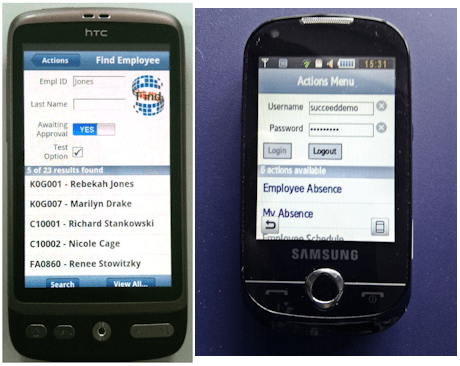
If anyone has any comments or great ideas on how we could improve this I’d be interested to hear.
Portal Greeting on Tools 8.50 May 21, 2010
Posted by Duncan in Look and Feel, PeopleTools 8.50, PIA.comments closed
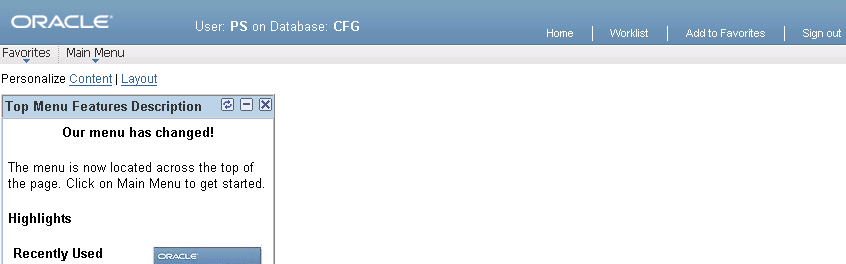
I’ve posted before about using the Portal Greeting / PIA Welcome message to display something useful here. I’ve recently come to implement this on a client and discovered that the method I suggested no longer works for Tools 8.50.
Pleasingly, it’s now actually slightly easier to achieve (and will appear on all pages, not just the Home Page).
Open up App Package PT_BRANDING, the Class BrandingBase and search for the string ‘add &addjs’. Immediately preceding that line, add the following line of code:
&greeting = "User: " | %UserId | " on Database: " | %DbName;
(Plus some comments identifying the customisation etc.)
This will do the trick, but the end result looks a bit big and blocky. It’s a piece of cake to alter the greeting style to achieve a much better looking result.
Open the PSHOMEPAGE Freeform Style Sheet, locate the greeting style class and replace it with this:
.greeting {

color: #FFFFFF;

font-family: Arial, Helvetica, sans-serif;

font-size: 10pt;

margin: 0 0 0 70px;

line-height: 24pt;

}
The end result will look something like this (I’ve also added bold tags around the UserID and Database for clarity):
PeopleTools 8.51 RVP April 21, 2010
Posted by Duncan in PeopleTools 8.51.comments closed
Most clients haven’t even got Tools 8.50 in and running yet, and now we have the Release Value Proposition for Tools 8.51. I know this doesn’t mean that the release is imminent (I’m guessing it’ll be out around Open World), but it does mean that we can start to get excited about what it will bring.
I’m not sure how much I can talk about here as the document isn’t freely available – you need a My Oracle Support account to get it – but I’ll summarise and see how we go. I assume most reading this will have Oracle accounts anyway.
The first point to note is that there’s a break from the tradition of odd/even numbered versions. Previously the even numbered versions 8.44, 8.46, 8.48, 8.50 brought new functionality, whereas the odd numbered releases 8.45, 8.47, 8.49 typically brought the 3rd party software versions up to date and included bug fixes, but weren’t big on new functionality. It seems that this has changed as 8.51 includes lots of new features.
PeopleSoft Smart Navigation
It’s difficult to picture this without an image to demonstrate it, but there are 3 changes to the navigation which revolve around embedding (or remembering) data within the navigation to allow users to get to the data in fewer clicks. It sounds quite useful – and moves further away from the typical routine of navigating to a page, and then searching for the data. Although Tools 8.51 brings this new functionality we won’t see any delivered examples until the next App Upgrade (or maybe bundle), although we can use it if we customise.
PeopleSoft Test Framework
I assume this is the integration of the PS Unit Testing framework.
Search Data Persistance
When moving between Components the Level 0 keys are stored for other Components you access, reducing the need to search again.
Related Content
Related Content can now use other key fields not just Level 0. So Levels 1 and 2, and even hidden fields. The related content window can even change when you select different rows in a grid.
Usage Monitor
Allows you to check the usage of the managed objects within your system.
Supported Platforms
Nothing too surprising in there, other than PeopleSoft support for Windows 2003 64-bit being discontinued.
Multiple Session Detection
Do your users share logins? If so, you’ll be able to detect them.
Browser Output for XMLP Reports
A few people have found running XMLP Reports to Window (via the REN Server) problematic in the past, and it seems like this is being resolved.
Other Misc Changes
– Extended Password Controls
– Hierarchical charting improvements
– Modal Secondary Pages
– Context Sensitive Popup Help
– A new App Designer object ‘Document’
– File Attachment protocol changes (HTTPS, SFTP and HTTP(s)).
I think from all that I’m most looking forward to the Smart Navigation, the Test Framework and the improvements to Related Content.
Balsamiq Mockups and PeopleSoft April 9, 2010
Posted by Duncan in PeopleTools.comments closed
About a month ago I stumbled across a fantastic tool called Balsamiq Mockups. It’s a product that lets you rapidly prototype the UI for some new functionality. It’s aimed at web development in general, not just PeopleSoft, but I think it’s so good that it’s something that the PeopleSoft community can embrace.
Mockups are useful for a number of reasons. They help the business understand what they’re going to get much earlier in the design process, meaning that any changes they want to make can be proposed early, when the cost to change is lower. It also helps the developer clearly understand what the requirements are. All very Agile.
Balsamiq beats other mockup methods hands down.
- It’s Fast. It has a pre-built library of controls so creating a mockup is fast, much much quicker than PowerPoint or MS Paint. So quick that you can create them on-the-fly in meetings.
- It’s more efficient. With pen and paper or a whiteboard it’s not easy to quickly rearrange what you’ve drawn. Plus, there’s no electronic copy to mail around at the end of the workshop.
- It shows only what’s necessary. Its style is more wireframe than glossy perfection, and that’s why it’s so good. No-one will be under the illusion that it’s a screenshot of something that’s nearly built.
I’ve put together a YouTube video so you can see it in action (click the video to view it on the YouTube site for higher definition).
If you like it head on over to the Balsamiq website. They let you use most of the functionality for free.
ExcelToCI and SSL April 7, 2010
Posted by Duncan in PeopleTools.comments closed
ExcelToCI is a very handy tool in the right circumstances. It has got significantly easier to use as each new version of PeopleSoft has been released too. It does have some quirks however. Among these is that it can be a little difficult to use with SSL.
Many companies use HTTP for test environments, in which case your ExcelToCI upload might be fine in these environments, but in Production (which likely uses HTTPS) there is extra work to do.
If your SSL certificate is valid for the hostname, not expired and was issued by a trusted root certificate authority you might well be fine. Just change the parameters on the Connection tab and you’re good to go.
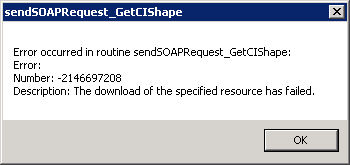
If your certificate was issued by a Company stand-alone CA things can be a little trickier. I faced this issue recently and received a cryptic error message relating to GetCIShape (error number 2146697208 – “The download of the specified resource has failed”). It took a while to work out what was wrong. There were no results on MyOracleSupport and Google didn’t turn up anything useful.
It was only when I turned to Bing (yes, I know!) that I found something.
http://javier-ps.blogspot.com/2010/02/exceltoci-under-https-with-ssl.html
Thank you Javier!
Oracle Ace Award February 23, 2010
Posted by Duncan in Oracle.comments closed
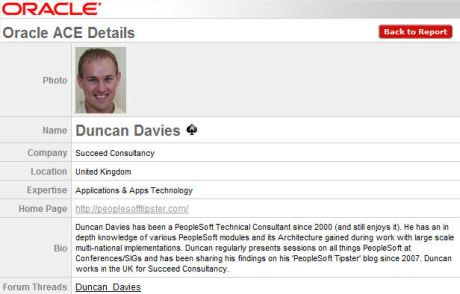
I’ve started off this morning feeling ACE! The reason for this great start to the day is that I’ve recently discovered that I’ve been named an Oracle ACE! I am very excited and honored to be added to the Oracle ACE community and I’m looking forward to continuing to contribute in the years ahead.
Scaning through the list there are only 258 ACEs worldwide across all specialisms (this includes ACEs for Database Management, Java, Linux etc as well as Applications). The list of all the ACEs and their profiles can be found here.
PeopleSoft Entity Relationship Diagrams (ERDs) February 10, 2010
Posted by Duncan in PeopleTools.comments closed
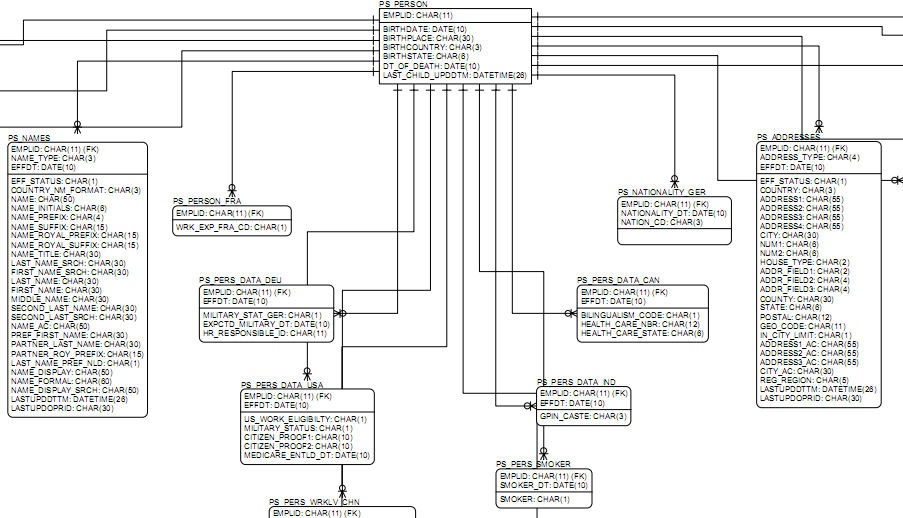
A week or so ago PeopleSoft released Entity Relationship Diagrams (ERDs) to anyone with a My Oracle Support account. Although it has always been possible to source them, you had to go through your Account Manager or raise a ticket. Now (provided you have an account on My Oracle Support) you can download them (using note id 1051533.1).
So why are they useful? They are a visual representation of the schema of parts of the database, so they tell you – at a glance – how the tables relate to one another, which fields are within each table and what the keys are. If you have them to hand it can save you browsing record definitions in App Designer.
A new Blog worth reading February 10, 2010
Posted by Duncan in PeopleTools.comments closed
For those of you outside the UK – or for those who haven’t worked with Global Payroll before – one of the UK’s preeminent GP experts is a lovely chap called John Eckersley, and he’s just started blogging.
Please make sure that you add his site to your feed-reader:
http://jreconsulting.blogspot.com/
John has a lot of good experience to share and an easy to read writing style.


 The PeopleSoft Tipster Blog