Tolerance of slow App Server boot January 22, 2008
Posted by Duncan in Infrastructure, Oracle, PeopleSoft, PeopleTools, PS Admin, Tuxedo.comments closed
In one of the more recent versions of Tools (8.49 is the first time I’ve noticed it, but that doesn’t mean it hasn’t been around in prior versions) I’ve noticed that occasionally the boot of an Application Server will fail with an error.
Booting admin processes ...

exec BBL -A :

CMDTUX_CAT:1863: INFO: Process ID=2636 Assume failed (timeout).
At the time of writing, there is nothing in Customer Connection for this, and a google search wasn’t particularly helpful either. So I had to resort to a technique from pre-Google days – i.e. work it out myself. Thankfully it wasn’t too difficult. (more…)
Multi Rowset Output from Query for XMLP January 15, 2008
Posted by Duncan in Oracle, PeopleSoft, PeopleTools, XML Publisher.comments closed
One of the issues with using PSQuery to generate the XML for an XMLP report is that you can only get a single rowset from a query, meaning your report had to be fairly simple. In the past, for more complex reports I’ve just created an App Engine instead as it gives me greater control over the XML generated.
Another method exists however …
XMLP and Checkboxes in PDFs January 2, 2008
Posted by Duncan in Oracle, PeopleSoft, PeopleTools, XML Publisher.comments closed
I’ve been having problems getting checkboxes to print correctly when creating PDFs using XMLP. I was faced with tiny little diamonds like those on the left here, when I was expecting ‘standard’ checkboxes like those on the right:

It turns out that the XML Publisher default PDF output font does not include a glyph to represent a checkbox and this is an issue faced by one or two Oracle people already (Tim Dexter has written about it here). I thought I add a quick write-up as I’m tackling the issue from a PeopleSoft perspective.
(more…)
UKOUG RoundUp – Part 2 – Wednesday December 19, 2007
Posted by Duncan in PeopleTools.comments closed
On the second (and final) day of PeopleSoft content at the UKOUG I attended the following sessions:
- Oracle Business Intelligence (XML) Publisher and PeopleTools Demonstration
- PeopleSoft Keynote
- PeopleSoft Enterprise Portal – What’s New and Where It’s Headed
- More Advanced Reporting Tips and Techniques for PeopleSoft Enterprise
- PeopleSoft Technical Discussion Forum
Change in Employer November 18, 2007
Posted by Duncan in PeopleTools.comments closed
Those of you who know me personally may or may not be aware that I’m changing employer. Tomorrow (Monday 19th) is my first day working for Succeed Consultancy, a UK based PeopleSoft consultancy (they do offer other services but my focus will mainly be PeopleSoft). My month’s notice period passed slowly so I’m looking forward to getting stuck in.
A Custom Message on the Signon Page (part 4) November 14, 2007
Posted by Duncan in PeopleTools.comments closed
Hopefully, this will be the final installment!
I’ve taken the reference link provided by Joe Ngo’s comment on part 3 and we now have a version that works across IE and Firefox. It only requires the PIA to be rebooted once, and the only files you need to create/change are the signin.html file and the file containing your message. This solution also gracefully handles the situation if your file doesn’t exist.
No screenshot this time as it looks the same as in part 3, but here’s the code:
XML Publisher and Out of Memory Errors October 30, 2007
Posted by Duncan in Oracle, PeopleSoft, PeopleTools, XML Publisher.comments closed
I’m getting a lot of comments on the XML Publisher posts about ‘Out of Memory’ errors. I’ve not experienced this myself so can’t give a fix or workaround, but wondered whether anyone else had hit this issue and found a resolution?
Doing a bit of digging there are a number of suggestions, none of them relate to the PeopleSoft implementation of XMLP however so I’m unconvinced by any solution in particular.
There’s a Tools patch out for this issue (8.48.06 and up contains the fix), so check your version of Tools:
http://www.peoplesoft.com/psp/portprd/CUSTOMER/CRM/c/C1C_MENU.C1_SOLN_SUMMARY.GBL?page=C1_SOLN_SUMMARY&SETID=SHARE&SOLUTION_ID=201046967
There’s a suggestion to change a parameter for XMLP (I guess this would be on the Process Defn or more likely the Process Type in PeopleSoft):
http://forums.oracle.com/forums/thread.jspa?threadID=568832&tstart=0&messageID=2116283
There’s a suggestion to create a config file (it is not delivered) to specify a temporary directory for processing large files:
http://asun.ifmo.ru/docs/XMLP/help/en_US/htmfiles/B25951_01/T421739T422152.htm
And there’s also a suggestion that a patch will fix it:
http://www.oracle.com/technology/products/xml-publisher/docs/AboutXMLP562.htm
If I was troubleshooting it and was already on 8.48.06 or greater, I’d probably try the parameter followed by the config file.
If anyone has encountered this error and fixed it, it’d be great if you posted a comment to let us know the resolution.
Fixing up PSAdmin and Services October 26, 2007
Posted by Duncan in Administration, PeopleTools, PS Admin.comments closed
I’ve just stumbled across what looks like a great new product by the Grey Sparling guys. Most (Windows) PeopleSoft DBAs and consultants who run VMs on their laptops will have been frustrated on many an occasion by the (kind of clunky) PSAdmin utility. Sure, it does what we need it to, but shouldn’t we have something better by now?
Changing the Default PIA Logo / Image August 15, 2007
Posted by Duncan in PeopleTools.comments closed
This is a pretty basic change – and I’m sure most people will already have been through this – but as it seems to be a pretty common query on message boards I thought I’d write it up, then at least in future I can just point people here instead of having to type a reply from scratch each time.
The requirement is this. Vanilla PeopleSoft comes delivered with the vendor logo in the top left hand corner of all PIA pages (Oracle for Tools 8.48, PeopleSoft on prior versions). The image can be changed to a custom one, usually the logo of the organisation or of the project the PeopleSoft implementation is part of.
Solution A – Quick and Dirty Solution
If your desired image is the same dimensions (or can be resized to be the same dimensions) as the vanilla logo then you can just upload your new image over the NEW_PS_LOGO image in App Designer.
Solution B – Full solution for those implementing Enterprise Portal
If you have the portal product, you can navigate to Portal Administration > Branding > Define Headers. On the Images Tab you can select the new image (you’ll have to load it in via App Designer first or have it available via a URL). On the Attributes tab of the grid you can also enter sizes, so the image dimensions don’t have to match the delivered image. (This tip is from rpavlica on the PeopleTools-L IT Toolbox mailing list).
Solution C – Full solution for those without Enterprise Portal
A little more effort is required if you don’t have the portal product. The default image is 145×41 pixels, and if you can get your company logo to look good in those dimensions then the job is really simple, just change the NEW_PS_LOGO Image as above. If you want to change the dimensions of the image, then there are 3 HTML objects to check:
– PORTAL_UNI_HEADER_NS4X
– PORTAL_UNI_HEADER_NNS
– PORTAL_EXP_PASSWORD_HDR
Changing the width of the image is straightforward. If you want to change the height then you will probably find you have to rejig the tables a little.
(more…)
ReUse in App Engines July 31, 2007
Posted by Duncan in Application Engine, PeopleSoft, PeopleTools, SQL.comments closed
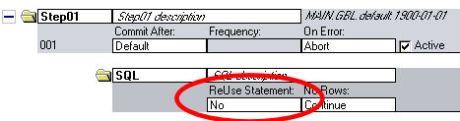
One of the easiest tricks to improve performance of some App Engines is the ‘ReUse’ setting. It’s useful when you have a SQL object that is called multiple times, for instance when you have a DoSelect that runs a SQL Step repeatedly, substituting different Bind variables in each time.


 The PeopleSoft Tipster Blog