Lag and Lead September 21, 2007
Posted by Duncan in Oracle, PeopleSoft, SQL.comments closed
I’ve previously looked at the RANK and DENSE_RANK analytic functions, so thought I’d expand a little by mentioning LAG (and LEAD).
Analytic Functions are extensions to Oracle SQL that enable common tasks to be accomplished faster than using large blocks of SQL or PL/SQL. They are apparently ‘under review by the ANSI SQL committee for inclusion in the SQL specification’, although whether this will ever happen or not is anyones guess.
The LAG function solves (at least for those of us on Oracle) the oft-encountered issue of retrieving data from a prior row.
Changing the Default PIA Logo / Image August 15, 2007
Posted by Duncan in PeopleTools.comments closed
This is a pretty basic change – and I’m sure most people will already have been through this – but as it seems to be a pretty common query on message boards I thought I’d write it up, then at least in future I can just point people here instead of having to type a reply from scratch each time.
The requirement is this. Vanilla PeopleSoft comes delivered with the vendor logo in the top left hand corner of all PIA pages (Oracle for Tools 8.48, PeopleSoft on prior versions). The image can be changed to a custom one, usually the logo of the organisation or of the project the PeopleSoft implementation is part of.
Solution A – Quick and Dirty Solution
If your desired image is the same dimensions (or can be resized to be the same dimensions) as the vanilla logo then you can just upload your new image over the NEW_PS_LOGO image in App Designer.
Solution B – Full solution for those implementing Enterprise Portal
If you have the portal product, you can navigate to Portal Administration > Branding > Define Headers. On the Images Tab you can select the new image (you’ll have to load it in via App Designer first or have it available via a URL). On the Attributes tab of the grid you can also enter sizes, so the image dimensions don’t have to match the delivered image. (This tip is from rpavlica on the PeopleTools-L IT Toolbox mailing list).
Solution C – Full solution for those without Enterprise Portal
A little more effort is required if you don’t have the portal product. The default image is 145×41 pixels, and if you can get your company logo to look good in those dimensions then the job is really simple, just change the NEW_PS_LOGO Image as above. If you want to change the dimensions of the image, then there are 3 HTML objects to check:
– PORTAL_UNI_HEADER_NS4X
– PORTAL_UNI_HEADER_NNS
– PORTAL_EXP_PASSWORD_HDR
Changing the width of the image is straightforward. If you want to change the height then you will probably find you have to rejig the tables a little.
(more…)
ReUse in App Engines July 31, 2007
Posted by Duncan in Application Engine, PeopleSoft, PeopleTools, SQL.comments closed
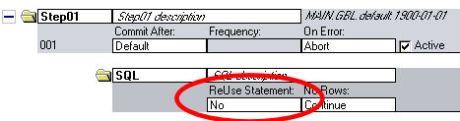
One of the easiest tricks to improve performance of some App Engines is the ‘ReUse’ setting. It’s useful when you have a SQL object that is called multiple times, for instance when you have a DoSelect that runs a SQL Step repeatedly, substituting different Bind variables in each time.
Counting characters in a field July 24, 2007
Posted by Duncan in PeopleSoft, PeopleTools, PIA.comments closed
I saw a query earlier today on the IT Toolbox messageboard where someone asked if there was a way to restrict a user to a certain number of letters or characters within a Long Edit box. The poster didn’t want to wait until the user tabs out of the field to tell them their text was too long.
I’d seen someone accessing the value of a field from JavaScript within an HTML Area before, and although I couldn’t find the post (I believe it was on SparkPath, but could be wrong) it set me thinking.
One solution (there may be better answers, but this was my submission) was as follows:
Outputing ALL images from PS July 12, 2007
Posted by Duncan in PeopleSoft, PeopleTools, PIA, SQL.comments closed
I was asked an unusual question yesterday and I thought I’d share it with you all.
The client wanted to view/extract all of the images held within PeopleSoft. My first reaction was that it couldn’t be done. As there are over 1000 images it’s not a task to be easily done manually. Also, only about 1/4 of the images are stored in the Web Server cache, so it’s not a task of just getting them from there.
So … how was it done?

Auto Login to PeopleSoft and App Designer July 4, 2007
Posted by Duncan in PeopleSoft, PeopleTools, PIA.comments closed
You can set up shortcuts to auto-logon to the PeopleSoft PIA and/or App Designer.
I’m still in two minds whether to add this post or not, but there are some circumstances where this can save you a bit of time and I’m sure you’ll know when and where that is – for example, on a single user VM, or in a DEMO environment, or even in a DEV environment if it’s a small team. It’s no different to having single sign-on enabled for PIA logon anyway. It shouldn’t need stating that these shortcuts should never be used in any environments where security is important, and under no circumstances anywhere near a Production environment!
App Designer:
Create a new shortcut and adapt the following line for your environment:
<pshome>\bin\client\winx86\pside.exe -CT <dbtype> -CD <dbname> -CO <oprid> -CP <pwd>
eg.
D:\pshome\bin\client\winx86\pside.exe -CT ORACLE -CD HR9DMO -CO PS -CP PS
It may help to alter the properties of the shortcut to run it maximised window, just to save clicking each time …
PeopleSoft PIA
The following works for some tools versions and not others. I’m sure it has worked in Tools 8.4x, but it doesn’t seem to work on Tools 8.48. If you get this working, let me know your Tools version and we’ll see if we can work out when they put a stop to it, or if it works for you in Tools8.48 what I’m doing wrong.
http://<web-server>/psp/<site>/?cmd=login &userid=<userid>&pwd=<pwd>&disconnect=y
eg.
http://hrdmo/psp/HR9DMO/?cmd=login &userid=PS&pwd=PS&disconnect=y
Remove line breaks from URLs when pasting. I don’t know what the ‘disconnect=y’ does.
Outer Joins and Effdt June 26, 2007
Posted by Duncan in Oracle, PeopleSoft, PeopleTools, SQL.comments closed
I was asked by one of our Junior Consultants the best method of outer joining to a table containing Effdt (which you’d want to do a Max Effdt sub-query on).
I provided a solution, but after pondering the issue further I realised there are a number of ways to do this.
For those not familiar with the problem, an Outer Join is a specific SQL statement where all rows from the first table are returned even if no corresponding row in the second table is found. Values from the second table are shown where they exist, defaulting to null when they do not. The issue arises as the second table has an effdt column, which usually necessitates a sub query (to find the row with the greatest effdt less than a supplied as of date). This would be a sub-query, and you can’t outer-join to a subquery.
So, which is the best solution?
Using the PIA Welcome Message June 13, 2007
Posted by Duncan in Administration, PeopleSoft, PIA, SQL.comments closed
The PIA Welcome message, or Portal Greeting is a pretty simple piece of functionality, but I’ve not seen it used on a single client site. For those that haven’t seen it before, it looks like this:

The welcome message is stored on a per user basis, it is set using the ‘Personalize Content’ link on the Homepage, and it is stored in the table PSPRUHDEFN. If updated via SQL, it won’t appear instantly unless you either bounce the App Server (and clear the cache) or increment the versions in PSVERSION and PSLOCK. There is an (Oracle) sql script to update the message – so it appears instantly – at the foot of this post.
A more constructive use of the greeting would be to alter it slightly. Particularly during development and testing it would be useful to display the logged on user and the environment name. An extremely simple change to a Tools object (yes, I know, but it’s such a small change that the upgrade implications will be minimal) allows this.
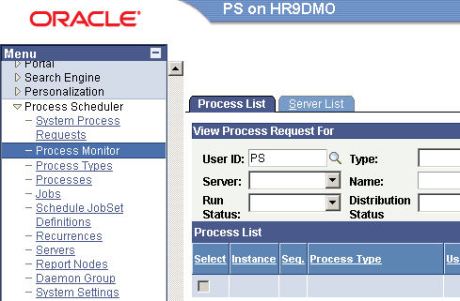
There are two steps, output the user/database in the greeting and make the message appear on every page, not just the Homepage.
Clearing the Process Scheduler Cache – without a Reboot June 11, 2007
Posted by Duncan in Administration, Application Engine, PeopleSoft, SQL.comments closed
I subscribe to a couple of PeopleSoft technical mailing lists / websites and I came across an interesting tip tonight that I thought I’d pass on.
The post was on IT Toolbox (peoplesoft.ittoolbox.com) and the poster was a guy called Neil Pak (at least that’s what the email said, I guess his real name could be anything).
The issue being discussed was one that’ll be familiar to all developers who’ve written a few App Engines in their time – needing to bounce the Process Scheduler to clear the cache, to get the Process Scheduler to use the latest changes. Sometimes it picks them up, sometimes it doesn’t, particularly if you’re changing an existing object – and for me this has happened mostly with SQL Objects. (more…)
State Records and Missing Data May 22, 2007
Posted by Duncan in Application Engine, PeopleSoft, SQL.comments closed
We’ve encountered an issue today that we hadn’t noticed before. Within an Application Engine program we populate a state record (AET table) with values. The first time we use these values (i.e. retrieve them using %Bind(<fieldname>)) the values are retrieved successfully, however when we attempt to use the values a second time they are empty/blank.
This occurred because our State Record was set as a Derived/Work record and our App Engine did not have restart disabled. As a result it was performing Commits after each Section (the default behaviour), and – this is the gotcha – a commit clears down the State Record!


 The PeopleSoft Tipster Blog