Using Excel as a datasource May 19, 2008
Posted by Duncan in PeopleTools, XML Publisher.comments closed
This post is from a coupl of months ago, but I don’t know how I missed it. Tim Dexter discusses how to use an Excel spreadsheet as a data-source.
http://blogs.oracle.com/xmlpublisher/2007/03/13#a192
This has the potential to be quite useful as clients frequently ask for some kind of Excel output which they then update ‘offline’ (i.e. disconnected from PeopleSoft) and then need a method of reloading the updates back into PeopleSoft.
Collaborate 08 Presentations May 19, 2008
Posted by Duncan in PeopleTools.comments closed
All,
many of the presentations from Collaborate 08 are now online (the library has been up for a while, but the number of presentations available wasn’t high to start with – it’s much more complete now).
It looks like theres some great content on there. Lots on existing PeopleTooks technologies, and some of the newer stuff too (XMLP, SOA, BPEL), plus some good lower level techie sessions.
I’m a sucker for this kind of thing so I’ve downloaded 45 presentations for going through to pick up little gems of knowledge (heaven knows when!).
They can be found here:
http://www.questdirect.org/QuestDirect/Events/COLLABORATE/Browse+Education+Sessions.htm
Filter on PeopleSoft to shorten the list.
Workday wins large clients May 19, 2008
Posted by Duncan in PeopleTools.comments closed
It seems Workday is doing pretty well. They’ve just won two ‘mega-clients’, one whilst competing against Oracle and SAP.
Also, Salesforce.com is going live on Workday’s HCM offering.
Interesting …
More detail from here.
Xls XMLP Output opens in Browser – Workaround April 18, 2008
Posted by Duncan in PeopleTools, XML Publisher.comments closed
There is a potential workaround for the issue detailed here, but it’s far from a graceful solution. Perhaps someone out there can suggest a more elegant implementation of the workaround.
Almost by accident while troubleshooting this issue I discovered that if I took the output text file (which incorrectly opens in the browser) within the Report Repository and editted it, then tried to open it again it would open in Excel. Strange! It seemed to make no difference what change I made – or even if I reversed out a previous change – all that mattered was that I’d editted it. Furthermore it only worked if I editted it with certain tools.
The upshot was that when you edit a text file using Windows Notepad it inserts an invisible non-printing character at the start called a BOM (Byte Order Mark). This is all related to whether the format is ANSI, or UTF-8 etc. Using a fuller-featured editor (I used Notepad++, see the Applications tab above for more) I toggled whether the BOM is present or not and this affected whether the file opened in Excel or a browser. Further testing seemed to show that it didn’t have to be a BOM character, as long as I didn’t interfere with the tags or their data content this workaround still worked.
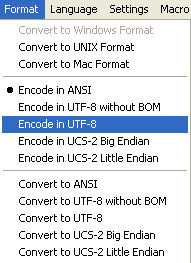
Now although I have a method, I can’t decide the best method of implementing it. The method I use at the moment is after the file is generated – but before it is published – I insert the character. Using PeopleCode the only method I can think of to achieve this is to create a new text file, insert the character to ensure Excel output, then copy in the contents of the original output file. The only alternatives I can think of involve external calls from PeopleCode.
Any smarter ideas?
Xls XMLP Output opening in Browser, not Excel April 16, 2008
Posted by Duncan in PeopleTools, XML Publisher.comments closed
I have an issue that I wouldn’t have thought I’m the first to encounter, but I can’t see any record online of others discussing it. The problem is as follows:
I’ve written an XML Publisher report that outputs an Excel file. When I open the output from within Report Manager it opens the file in the browser, when I want it opening in Excel.
I’m aware that XMLP doesn’t output binary .XLS files, but what’s described as Excel(HTML) – which is basically a text file containing HTML that can be read and rendered as a spreadsheet when opened with Excel. The file in the report repository has an xls extension, and the Report Manager Hyperlink points to the right place. If – instead of opening the file – I save it locally then open it with Excel it renders perfectly.
Also, if I change the output to RTF instead of XLS then it opens in Word correctly. It’s also not a template issue as if I preview the output from within the XMLP Report Definition it opens in Excel. This happens on more than one client PC, and in different browsers so it doesn’t look like it’s a local machine configuration issue.
If I place the output xls file on the web server and create a hyperlink on a PIA page it works fine. However if I repoint the hyperlink to the same output file in the report repository it doesn’t work – so it seems as though the psreports servlet might be the issue. If I use a tool to examine the HTTP Header for each of these requests I can see that the Mime Type is set to “Application/MSExcel” for a PIA page hyperlink (which works), and “text/html” for the same file from the Report Repository. The mime types are set correctly (by default) in the Web Server profile, but I can’t see anywhere to set the mime-types for psreports.
I’ve been in dialogue with GSC for the last 6 weeks or so, but they say that it isn’t a misconfiguration or bug, but a ‘”potential future development with a status of ‘Awaiting review’.” The case id is:
1750412000 – “8.50: Support MHTML Excel format in XML Publisher”.
It seems Oracle eBiz suite has the same issue, but they can fix it with a configuration change.
I do have a workaround (not a solution) for this – posted here – but has anyone else faced this issue? And if so, how have you dealt with it?
Dynamics growth slows? March 15, 2008
Posted by Duncan in PeopleTools.comments closed
There’s an interesting post over on The Enterprise Spectator (a good blog to add to your feed-reader if it’s not there already) about how Microsoft Dynamics is fairing. Not good is the answer, which may explain the recent-ish management changes.
One or two consultancies here in the UK have been starting Dynamics practises. I’d be interested to hear whether their experiences match the articles findings.
Inserting XMLP File Definitions into Projects March 12, 2008
Posted by Duncan in PeopleTools.comments closed
There have been a couple of occasions where the file definition (the template file behind the XMLP Report Definition) has become out of sync with what is in the project.
This may be because the file was inserted into the Project, and then a subsequent change made to the template and uploaded into PeopleSoft. In this case, the updated Report Definition and Template Definition would be migrated, but the new file wouldn’t be in the project so it wouldn’t be taken across. Unfortunately this leads to a really rather nasty message in the PIA.
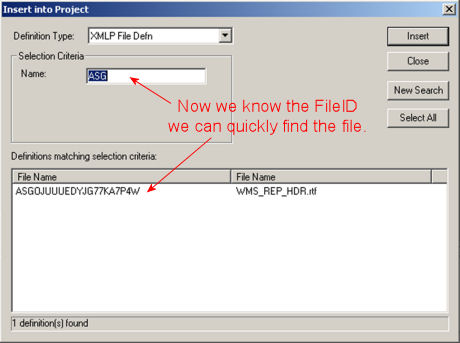
The solution is clearly to re-add the File Definition in to he project, but it’s not always straightforward. You can select it as a related definition when you insert the template, but sometimes this inserts the old (overwritten file). To be sure you have the file inserted, you have to add it manually. The only issue is the insert file definition dialogue box is not helpful.

The search field only allows you to search on the long alphanumeric string, not the actual filename so you end up scrolling through the full list attempting to spot the file you’re after. As more reports get developed, the list will get longer.
The alternative is to use some SQL:
SELECT FILEID

  FROM PSFILEDEFN

 WHERE USERFILENAME = '<filename>'
This gives you the File ID, which is what the dialogue box searches on, enabling you to find your template file a lot quicker.
The REN Server – an Overview and a Neat Trick – Part 2 of 2 February 13, 2008
Posted by Duncan in PeopleTools.comments closed
This is part 2 of 2. See the companion post here.
The Trick
The neatest trick I’ve heard relating to the REN Server came from Chris Heller and Larry Grey who were over for the UKOUG last year. They drew my attention to the ‘NotifyToWindow’ method of the PrcsApi class. It’s one of those little gems that’s tucked away in PeopleBooks that I’d never noticed before.
It’s a method that lets you inject HTML into the REN Server window and it sounded like an ideal method of giving users feedback on the progress of their process/report. To give it a quick try I added some code to the PORTAL_CSS App Engine (in a play environment obviously, not anywhere important) and gave it a whirl.
The code I added all went into PORTAL_CSS.CREFPERM.Step1 and was as follows:
At the top:
import PT_PRCS:API:*;
After the functions (about half way down):
Local PT_PRCS:API:PrcsApi &api = create PT_PRCS:API:PrcsApi();
Then, wherever I wanted to update the user of the status, I added the following:
&strl_WindowMsg = &strl_WindowMsg | "<br />Step 1/5: Portal Security Sync starting. (" | DateTimeToLocalizedString(%Datetime, "HH:mm:ss") | ")";

&nret = &api.notifyToWindow(AEPORTALCSS_AET.PROCESS_INSTANCE, &strl_WindowMsg);
I placed my messages at reasonable points in the process and ran it. The resulting REN Window looked as follows:
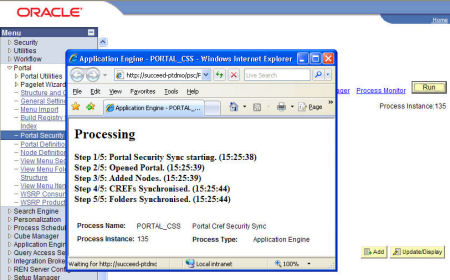
I’ve only output static text to the window, but there are further possibilities. Chris mentioned that in the past he has inserted the last few lines of the log file. I’d be interested to hear from anyone with good ideas on how to use this.
The REN Server – an Overview and a Neat Trick – Part 1 of 2 February 13, 2008
Posted by Duncan in PeopleTools.comments closed
This is part 1 of 2. See the companion post here.
The Overview
The REN Server is a seperate Web Server designed to publish Real-time Event Notifications to users, saving them the effort of repeatedly clicking on the Refresh button in Process Monitor. The Popup window you see when running a process ‘to window’ is originally an HTML area populated/called from an iScript, but then some HTML/JavaScript is loaded from the REN Server itself.
To assign permission to run a report ‘to window’ there are 2 steps to follow:
1) Look on the PeopleTools tab of the Permission List and click on Realtime Event Notification Permissions and check ‘Reporting Window’ has ‘Full Access’.
If you wish to use SQL, this will show which Permission List is giving you access to the Report to Window functionality. By default, it is PTPT1200.
SELECT RU.ROLEUSER

     , RU.ROLENAME

     , RC.CLASSID

     , AI.AUTHORIZEDACTIONS

  FROM PSROLECLASS RC

     , PSROLEUSER RU

     , PSAUTHITEM AI

 WHERE RC.ROLENAME = RU.ROLENAME

   AND RU.ROLEUSER = 'PTDMO'

   AND AI.CLASSID = RC.CLASSID

   AND AI.BARNAME = 'REPORTING'
2) You’ll also need access to the iScript. Stay with the Permission List, and look on the Web Libraries tab. You need to give WEBLIB_RPT Full Access to the iScript.
Again, if you wish to use SQL, this will show you the Permission list that is giving you access:
SELECT RU.ROLEUSER

     , RU.ROLENAME

     , RC.CLASSID

     , AI.AUTHORIZEDACTIONS

  FROM PSROLECLASS RC

     , PSROLEUSER RU

     , PSAUTHITEM AI

 WHERE RC.ROLENAME = RU.ROLENAME

   AND RU.ROLEUSER = 'PTDMO'

   AND AI.CLASSID = RC.CLASSID

   AND AI.MENUNAME = 'WEBLIB_RPT'

   AND AI.BARNAME = 'ISCRIPT1'

   AND AI.PNLITEMNAME = 'IScript_GetReport'
Now that security is covered you might think that there’s not a huge amount to talk about with the REN Server as in some ways it’s a bit of a ‘black box’. Unless you need Clustering/Failover or a Reverse Proxy Server there isn’t much to configure.
- There are some settings in the psappsrv.cfg (logging levels, ports and authentication token domain),
- and some settings under PeopleTools in the PIA (client authentication, SSL and host machine),
- and of course the option to boot the PSRENSRV process or not is set using PSAdmin
- there is also a psrenconfig.txt under the App Server directory, but I’ve never needed to mess with these settings
Yes, yes, you say. I know all that already. Tell me something I don’t know. Ok, I’ll wager you didn’t know this …
REN Server Ports on Multi-App Installations February 7, 2008
Posted by Duncan in Administration, Infrastructure, Oracle, PeopleSoft, PeopleTools, PS Admin.comments closed
When you have more than one App Server on a single machine – and they both need to run a Ren Server process – you need to adjust the port number in the same way you do for other processes (although the REN Server is easy to miss – like I did – as it’s near the bottom away from the other port numbers).
If you do boot the App Server without changing the port you’ll get an error message:
exec PSRENSRV -A -- -C psappsrv.cfg -D PADMO -S PSRENSRV : CMDTUX_CAT:1685: ERROR: Application initialization failure
tmboot: CMDTUX_CAT:827: ERROR: Fatal error encountered; initiating user error handler
tmshutdown -qy
OK, you think. I know what that is, it must be a port clash. So you reconfigure the port in PSADMIN and then try to boot it again. Same error. Checking the REN Server log gives the following clue:
(ERROR) nssock: Cannot listen on port 7180. The port may already be in use.
It’s still looking on port 7180, not the new port!
The missing step is to update the database, as the port is stored there also:
UPDATE PSREN SET PORT_NUM = 7185, SSLPORT_NUM = 7148
You should then find you App Server and Ren Server boot fine.


 The PeopleSoft Tipster Blog