New Blog and Twitter Account January 11, 2012
Posted by Duncan in PeopleTools.comments closed
If you pop by here now and again may I recommend another blog and twitter account that’s just started, but which will be worth following?
It’s the blog of many of my colleagues at Succeed consultancy – and they’re going to post genuine soundbites of knowledge, not promotional content for Succeed. Many of them are well worth listening too, and as there’s lots of them I hope they’ll post a bit more frequently than I can on here. The address is http://blog.succeed.co.uk/.
We also have a twitter account, @SucceedUK. If you follow it, then look at that account’s follower list you’ll find the twitter accounts of many Succeed employees who might also be worth a look.
Using Tilt with PeopleSoft October 30, 2011
Posted by Duncan in PeopleTools.comments closed
I was recently introduced to the Tilt firefox add-on as a way of visualising the DOM of a webpage in 3D. The demo looked pretty useful, and I used it against this blog and the results were quite nice:

It nicely shows all of the objects on the page and layers them, so you can see where in the DOM tree they sit and what the containing elements are. I was excited to see what a PeopleSoft page would look like through Tilt, so I picked a fairly straightforward component (User Profiles) and started it up.
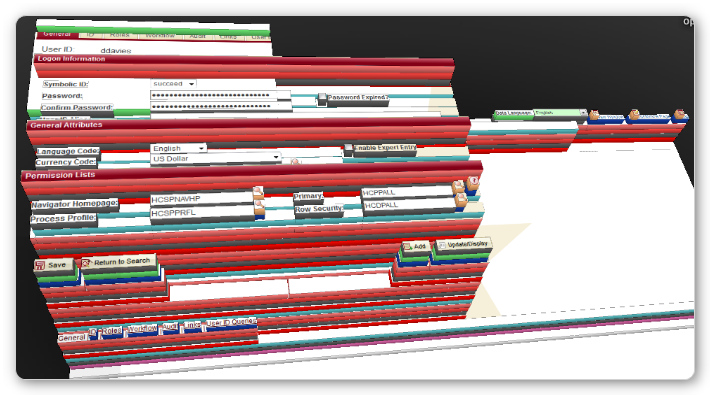
I guess the only useful conclusion I can draw from this little experiment is that the DOM for PeopleSoft pages is very complex indeed!
Oracle Open World 2011 September 30, 2011
Posted by Duncan in PeopleTools.comments closed
Finally, I’m getting to go to Open World! I’ve been trying for a few years now, but this time it’s actually going to happen!
I can’t wait. I’m looking forward to meeting a whole lot of people and trying to soak up as much of the content as I can. Sure, much of my focus will be on PeopleSoft, but I’m itching to see more of Fusion too.
Here’s what I’m looking for:
– I’m hoping to get a couple of goes at Fusion demo pods. I want to see it in action.
– I want to know when it’s going to available outside of the ‘early adopter program’
– I’d like to know what Oracle is doing about the ‘hot areas’ at the moment (NoSQL databases, mobile/tablet accessibility, multi-tenant/full SaaS)
– What the highlights are with Fusion for Partners. I’m thinking extending, hosting etc.
Picking what to attend has been difficult as there’s a lot of great content that conflicts. Here’s my current thinking:
Browser speed discrepancies September 22, 2011
Posted by Duncan in PeopleTools.comments closed
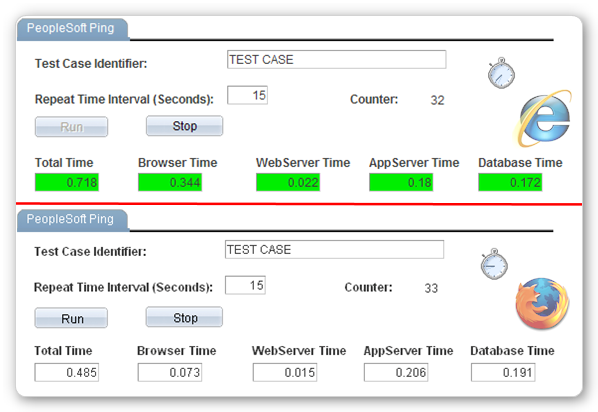
Whilst troubleshooting the performance of an environment recently I used the PeopleSoft Ping utility. I’m aware that it isn’t a flawless measure, but for a quick and dirty check it’s a useful aid.
For those that don’t know, it gives a timing for each of the tiers in the Internet Architecture (Browser, Web, App and Database).
One thing that I noticed that I wasn’t expecting was the difference between browsers. If I ran a ping test to the same environment, at the same time, using different web browsers I’d get wildly different results.
Self Service at Pret – Technical Details September 7, 2011
Posted by Duncan in Look and Feel, PeopleTools, PIA, Strategy.comments closed
I posted a video yesterday showing some of the work we’d done at Pret and thought I’d add a little more technical detail and some clearer screenshots. (more…)
UKOUG PeopleSoft Conference 2011 June 20, 2011
Posted by Duncan in PeopleTools.Tags: Conference, UKOUG
comments closed
I’m looking forward to the UK PeopleSoft Conference on Wednesday and Thursday of this week.

If you’re UK based and work with PeopleSoft then there’ll be something for you there. This year there are 4 streams, the usual three of Tech, HR and Financials, plus a new Global Payroll stream, and all 4 are full of content.
The agenda is available here, but in the Tech stream there’s lots to grab the interest. I’ll be spending most of my time in the Tech stream where we have sessions on some of the new features for those interested in Tools 8.5x (Reporting Console, Web Services, Test Framework) and some other sessions that apply to older versions of PeopleTools too (Archiving, Query, Batch Scheduling).
I’ll also be giving a couple of sessions myself. The first is “Case Study: How using ‘The Cloud’ accelerated Pret’s PeopleSoft project”, where I’ll walk through how we used Amazon EC2 to dramatically speed-up/improve Pret a Manger’s PeopleSoft implementation. I’m also doing a joint session with a very smart colleague of mine – Simon Wilson … I’ll be talking about “Automating and Monitoring PeopleSoft using Open Source Tools” and Simon will be showing his solution for “Comparing and Syncronising Config between Environments”.
Although there’s some great content, that’s only half of the value of attending. It’s also awesome to meet like-minded peers to discuss what’s happening at different customers and hear the great things that they’re doing.
Looking forward to it!
Changing the Favicon in PeopleSoft – The “How to” May 12, 2011
Posted by Duncan in PeopleTools.comments closed
Last week I posted a blog entry highlighting why I think adding a favicon to PeopleSoft can be a helpful visual aid for your users. This post walks through how I did it – note: I’ve only tested this in Tools 8.50.
Step 1 – Create your icons
It’s probably a good idea to have one for each environment excluding Production that shows the environment name, and then have Production as the corporate logo (or your PeopleSoft system logo etc). I created my 32×32 pixel images in GIMP as it can save as a .ico file, but any graphics package will do (as will this online ico creator). I didn’t experiment with other sizes or file formats, let me know if you do and I’ll update the post.
Upload your icons as images in App Designer.
Step 2 – Create a Function to return your Favicon
We need to create a function to provide the correct image for each environment as we’ll be calling this from more than one place. I added my function to WEBLIB_PT_NAV.ISCRIPT1 as we’ll be customising it later anyway.
Function GetFavicon() Returns string

   Local string &Favicon;
   Evaluate %DbName
   When = "DEV"
      &Favicon = %Response.GetImageURL(Image.<<DEV_IMAGE>>);
      Break;
   When = "TST"
      &Favicon = %Response.GetImageURL(Image.<<TST_IMAGE>>);
      Break;
   ...etc...
   End-Evaluate;

   &Favicon = "<link href=""" | &Favicon | """ rel=""shortcut icon"" type=""image/x-icon"" />";
   Return &Favicon;
End-Function;
Step 3 – Amend the HTML Definitions
You need to amend both PT_HNAV_TEMPLATE and PT_IFRAME_HDR_SWAN HTML templates so that the code for the Favicon can be passed in.
Amend PT_HNAV_TEMPLATE thus (I’m just showing the top 6 lines – lines 4 and 5 are the ones I’ve added):
<!DOCTYPE HTML PUBLIC "-//W3C//DTD HTML 4.01//EN" "http://www.w3.org/TR/html4/strict.dtd">
<html dir="%Direction" lang="%LanguageISO">
<head>
<!--Favicon-->
%bind(:23)
<meta http-equiv="X-UA-Compatible" content="IE=8">
...
Amend PT_IFRAME_HDR_SWAN thus (I’m just showing the top 5 lines – lines 3 and 4 are the ones I’ve added):
<head>
<meta http-equiv='content-type' content='text/html; charset=%bind(:1)'>
<!--Favicon-->
%bind(:25)
<link rel="stylesheet" href="%bind(:2)" type="text/css">
...
Note: Your bind numbers may vary. You can check they’re correct when we get to the calling functions shortly.
Step 4 – Pass the Favicon into the HTML templates
The final step is to amend the PeopleCode so that the string provided by our GetFavicon function is passed into our HTML definitions. Open PT_BRANDING.BrandingBase. Scroll down to where the delivered code is declaring functions (it’s around line 155 for me) and declare the function that you created in Step 2.
Next, find method ‘getIframeHeaderHTML’ and scroll down to near the bottom. You’ll see a call to one of the HTML objects that you just amended ‘PT_IFRAME_HDR_SWAN’. Add your function as a parameter to the end thus:
&hdrHTML = GetHTMLText(HTML.PT_IFRAME_HDR_SWAN, &charSet, ... , &hoverNavLoc, GetFavicon());
As a double-check, you should also make sure that it’s the same number parameter as the bind variable that you added in the previous step.
You’ll need to make a similar change for the other HTML template. Open WEBLIB_PT_NAV.ISCRIPT1.FieldFormula and search for the function ‘buildIframeTemplate’. Again, scroll down to the end of the function and add your function as a parameter to the end:
Return GetHTMLText(@("HTML." | &templateHTMLObjName), &charSet, &requiredToolsSS, ... , &ptcxmCollapseImgURL, GetFavicon());
Again, make sure that the parameter number matches the bind number in the HTML file (PT_HNAV_TEMPLATE) earlier.
Testing
You should be able to sign in and see the results immediately. Good luck and let me know how you get on!
Changing the Favicon in PeopleSoft May 5, 2011
Posted by Duncan in PeopleTools.comments closed
A Favicon (short for favorites icon, also known as a shortcut icon, website icon, URL icon, or bookmark icon) is a small logo that appears next to the website URL in the browser address bar. This website has the favicon from WordPress, as that’s the blogging platform that I use.
Although adding a favicon made the web surfing experience marginally more attractive (the favicon also appears in your bookmarks/favourites menu to make it easier to identify each website, for example) it was pretty unimportant to us in the PeopleSoft world. Now that tabbed browsers are starting to proliferate into company workstation rollouts the favicon is starting to become more useful.
As an example, can you identify these 9 favicons from my open browser tabs (I’ve redacted the text from a couple as they’re pretty easy):

I’m quite a fan of finding methods to make it easy to differentiate your PeopleSoft environments. I think it’s a useful productivity tweak to be able to instantly know whether you’re in DEV, TST or PRD without having to check the address bar and parse through the URL (for less technical business users especially).
Wouldn’t it be useful to have a different Favicon for each environment? That way you can easily tell which tab you need. When you’re trying to find a specific environment that you’ve logged into, how useful is it to go from this:
to this:

And with grouped taskbar buttons being the default in recent versions of Windows, it’s also handy to go from this:
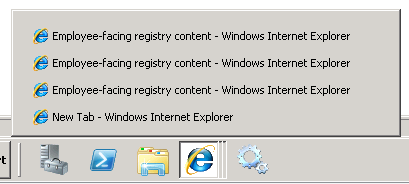
to this:
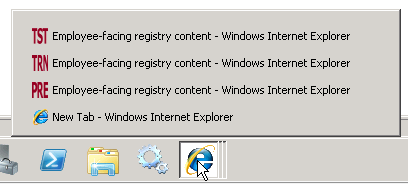
So how is it done?
It’s not a big customisation, although it does obviously touch a couple of Tools objects. I’ve written it up here.
Twitter! February 3, 2011
Posted by Duncan in PeopleTools.comments closed
For those that do the whole Web2.0  Social Media thing, I’m now on Twitter. I’d be interested in any recommendations for PeopleSoft people to follow, and if anyone fancies getting in touch on there my username is Duncan_Davies.
Error in Recruitment – Build Applicant Search February 3, 2011
Posted by Duncan in PeopleTools, Recruitment, Troubleshooting, Verity.comments closed
This probably won’t help a great many people, but for the small minority it does help it might save them a lot of time … (more…)


 The PeopleSoft Tipster Blog